Go Unlimited with Magzter GOLD
Get unlimited access to 10,000+ magazines, newspapers and Premium stories for just
Try GOLD - Free
Power up your Mac with Alfred
Mac Life
|January 2026
Use its Powerpack to browse and manage your files and their contents
LIKE THE PERFECT butler, Alfred is far more than Spotlight search done right. Add its Powerpack, and you can use its temporary file buffer to gather multiple files and perform actions on them, browse PDFs using a ready-made workflow, and build yourself a collection of snippets to paste.
Once you’ve installed Alfred and licensed its Powerpack, visit Privacy & Security in System Settings and add Alfred to its Full Disk Access and Accessibility lists. As you proceed, you’ll be invited to give Alfred any additional access that it requires. You should also visit Login Items & Extensions settings and check that Alfred is set to “Open at Login” so it will be loaded into the menu bar at startup.
Each of these examples begins in Alfred’s Preferences, opened using the Preferences command from Alfred’s menu. Start by familiarizing yourself with those settings, including the Alfred Hotkey you’ll use to open its regular window.
HOW TO Find and collate files
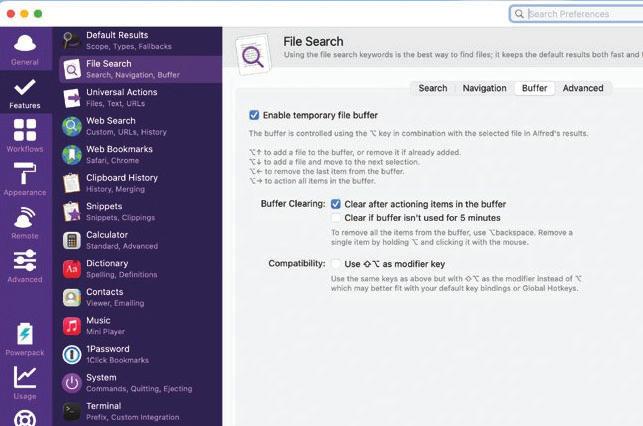 1 Enable file buffer
Open Alfred’s Preferences, select Features in its sidebar, then File Search and its Buffer view. Enable the temporary file buffer, leaving it to be cleared after actioning. Use an additional modifier key if you need to avoid any clash.
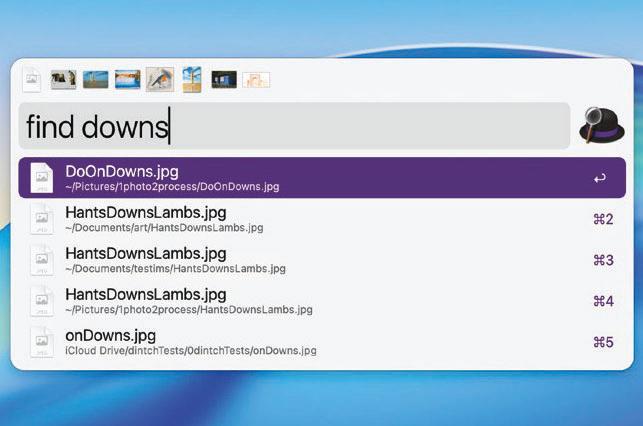 2 Find and add files

This story is from the January 2026 edition of Mac Life.
Subscribe to Magzter GOLD to access thousands of curated premium stories, and 10,000+ magazines and newspapers.
Already a subscriber? Sign In
MORE STORIES FROM Mac Life
Mac Life
Apple at 50
Graham Barlow recollects what 50 years of Apple feels like

2 mins
May 2026

Mac Life
LOCK DOWN YOUR iPHONE
Lower the odds of iPhone theft - and the cost of it
8 mins
May 2026
Mac Life
MacBook Air 13in (2026)
Now with more powerful M5 chip and twice the storage to start
5 mins
May 2026
Mac Life
Anker Nano Docking Station
Neat 13-in-1 dock with removable hub
2 mins
May 2026

Mac Life
Create an iPad weather station
Use Carrot Weather and never get caught out by a downpour again
3 mins
May 2026

Mac Life
Use the correct port
Every time I try to install macOS on my external SSD it fails and my M2 MacBook Air can't start up from it. What am I doing wrong?
1 min
May 2026
Mac Life
Soundcore Nebula X1 Pro
The ultimate home cinema experience
3 mins
May 2026

Mac Life
The hazards of magnets
The magnets for keeping my MacBook Pro closed picked up a tiny craft pin that's now wedged between the display and its surrounding bezel, and it no longer turns on. How can I extract it?
1 min
May 2026

Mac Life
Find planes fast with Zephy
Follow aircraft routes with your very own radar tracker
2 mins
May 2026
Mac Life
Manage Mac windows with Moom
Use shortcuts and maximize buttons to move Mac windows - in a snap
3 mins
May 2026
Listen
Translate
Change font size