
Go Unlimited with Magzter GOLD
Get unlimited access to 10,000+ magazines, newspapers and Premium stories for just
Try GOLD - Free
Share files fast with AirDrop
Mac Life
|December 2022
Instantly send things to friends and family with this built-in feature
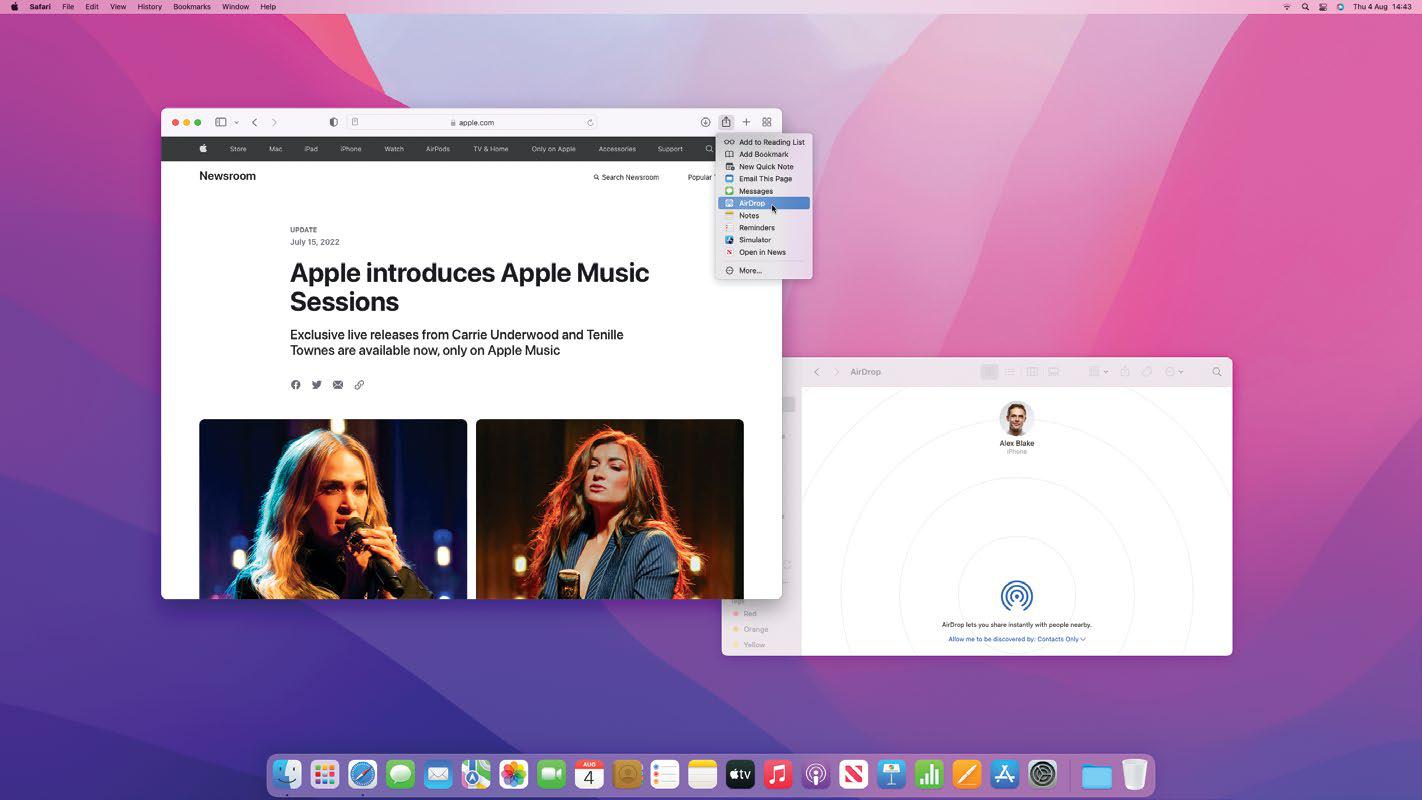
REQUIRES Bluetooth and Wi-Fi enabled, sending and receiving devices must be within 30ft of each other
YOU WILL LEARN How to send and receive files using AirDrop
IT WILL TAKE 5 minutes
WHETHER COLLABORATING WITH colleagues or sharing a memorable photo at a family event, we send files to each other all the time. But instead of clogging up your inbox with attachments and emails, there's an easier way to share things: AirDrop.
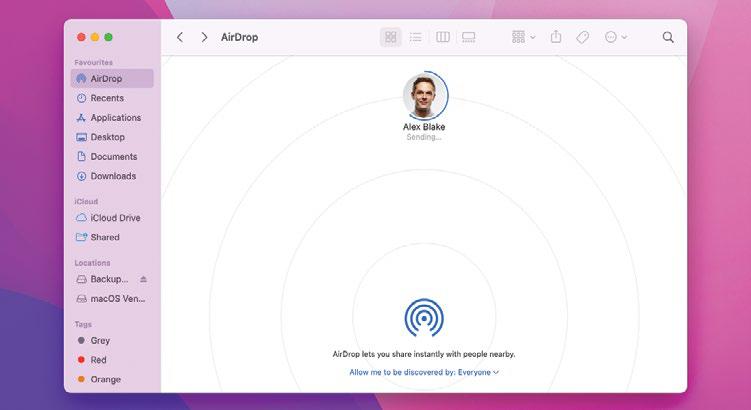
This great feature is built into your Apple devices, and lets you send and receive files quickly and easily, without relying on email or Messages. You can ping a photo from an iPhone to a Mac (or vice versa) with nothing more than a couple of clicks. It's accessible from any Finder window, and you can enable or disable it from your Mac's Control Center.
TOP-NOTCH SHARING
For MacBooks with a notch (such as the M2 MacBook Air), there's a third-party app called TopDrop that takes AirDrop further. It turns the notch into an AirDrop shortcut area. Once TopDrop is installed, drag a file to your Mac's notch and the AirDrop menu appears. Then all you need to do is drop the file onto the recipient of your choice.

This story is from the December 2022 edition of Mac Life.
Subscribe to Magzter GOLD to access thousands of curated premium stories, and 10,000+ magazines and newspapers.
Already a subscriber? Sign In
MORE STORIES FROM Mac Life

Mac Life
TerraMaster F4-425 NAS
Home or office four-bay network-attached storage

3 mins
March 2026

Mac Life
Satechi OntheGo 7-in-1 Adapter
Easily add more ports to your Mac, iPhone and iPad
2 mins
March 2026

Mac Life
BenQ ScreenBar Halo 2
Monitor lighting that's a sight for sore eyes
1 mins
March 2026
Mac Life
AI: WHAT YOU NEED TO KNOW
Al can be brilliant when put to proper use, but it also has some major downsides
11 mins
March 2026

Mac Life
Calibrate a MacBook Pro display
Can I calibrate my MacBook Pro 16-inch M3 Pro's XDR display, and if so, how?
1 min
March 2026

Mac Life
Edifier S880DB MKII
Great-sounding speakers with loads of connectivity
3 mins
March 2026

Mac Life
Search text in document images
I keep thousands of images of printed documents, and want to search their contents using Live Text, but Spotlight won't index them. How can I get it to work?
1 min
March 2026

Mac Life
No looking back at old icons
Can I customize the apps bundled in macOS Tahoe by giving them back their old icons?
1 min
March 2026

Mac Life
Set up multiple timers on iOS
Discover timers done right
2 mins
March 2026

Mac Life
Blue Prince
A multilayered inheritance challenge like no other
2 mins
March 2026
Translate
Change font size