
Go Unlimited with Magzter GOLD
Get unlimited access to 10,000+ magazines, newspapers and Premium stories for just
Try GOLD - Free
MAKE AMAZING DOCUMENTS
Mac Life
|September 2023
Create top-quality documents with Apple's brilliant iWork apps: Pages, Numbers, and Keynote

Apple's productivity suite has come a long way. Originally sold as a collection called iWork, the three apps - a word processor called Pages, the Numbers spreadsheet application, and Keynote for presentations-are now available separately, and they're all free.
The iWork apps are built with user-friendliness in mind, but not at the cost of features. Pages, Numbers and Keynote are likely to offer everything you need, and right at your fingertips. You can learn the basics of each app in about half an hour, and expert features are within easy reach too. As well as using the iWork apps on your Mac, iPad and iPhone, you can also log on to the iCloud website (iCloud.com) with your Apple account and access web-based versions of the apps, even picking up where you left off with a document you saved earlier.
In this guide, we show you how to get to grips with Pages, Numbers and Keynote. Assuming no prior knowledge, we teach you how to create your first document. Taking things further, we also bring you a selection of pro tips to help you get even more from your Apple productivity apps. So what are you waiting for? Let's see what the suite can do.
Pages: Apple's word processor
Make awesome documents, flyers and more
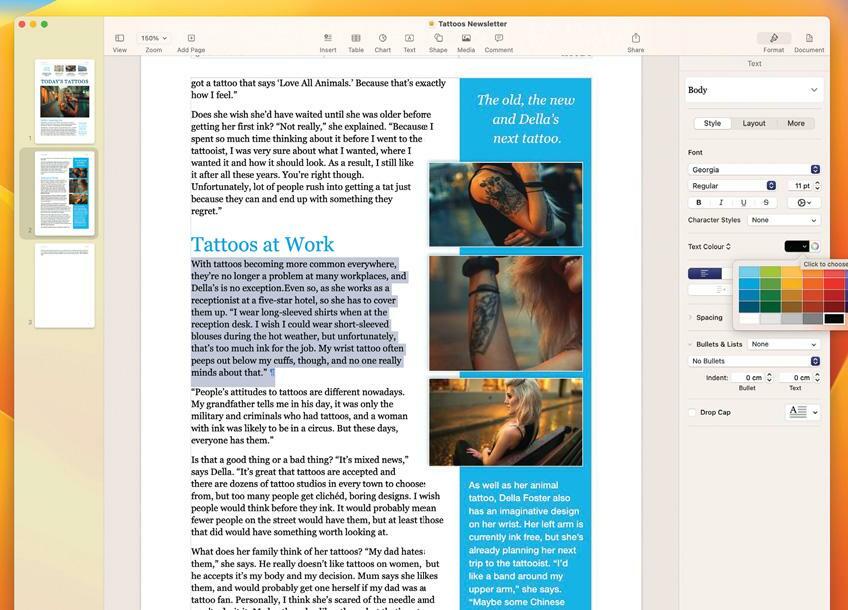
Pages offers a comprehensive set of features. You can use it to create stunning documents containing charts, pictures, shapes, tables, and even videos as well as text. You can flow text around objects for that professional look, and there's a huge range of templates to choose from.
1 Use templates

This story is from the September 2023 edition of Mac Life.
Subscribe to Magzter GOLD to access thousands of curated premium stories, and 10,000+ magazines and newspapers.
Already a subscriber? Sign In
MORE STORIES FROM Mac Life

Mac Life
TerraMaster F4-425 NAS
Home or office four-bay network-attached storage

3 mins
March 2026

Mac Life
Satechi OntheGo 7-in-1 Adapter
Easily add more ports to your Mac, iPhone and iPad
2 mins
March 2026

Mac Life
BenQ ScreenBar Halo 2
Monitor lighting that's a sight for sore eyes
1 mins
March 2026
Mac Life
AI: WHAT YOU NEED TO KNOW
Al can be brilliant when put to proper use, but it also has some major downsides
11 mins
March 2026

Mac Life
Calibrate a MacBook Pro display
Can I calibrate my MacBook Pro 16-inch M3 Pro's XDR display, and if so, how?
1 min
March 2026

Mac Life
Edifier S880DB MKII
Great-sounding speakers with loads of connectivity
3 mins
March 2026

Mac Life
Search text in document images
I keep thousands of images of printed documents, and want to search their contents using Live Text, but Spotlight won't index them. How can I get it to work?
1 min
March 2026

Mac Life
No looking back at old icons
Can I customize the apps bundled in macOS Tahoe by giving them back their old icons?
1 min
March 2026

Mac Life
Set up multiple timers on iOS
Discover timers done right
2 mins
March 2026

Mac Life
Blue Prince
A multilayered inheritance challenge like no other
2 mins
March 2026
Translate
Change font size