
Go Unlimited with Magzter GOLD
Get unlimited access to 10,000+ magazines, newspapers and Premium stories for just
DRAW AN EXCITING MEGA MAN COVER
ImagineFX
|May 2025
Follow along as Kenny Ruiz and Noiry guide us through the process of crafting a cover for Mega Man Timelines
-
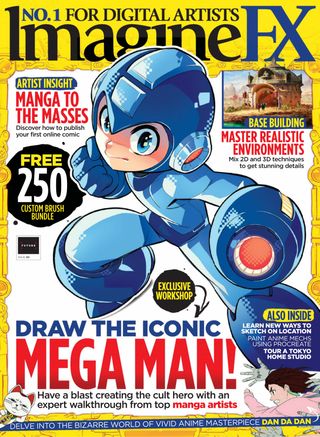
What better choice for teaching you how to create a stunning character cover than the iconic Mega Man. Udon Entertainment commissioned cover art for Mega Man Timelines, which was inspired by Mega Man 11. The idea was to use the game's iconic enemy selection grid and make Mega Man stand out. The main challenge for us was to capture the character's strength and agility.
For a cover, it's crucial to work directly in the final reproduction format or a proportional one. From the start, you must consider the space needed for the logo, publisher, and other essential information, which impacts the composition.
First, Kenny will create a rough sketch and test some options. Often, the first is the best, but it's important to push beyond our comfort zone and try alternatives. He'll then work on the main character separately, before Noiry takes over to talk about her process for using colour and light to make the character pop.
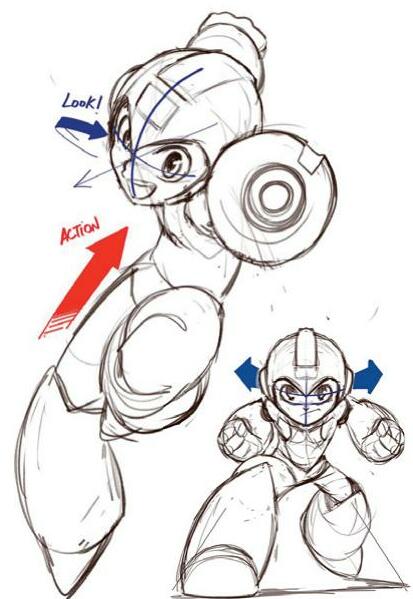
1 Explore visual connection
I began with two options for creating a connection with the viewer. The first was a direct frontal gaze that challenges the audience. I also tried a secondary gaze where Mega Man is pictured in dynamic action but, for a split second, locks eyes with the viewer.
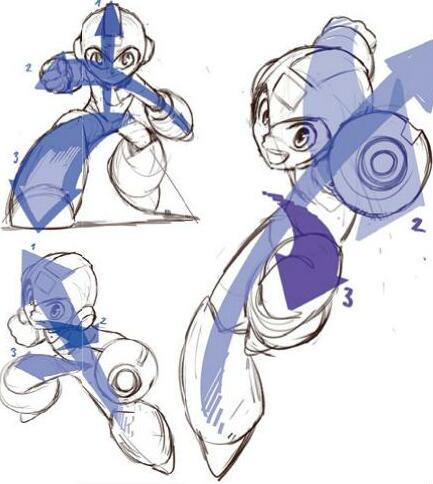 2 Make motion lines
I love dynamic poses, so I also explored different options for them. For me, the recipe for success divides a character's movement into three axes:
• Main movement: the body's general direction.
• Shoulder axis: connects the hands.
• Hip axis: defines leg positioning.
Sometimes all three of these reinforce the same action. If the second and third axes go in opposite directions, then the action feels more dynamic. I also try simpler compositions, which can often get better results.

This story is from the May 2025 edition of ImagineFX.
Subscribe to Magzter GOLD to access thousands of curated premium stories, and 10,000+ magazines and newspapers.
Already a subscriber? Sign In
MORE STORIES FROM ImagineFX

ImagineFX
HP Omnibook X Flip 16
DOUBLING UP HP's latest Omnibook 2-in-1 is a decent-enough productivity laptop, but it truly shines when it's transformed into tablet mode

2 mins
February 2026

ImagineFX
Phaya Akat - The Sanctuary
“Phaya Akat’s Sanctuary Village began from a simple idea inspired by Thailand’s tradition of boiling eggs in natural hot springs.
1 min
February 2026

ImagineFX
HOW SURFACE NORMALS IMPROVE YOUR 3D ART
Ant Ward explains how to quickly change the way a polygon model looks by adjusting its normals
1 mins
February 2026

ImagineFX
Painting in Procreate: Reimagine Your Surroundings
VISIONARY WORK Across 20 lessons, Mikko Eerola reveals how he brings his ideas to life on the iPad using Procreate
1 mins
February 2026

ImagineFX
Technique focus: WORK SMARTER WITH COLOURS
Álvaro Jiménez reveals the workflow process he follows to summon an armoured demon
1 mins
February 2026

ImagineFX
FIVE MINUTES WITH PAT IMRIE
Big-screen blockbusters and a certain 3D art magazine helped set this creative on his career path
3 mins
February 2026

ImagineFX
RIFF ON YOUR PASSIONS
Max Froer draws on a range of influences when rendering a beast that's part machine
1 min
February 2026

ImagineFX
Anker SOLIX C1000
BOX OF DELIGHTS The chonkiest power bank around is powerful, portable (after a fashion) and boy is it well built
2 mins
February 2026

ImagineFX
PAINTING A SCENE OF GREEK DRAMA
Alexander Leskinen creates a stormy environment featuring harpies, the winged messengers of Zeus.
3 mins
February 2026

ImagineFX
HOW DO I COLOUR A 3D OBJECT?
The process of colouring a 3D image has a lot of layers, so let's start at the surface. Mike Griggs weighs up the material requirements
2 mins
February 2026
Listen
Translate
Change font size