
Go Unlimited with Magzter GOLD
Get unlimited access to 10,000+ magazines, newspapers and Premium stories for just
Try GOLD - Free
Perfect your presentations
MacFormat UK
|November 2025
Use Apple Intelligence to make your Keynote presentations better than ever!
IT WILL TAKE
An hour
YOU WILL LEARN
How to use Apple Intelligence tools to polish presentations
YOU'LL NEED
Keynote 14.4 or later, Apple silicon Mac with macOS 15.4 or later
Although Keynote won't, as yet, allow you to use Apple Intelligence to generate an entire presentation from scratch, you can still use the Al system introduced last year to make them look more impressive. If you're not sure that your text is hitting the mark, or you're scratching your head wondering what to write, Apple Intelligence can come to your rescue - more so if you also grant access to ChatGPT, which adds a few more useful features that you're sure to reach for.
Thanks to Image Playground, you don't even need to spend ages looking for suitable images or, for that matter, photographs that have the necessary copyright clearance. Instead, you can have Apple Intelligence generate images for you in a host of styles and instantly drop them on to a slide. In combination with Keynote's already impressive array of features, your presentations are sure, with a bit of effort, to sparkle like never before.
HOW TO Use AI when creating presentations >
Start your presentation
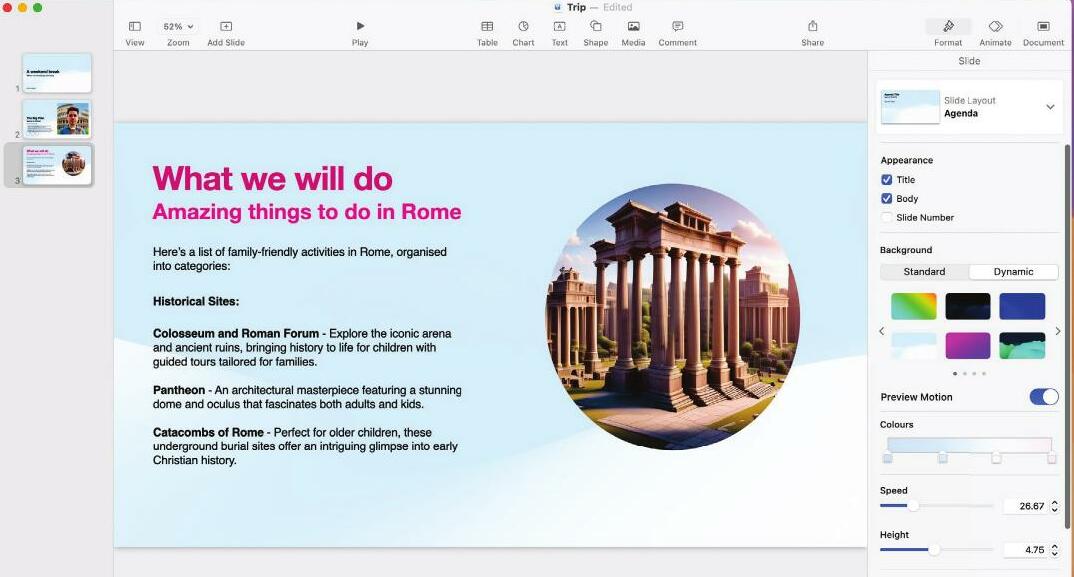
Whether or not you opt to use a template, a Keynote presentation will typically consist of basic elements such as text, images, movies, shapes and animations. You can get started as normal and call upon Al when required.


This story is from the November 2025 edition of MacFormat UK.
Subscribe to Magzter GOLD to access thousands of curated premium stories, and 10,000+ magazines and newspapers.
Already a subscriber? Sign In
MORE STORIES FROM MacFormat UK
MacFormat UK
Affinity by Canva
A complete creative studio for zero cost

3 mins
February 2026
MacFormat UK
RSRs return from the dead
Apple announced Rapid Security Responses in June 2022, as a new means of applying urgent security patches in between macOS updates.
1 min
February 2026
MacFormat UK
Rediscover albums with Longplay
Fall in love with your albums all over again with this amazing music player
3 mins
February 2026
MacFormat UK
Set up multiple timers on iOS
Discover timers done right
2 mins
February 2026

MacFormat UK
Chants of Sennaar
Work your way beyond being lost in translation
2 mins
February 2026
MacFormat UK
Signature Slim Solar+ wireless keyboard K980
A comfortable, full-size keyboard that's always good to go
2 mins
February 2026
MacFormat UK
One more thing Apple Intelligence
Apple has promised a big AI update in 2026, and Graham Barlow feels nervous
2 mins
February 2026

MacFormat UK
Search any website - fast!
Find your favourite websites faster than ever
3 mins
February 2026

MacFormat UK
Make your ideal web browser
Make online life easy by making your web browser work your way
2 mins
February 2026

MacFormat UK
Best home printers & all-in-ones
We put six all-round home models through their printing paces
7 mins
February 2026
Listen
Translate
Change font size