
Go Unlimited with Magzter GOLD
Get unlimited access to 10,000+ magazines, newspapers and Premium stories for just
Blender- MODEL A BIKE DESIGN IN BLENDER
ImagineFX
|July 2021
Rashid Tagirov draws on his vehicle design experience to turn a 2D sketch of a motorcycle into a 3D concept model

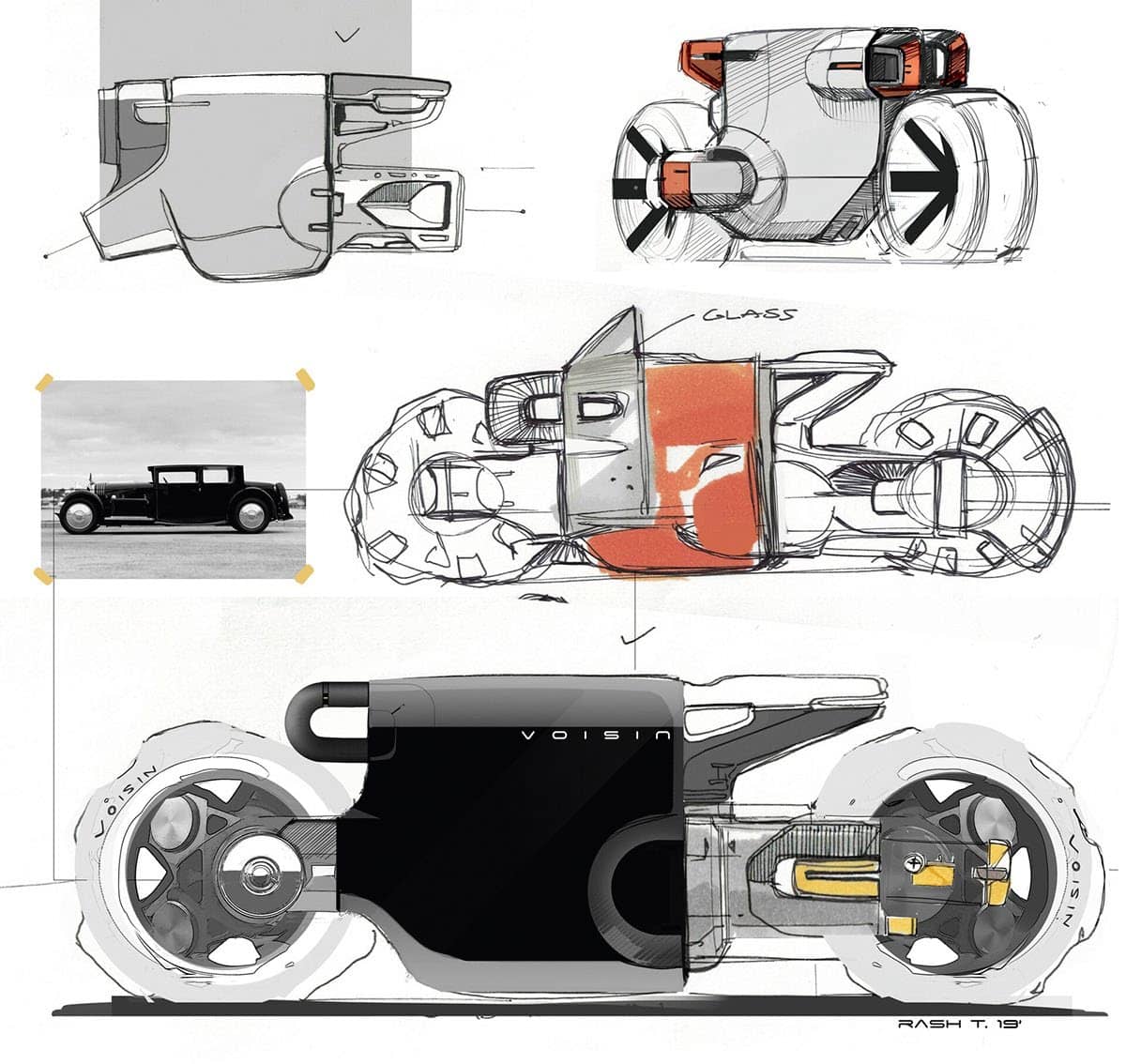
In this workshop, I’ll guide you through some of Blender’s basic tools, which can help you to work in a 3D space and take your creativity to the next level. Before getting started, make sure you already have a 2D sketch of your motorcycle or any other vehicle. Ideally, you’ll have the main side-view and a view from several angles, including front and rear three-quarters views. Drawings taken from a bird’s-eye view are also handy when you start adjusting the proportions in 3D.
I have only two views: a front three-quarters and a side-sketch. It’s more than enough for a motorcycle. The main idea is to capture the main proportions and dimensions. I’d also recommend finding reference images for surfaces and technical parts, to ensure your design looks realistic.
1 Placing the sketch
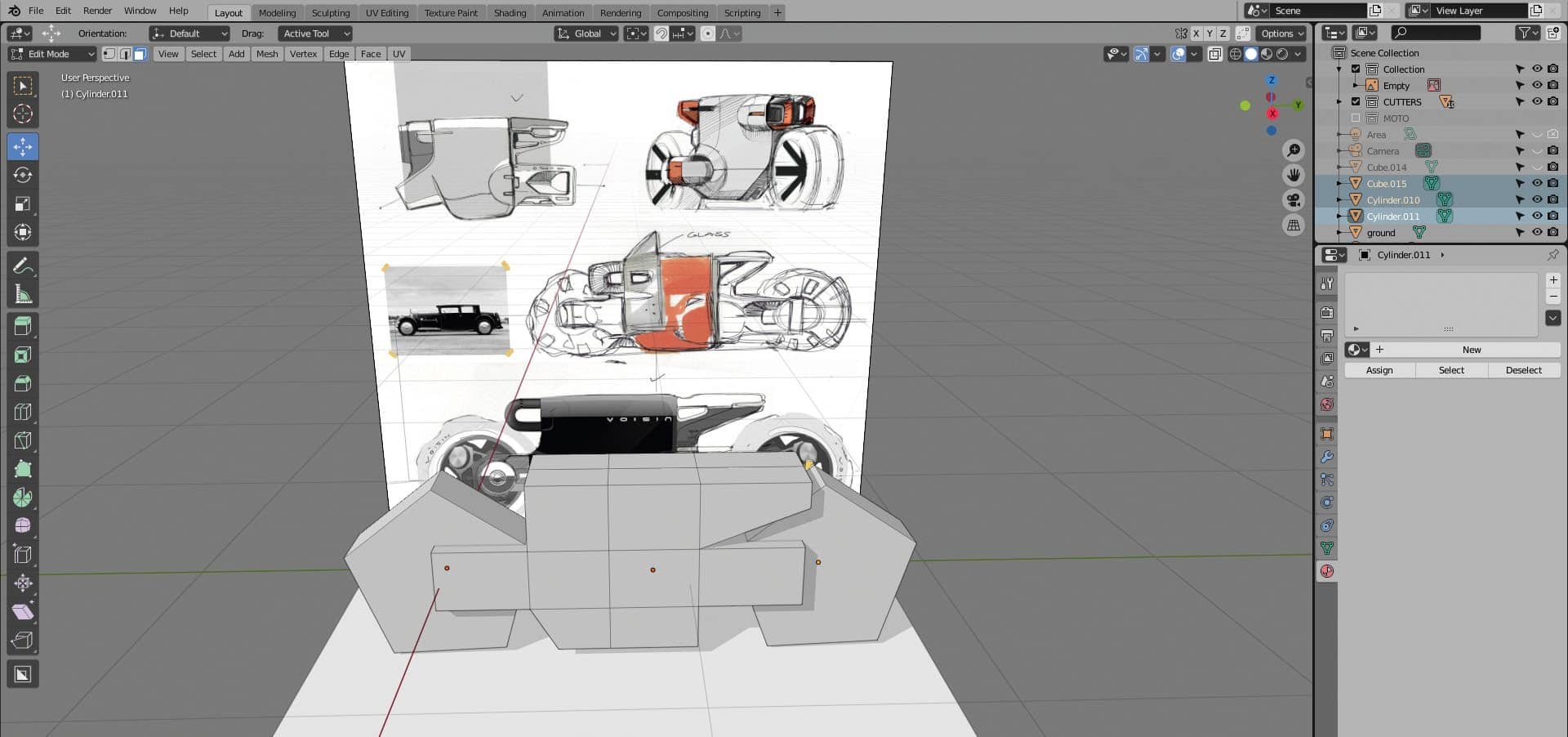
I set up the scene in Blender, using the default Layout workspace settings. I press 3 on the Numpad to set up a side-view. Then I use drag and drop to move my JPG image of the sketch to a Blender 3D space. (If it doesn’t work, select the collection in the Outliner list.) I suggest placing your side-view sketch to Align 0 of the 3D scene, using the front wheel axis of the bike.
2 Create a model of geometric shapes

This story is from the July 2021 edition of ImagineFX.
Subscribe to Magzter GOLD to access thousands of curated premium stories, and 10,000+ magazines and newspapers.
Already a subscriber? Sign In
MORE STORIES FROM ImagineFX

ImagineFX
HP Omnibook X Flip 16
DOUBLING UP HP's latest Omnibook 2-in-1 is a decent-enough productivity laptop, but it truly shines when it's transformed into tablet mode

2 mins
February 2026

ImagineFX
Phaya Akat - The Sanctuary
“Phaya Akat’s Sanctuary Village began from a simple idea inspired by Thailand’s tradition of boiling eggs in natural hot springs.
1 min
February 2026

ImagineFX
HOW SURFACE NORMALS IMPROVE YOUR 3D ART
Ant Ward explains how to quickly change the way a polygon model looks by adjusting its normals
1 mins
February 2026

ImagineFX
Painting in Procreate: Reimagine Your Surroundings
VISIONARY WORK Across 20 lessons, Mikko Eerola reveals how he brings his ideas to life on the iPad using Procreate
1 mins
February 2026

ImagineFX
Technique focus: WORK SMARTER WITH COLOURS
Álvaro Jiménez reveals the workflow process he follows to summon an armoured demon
1 mins
February 2026

ImagineFX
FIVE MINUTES WITH PAT IMRIE
Big-screen blockbusters and a certain 3D art magazine helped set this creative on his career path
3 mins
February 2026

ImagineFX
RIFF ON YOUR PASSIONS
Max Froer draws on a range of influences when rendering a beast that's part machine
1 min
February 2026

ImagineFX
Anker SOLIX C1000
BOX OF DELIGHTS The chonkiest power bank around is powerful, portable (after a fashion) and boy is it well built
2 mins
February 2026

ImagineFX
PAINTING A SCENE OF GREEK DRAMA
Alexander Leskinen creates a stormy environment featuring harpies, the winged messengers of Zeus.
3 mins
February 2026

ImagineFX
HOW DO I COLOUR A 3D OBJECT?
The process of colouring a 3D image has a lot of layers, so let's start at the surface. Mike Griggs weighs up the material requirements
2 mins
February 2026
Translate
Change font size