Denemek ALTIN - Özgür
TRY THESE 12 POWER TIPS FOR LONGER IPAD BATTERY LIFE
Macworld
|March 2025
YOU CAN SIGNIFICANTLY IMPROVE THE BATTERY LIFE OF YOUR IPAD WITH OUR TIPS AND TRICKS.

The great strength of iPads is their long battery life. With a current iPad, you can surf the web or watch videos for up to ten hours. However, not everything you do gives you ten hours of battery life; if you play a demanding game, use a video editing app intensively, or operate the iPad at full brightness, the battery drains quite quickly.
But it is not always clear why your battery is draining so quickly. Sometimes the cause is a background process or a poorly programmed app. You have probably already read numerous tips on how to extend the battery life of an iPad, but many of the instructions circulating on the web are pure legend, and there are a few new features you should be aware of.
We have compiled the twelve most important tips for improving battery life on iPads here.
In dark mode, an OLED panel consumes significantly less energy.
USE DARK MODE
Since iOS 13, the iPad has had Dark Mode, which could have a slight effect on battery life due to lesser general brightness. With the iPad Pro M4 (fave.co/4dGakGZ), Dark Mode can significantly extend the battery life due to their large OLED screens, which switch off pixels when the screen is dark, saving battery life.
CHECK BATTERY USAGE PER APP
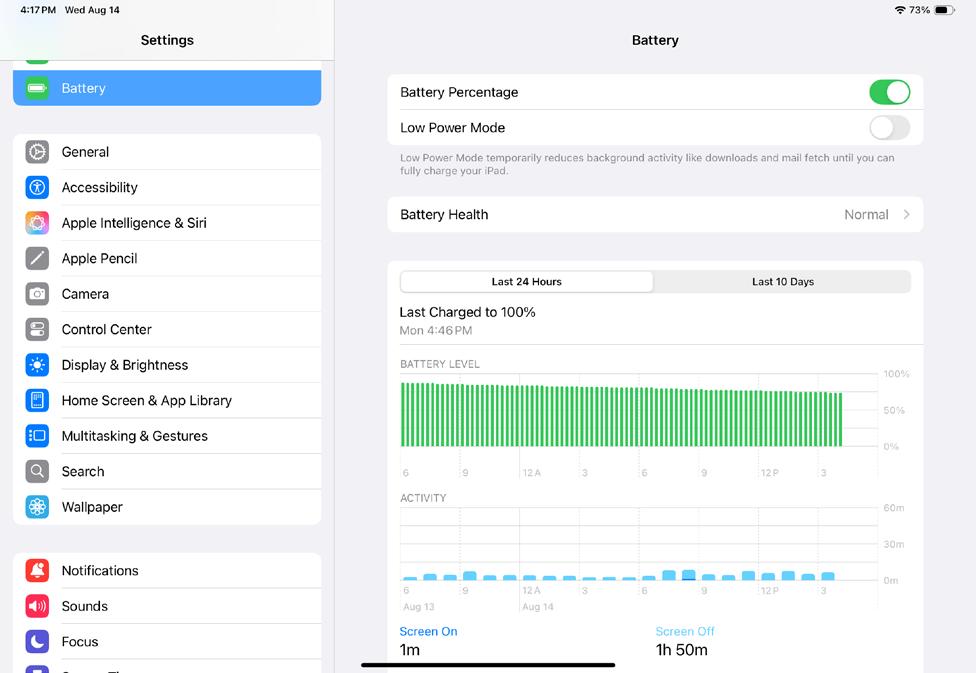
You may already be familiar with the tip of deactivating apps that eat up battery life. Unfortunately, you have to take action yourself to track these down. To do this, open Settings Battery and check the "Battery usage by app" tab. You can tap once on the entries to toggle between how much you're using the app, how much battery it has used, and also how much background activity was used.
TURN ON LOW POWER MODE

Bu hikaye Macworld dergisinin March 2025 baskısından alınmıştır.
Binlerce özenle seçilmiş premium hikayeye ve 9.000'den fazla dergi ve gazeteye erişmek için Magzter GOLD'a abone olun.
Zaten abone misiniz? Oturum aç
Macworld'den DAHA FAZLA HİKAYE

Macworld
Maximize iCloud+! 5 tips and tricks you need to start using right now
iCloud is a major component of the Apple ecosystem. Here's how to get the most from it.

6 mins
October 2025

Macworld
Your Apple TV+ subscription is going up by a whopping 30%
Apple's video-streaming service is now $12.99 per month.
1 mins
October 2025

Macworld
Apple TV tweaks: The 8 settings you should change ASAP
How to level up your Apple TV experience in 15 minutes.
4 mins
October 2025

Macworld
Apple announces AppleCare One with multi-device coverage for a flat fee
You can now protect three of your devices for $20 a month.
1 mins
October 2025

Macworld
KUXIU K1 15W 3-IN-1 MAGSAFE POWER BANK: COMPACT, VERSATILE PORTABLE iPHONE, WATCH, AIRPODS CHARGER
This apparently nondescript power bank looks like a slightly chunky iPhone power bank or an Amex Black Card member's pack of cards.
3 mins
October 2025

Macworld
Anker Prime 14-in-1 Thunderbolt 5 Docking Station: Mac mini-like looks and power
Smart and stylish dock that is right up to date with the latest Macs.
6 mins
October 2025

Macworld
VERBATIM TURBOMETAL PORTABLE SSD: STYLISH PORTABLE DRIVE
The Verbatim TurboMetal SSD comes in the classic NVMe form factor with a length of around 106 millimeters.
2 mins
October 2025

Macworld
How to reduce the Liquid Glass transparency effect in macOS Tahoe
If Apple's new look isn't for you, here's how to adjust it.
1 min
October 2025

Macworld
Everyone will want to try Apple's live translation this fall. Here's where to find it
Live translation runs on device, and can translate text and speech across several apps.
2 mins
October 2025

Macworld
RETROSTRIP: NOSTALGIC UTILITY BRINGS BACK THE LEGENDARY MAC CONTROL STRIP
Question for classic Mac users who go way back to System 6 or 7: Remember the Control Strip, which gave you direct access to various applications or functions at the click of a mouse? It was released in 1994 with System 7.1, with the PowerBook 500 series the PowerBook Duo 280 computers. With System 7.5.3, it was made available to all Macintoshes.
2 mins
October 2025
Listen
Translate
Change font size