कोशिश गोल्ड - मुक्त
TRY THESE 12 POWER TIPS FOR LONGER IPAD BATTERY LIFE
Macworld
|March 2025
YOU CAN SIGNIFICANTLY IMPROVE THE BATTERY LIFE OF YOUR IPAD WITH OUR TIPS AND TRICKS.

The great strength of iPads is their long battery life. With a current iPad, you can surf the web or watch videos for up to ten hours. However, not everything you do gives you ten hours of battery life; if you play a demanding game, use a video editing app intensively, or operate the iPad at full brightness, the battery drains quite quickly.
But it is not always clear why your battery is draining so quickly. Sometimes the cause is a background process or a poorly programmed app. You have probably already read numerous tips on how to extend the battery life of an iPad, but many of the instructions circulating on the web are pure legend, and there are a few new features you should be aware of.
We have compiled the twelve most important tips for improving battery life on iPads here.
In dark mode, an OLED panel consumes significantly less energy.
USE DARK MODE
Since iOS 13, the iPad has had Dark Mode, which could have a slight effect on battery life due to lesser general brightness. With the iPad Pro M4 (fave.co/4dGakGZ), Dark Mode can significantly extend the battery life due to their large OLED screens, which switch off pixels when the screen is dark, saving battery life.
CHECK BATTERY USAGE PER APP
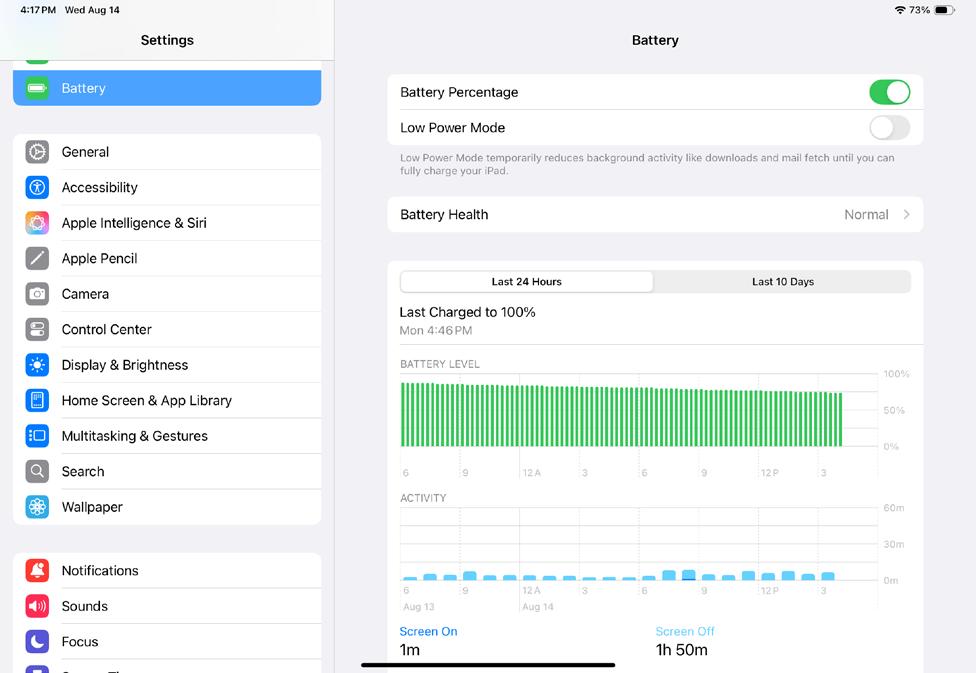
You may already be familiar with the tip of deactivating apps that eat up battery life. Unfortunately, you have to take action yourself to track these down. To do this, open Settings Battery and check the "Battery usage by app" tab. You can tap once on the entries to toggle between how much you're using the app, how much battery it has used, and also how much background activity was used.
TURN ON LOW POWER MODE


यह कहानी Macworld के March 2025 संस्करण से ली गई है।
हजारों चुनिंदा प्रीमियम कहानियों और 10,000 से अधिक पत्रिकाओं और समाचार पत्रों तक पहुंचने के लिए मैगज़्टर गोल्ड की सदस्यता लें।
क्या आप पहले से ही ग्राहक हैं? साइन इन करें
Macworld से और कहानियाँ

Macworld
PSA: Neo won't work with some MacBook USB-C hubs
Accessory makers warn that dual-port USB-C hubs made for MacBooks aren't compatible with the Neo.

3 mins
July 2026

Macworld
16-INCH MACBOOK PRO (M5 MAX): ULTRA SPEED WITH SHOCKING READS
The MacBook Pro with the M-series Max chip is the company’s fastest laptop.
6 mins
July 2026

Macworld
OpenAI's Codex is now smart enough to control your Mac even when it's locked
In Codex’s settings, there is an option for Locked use, which does exactly what it says when you turn it on.
1 min
July 2026

Macworld
APPLE BUILT THE DREAM iPHONE. WHY DIDN’T YOU BUY IT?
APPLE FINALLY GAVE US WHAT WE WANTED, BUT IT TURNED OUT IT WASN’T SOMETHING MOST PEOPLE ACTUALLY NEED.
5 mins
July 2026

Macworld
Audio Pro Drumfire D-2 W: Powerful AirPlay speaker with impressive sound
The Audio Pro Drumfire D-2 W delivers powerful, room-filling sound with AirPlay and high-res streaming, but limited wired inputs and portability may put some buyers off.
4 mins
July 2026

Macworld
Use FaceTime like a pro with these 7 hidden features
The app has gained a ton of advanced options in the last few years that can really dress up your video calls.
4 mins
July 2026

Macworld
Apple just gave us a peek at some of iOS 27's new features
Our first official info about the capabilities and features coming in the next big OS update.
3 mins
July 2026

Macworld
How AI is working to make your iPhone and Mac nearly impervious to attacks
AI coding agents set to level the playing field between hackers and security engineers.
4 mins
July 2026

Macworld
Wavlink Thunderbolt 5 Dock: Affordable fast Thunderbolt plus handy power options
This affordable Thunderbolt 5 docking station looks good and offers some useful power options.
5 mins
July 2026

Macworld
Typed the wrong macOS password? That pause isn't a glitch
It’s a way to hinder brute-force attempts to get into your Mac.
2 mins
July 2026
Listen
Translate
Change font size