
Go Unlimited with Magzter GOLD
Get unlimited access to 10,000+ magazines, newspapers and Premium stories for just
Try GOLD - Free
Bring Help windows to the front
Mac Life
|October 2024
Why doesn't macOS bring Help windows to the front when open them, instead of hiding them?
-

This problem may have been made more obvious with Stage Manager in macOS 13 Ventura. The most likely cause is a hidden preference setting that you may have changed long ago. Open Terminal, and enter the command
defaults read com.apple. helpviewer DevMode
If that returns 0, Developer Mode is turned off. Turn it on again, using
com.apple.helpviewer DevMode -bool true
If the first command returns 1, you need to turn it off instead. so type
com.apple.helpviewer DevMode -bool false
Log out, and log back in again, as this will ensure that the new setting takes full effect, although it can be applied immediately. You may also find utilities like MacPilot offer a simple graphic control, saving you using the command line.
 > Start up in Sonoma or Ventura
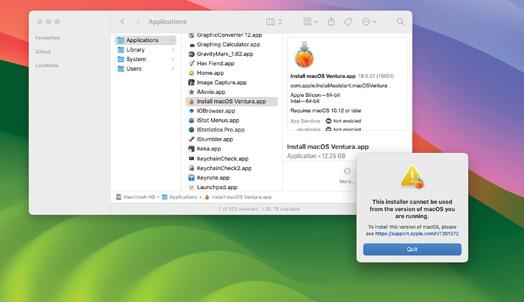
I'm about to travel with my MacBook Pro running macOS 14 Sonoma, but want to start it in macOS 13 Ventura to run older software. What's the best way to do that?
Options range from downgrading the system on its internal storage, to dual-booting it from both versions. Apple's recommendations for downgrading at beta.apple.com/restore involve reinstalling the original version of macOS that it came with, leaving you to upgrade it from that to Ventura. Dual-booting from two versions of macOS installed on internal storage can cause problems, and would take a lot of disk space.

This story is from the October 2024 edition of Mac Life.
Subscribe to Magzter GOLD to access thousands of curated premium stories, and 10,000+ magazines and newspapers.
Already a subscriber? Sign In
MORE STORIES FROM Mac Life

Mac Life
TerraMaster F4-425 NAS
Home or office four-bay network-attached storage

3 mins
March 2026

Mac Life
Satechi OntheGo 7-in-1 Adapter
Easily add more ports to your Mac, iPhone and iPad
2 mins
March 2026

Mac Life
BenQ ScreenBar Halo 2
Monitor lighting that's a sight for sore eyes
1 mins
March 2026
Mac Life
AI: WHAT YOU NEED TO KNOW
Al can be brilliant when put to proper use, but it also has some major downsides
11 mins
March 2026

Mac Life
Calibrate a MacBook Pro display
Can I calibrate my MacBook Pro 16-inch M3 Pro's XDR display, and if so, how?
1 min
March 2026

Mac Life
Edifier S880DB MKII
Great-sounding speakers with loads of connectivity
3 mins
March 2026

Mac Life
Search text in document images
I keep thousands of images of printed documents, and want to search their contents using Live Text, but Spotlight won't index them. How can I get it to work?
1 min
March 2026

Mac Life
No looking back at old icons
Can I customize the apps bundled in macOS Tahoe by giving them back their old icons?
1 min
March 2026

Mac Life
Set up multiple timers on iOS
Discover timers done right
2 mins
March 2026

Mac Life
Blue Prince
A multilayered inheritance challenge like no other
2 mins
March 2026
Listen
Translate
Change font size