
Go Unlimited with Magzter GOLD
Get unlimited access to 10,000+ magazines, newspapers and Premium stories for just
Try GOLD - Free
The Adamski Effect – A Simple Photoshop Technique
Smart Photography
|July 2025
Some popular post-processing techniques are named after the person who created or popularized them.
-

You may recall that we earlier published (refer to the article ‘Bokeh Panorama’, July 2018) a tutorial on a technique called the Brenizer Portraits that helps you to create the look of a photograph as it was taken with a super-fast wide-angle lens. Likewise, the Adamski Effect is a technique that adds blur (with the help of Photoshop’s filters) to the background of existing images without altering the subject. The most common blur type is the motion blur which creates a realistic motion effect in your images. However, other types of blurs can be used too.
 Picture 2
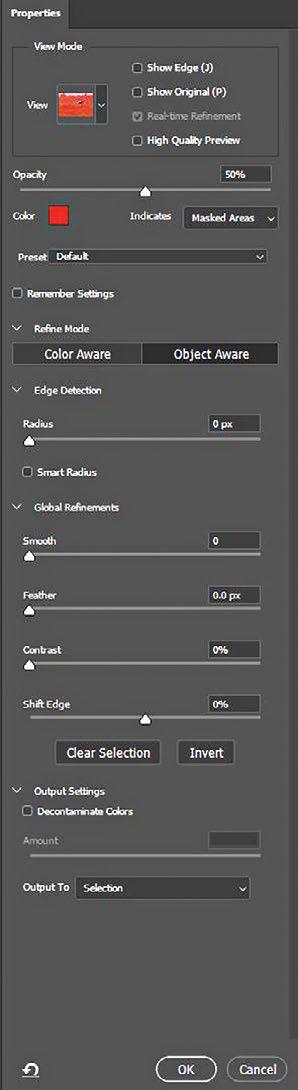
This technique needs precise selection and extraction of the subject and the latest versions of Photoshop have excellent tools to support that. Please note that some of the steps explained may require connection to the Internet as Photoshop might access Adobe cloud servers for execution.
Let us start with a simple image (Picture 1) to understand the process.
We recommend that you copy the background layer and perform all the editing on it. So, right-click on the background layer and choose Duplicate Layer. In case any damage occurs to the duplicated layer you can recover the same from the Background layer.
 Picture 3
From the Main menu of Photoshop,
Window > Contextual Task Bar
This will open the Contextual Task Bar. This will show 'Select Subject' in a field. Click on that to select the subject.
Alternately go to the Photoshop Toolbar and choose Select Subject (it is one of the selection tools) to select the subject.


This story is from the July 2025 edition of Smart Photography.
Subscribe to Magzter GOLD to access thousands of curated premium stories, and 10,000+ magazines and newspapers.
Already a subscriber? Sign In
MORE STORIES FROM Smart Photography

Smart Photography
Great Performance, Affordable Price!
The second lens launched with the joint efforts of Samyang and Schneider Kreuznach is the 24mm to 60mm F 2.8 standard zoom for the Sony E mount.

2 mins
April 2026

Smart Photography
Smart Photography AWARDS 2026
Yet another year has passed and it is now time to highlight the best products launched in the past year.
1 min
April 2026
Smart Photography
A Stepping Stone for Serious Cinematography
The ZR is the culmination of Nikon's much-publicised partnership with RED Digital Cinema, two giants in their respective fields.
8 mins
April 2026

Smart Photography
When Printing Becomes a Choice
As photography becomes increasingly digital, printing is no longer automatic. It is intentional. This month's issue explores the technologies, materials, and market shifts shaping the future of photographic print.
1 mins
April 2026

Smart Photography
Shreenath Veer Mhaskoba Festival
Every year in rural Maharashtra, thousands of devotees gather to celebrate Shreenath Veer Mhaskoba, a revered folk deity worshipped by farming and pastoral communities.
1 min
April 2026

Smart Photography
MagSafe storage expansion
When we got the Mag-Vault for review we were hoping for a clever on-the-go solution for the iPhone, but after a week of testing it mostly sits in the drawer.
1 min
April 2026
Smart Photography
Crop or Use a TC?
All wildlife photographers are perennially short of one thing and that is, reach.
10 mins
April 2026

Smart Photography
Lens Extraordinaire
The newly designed wide-angle prime lens from the house of Nikon is a S-Line (Performance) full frame lens with a superfast f/1.2 aperture.
3 mins
April 2026

Smart Photography
CP Plus attracts record crowds
CP Plus 2026 was held in February and attracted a record 23000 visitors in the first two days.
1 min
April 2026

Smart Photography
Printing Photographs: From Silver Halide to Substrates of the Future
For decades, photographic printing has evolved quietly, often overshadowed by cameras, sensors, and screens. Yet behind every meaningful print lies a complex interplay of technology, chemistry, substrates, and market forces.
10 mins
April 2026
Listen
Translate
Change font size