
Magzter GOLDで無制限に
10,000以上の雑誌、新聞、プレミアム記事に無制限にアクセスできます。
試す 金 - 無料
GET STARTED WITH Reminders
Mac Life
|May 2023
Never forget those important tasks again
APPLE’S REMINDERS APP has come a long way over the last few years. From a fairly basic to–do list tool that allowed us to set alerts, to a fully-fledged task manager that supports multiple lists, tagging, and sharing with others. Throw in the fact that it syncs with iCloud across all your devices, and there’s no excuse for forgetting anything ever again. And if typing details of a task into your iPhone or Mac is too much effort, you can ask Siri to do it for you. Creating basic reminders really couldn’t be easier. But Reminders goes way beyond the basics.
Let’s say you want to remind yourself to buy tickets for a concert just before they go on sale. You could create the reminder, add the URL of the ticket sales site and the price of the ticket. That way, when the reminder alert is triggered, you can just tap the reminder to navigate directly to the website. Need to remember to buy milk next time you’re in the supermarket? Set a geofenced reminder that’s triggered the next time iOS senses your location is close to that supermarket.
As we’ll demonstrate over these next few pages, it’s easy to create and schedule reminders, make your own lists, or templates for lists, and store them in folders. Plus, you can build Smart Lists based on tags, collaborate on shared lists with others, and much more.
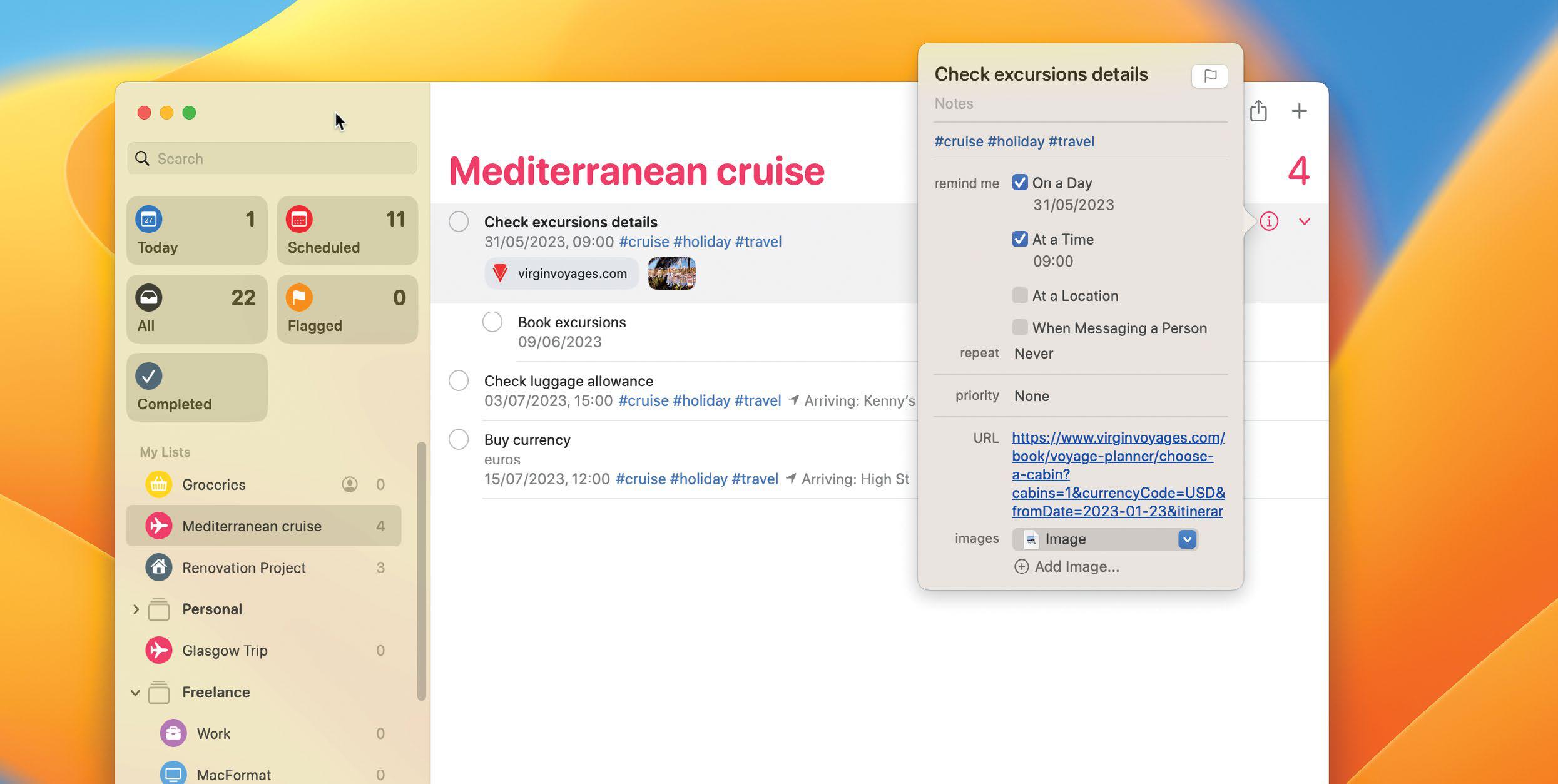
Build efficient to–do lists
Create and schedule Reminders to help manage all your important tasks

このストーリーは、Mac Life の May 2023 版からのものです。
Magzter GOLD を購読すると、厳選された何千ものプレミアム記事や、10,000 以上の雑誌や新聞にアクセスできます。
すでに購読者ですか? サインイン
Mac Life からのその他のストーリー

Mac Life
TerraMaster F4-425 NAS
Home or office four-bay network-attached storage

3 mins
March 2026

Mac Life
Satechi OntheGo 7-in-1 Adapter
Easily add more ports to your Mac, iPhone and iPad
2 mins
March 2026

Mac Life
BenQ ScreenBar Halo 2
Monitor lighting that's a sight for sore eyes
1 mins
March 2026
Mac Life
AI: WHAT YOU NEED TO KNOW
Al can be brilliant when put to proper use, but it also has some major downsides
11 mins
March 2026

Mac Life
Calibrate a MacBook Pro display
Can I calibrate my MacBook Pro 16-inch M3 Pro's XDR display, and if so, how?
1 min
March 2026

Mac Life
Edifier S880DB MKII
Great-sounding speakers with loads of connectivity
3 mins
March 2026

Mac Life
Search text in document images
I keep thousands of images of printed documents, and want to search their contents using Live Text, but Spotlight won't index them. How can I get it to work?
1 min
March 2026

Mac Life
No looking back at old icons
Can I customize the apps bundled in macOS Tahoe by giving them back their old icons?
1 min
March 2026

Mac Life
Set up multiple timers on iOS
Discover timers done right
2 mins
March 2026

Mac Life
Blue Prince
A multilayered inheritance challenge like no other
2 mins
March 2026
Translate
Change font size