
Passez à l'illimité avec Magzter GOLD
Obtenez un accès illimité à plus de 9 000 magazines, journaux et articles Premium pour seulement
Essayer OR - Gratuit
Fill in forms and edit PDFs
MacFormat UK
|May 2025
You can use Preview to fill in, annotate and even password protect PDFs
IT WILL TAKE
> 20 minutes
YOU WILL LEARN
> How to edit, annotate, sign, protect and share your PDFs
YOU'LL NEED
> Preview app on Mac (iPhone/iPad/Apple Pencil optional)
Tricky things PDFs! So what can you do with them on a Mac? Well, quite a lot actually, with Preview alone letting you fill in forms, add signatures, make comments, use passwords, and more.
Opt for some other PDF editors and you can go further. PDF Expert (£72.99/year, pdfexpert.com), for instance, lets you change text and add links, and enables you to convert PDFs to Word, Excel and PowerPoint docs. Foxit's PDF Editor (£111.16/year, foxit.com) adds nifty share and collaborative options. With some deep diving, however, you'll soon discover how versatile Preview and macOS can be.
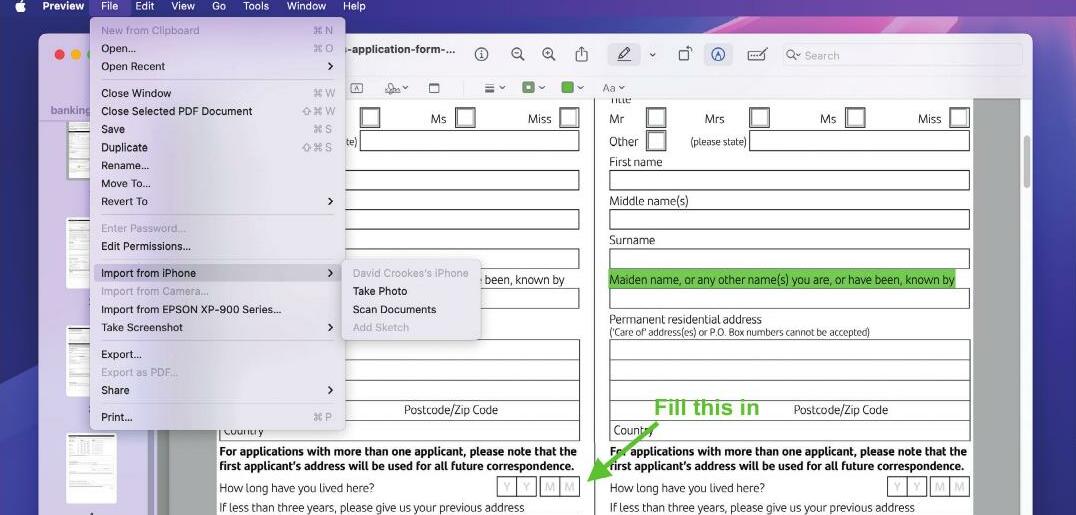
For starters, you can create a PDF from docs and web pages by trying File > ‘Export as PDF’, or by selecting Print in an app and choosing ‘Save as PDF’ in the bottom left corner. In Preview, you can also select File > ‘Import from Phone’ and use an iPhone to take photos or scan documents to help build a PDF. With a PDF to work with, you can then dive deeper.
HOW TO DO more with your PDFs
 1 Fill in a PDF
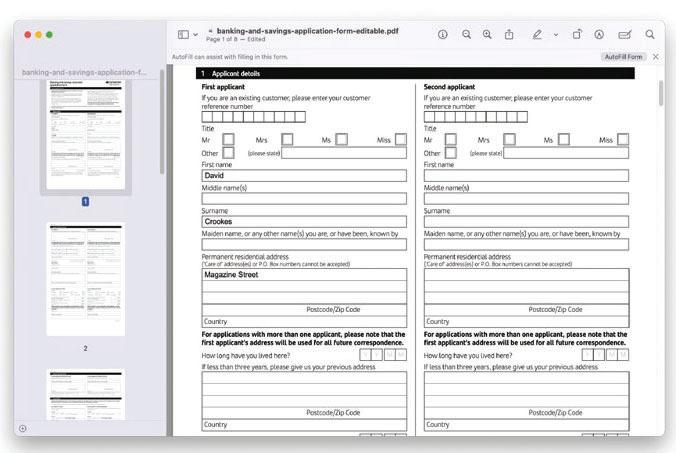
The Preview app is more than an image and PDF viewer. It's an editing tool you can use to directly fill in forms - there's no need to print, just complete on screen and scan! It's generally as simple as clicking a field and typing text.


Cette histoire est tirée de l'édition May 2025 de MacFormat UK.
Abonnez-vous à Magzter GOLD pour accéder à des milliers d'histoires premium sélectionnées et à plus de 9 000 magazines et journaux.
Déjà abonné ? Se connecter
PLUS D'HISTOIRES DE MacFormat UK
MacFormat UK
Affinity by Canva
A complete creative studio for zero cost

3 mins
February 2026
MacFormat UK
RSRs return from the dead
Apple announced Rapid Security Responses in June 2022, as a new means of applying urgent security patches in between macOS updates.
1 min
February 2026
MacFormat UK
Rediscover albums with Longplay
Fall in love with your albums all over again with this amazing music player
3 mins
February 2026
MacFormat UK
Set up multiple timers on iOS
Discover timers done right
2 mins
February 2026

MacFormat UK
Chants of Sennaar
Work your way beyond being lost in translation
2 mins
February 2026
MacFormat UK
Signature Slim Solar+ wireless keyboard K980
A comfortable, full-size keyboard that's always good to go
2 mins
February 2026
MacFormat UK
One more thing Apple Intelligence
Apple has promised a big AI update in 2026, and Graham Barlow feels nervous
2 mins
February 2026

MacFormat UK
Search any website - fast!
Find your favourite websites faster than ever
3 mins
February 2026

MacFormat UK
Make your ideal web browser
Make online life easy by making your web browser work your way
2 mins
February 2026

MacFormat UK
Best home printers & all-in-ones
We put six all-round home models through their printing paces
7 mins
February 2026
Listen
Translate
Change font size