Intentar ORO - Gratis
Master beats in GarageBand
Mac Life
|September 2025
Create fantastic fills and block-rocking beats on your iPad
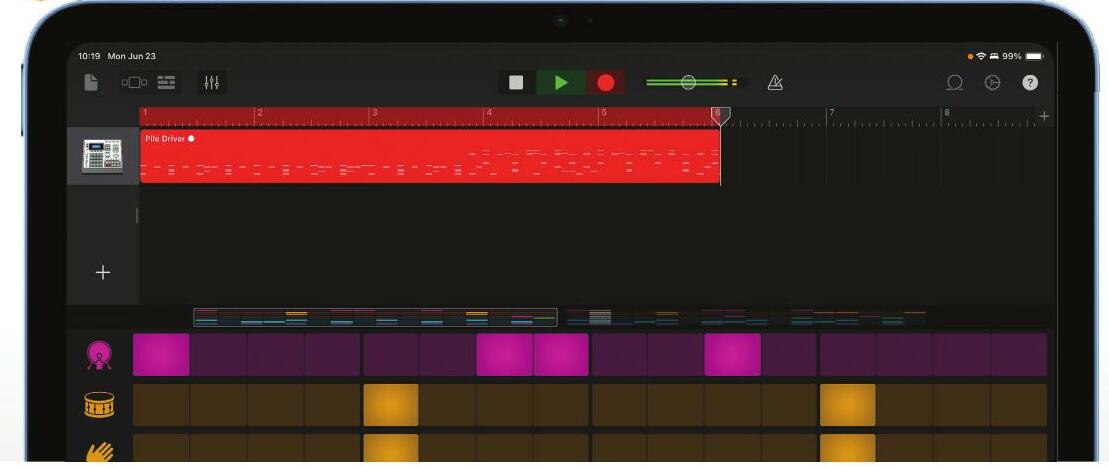
ONE OF OUR favorite GarageBand features is the Beat Sequencer, which enables you to create your own drum and percussion patterns, even if you’ve never hit a hi-hat or smacked a snare drum before.
As we'll discover in this tutorial, it’s incredibly easy to use, but it’s also a very powerful creative tool. The Beat Sequencer enables you to create very complex patterns, and it’s very simple to then incorporate multiple Beat Sequencer patterns in your song and tweak the patterns to keep things musically interesting. A really useful thing about Beat Sequencer is that if you know how to use it in GarageBand, you’ll be able to use the Step Sequencer in GarageBand’s bigger sibling, Logic Pro. That's because the Step Sequencer in Logic Pro is based on this feature in GarageBand, and while it has been given quite a lot of extra features — it has got more customization, and can be used across more instruments — it works in the same way.
HOW TO Use the Beat Sequencer
Start your song
Create a new song in GarageBand, and swipe along until you get to the Drums option shown here. If you look at the icons below the picture of a snare drum, you'll see the Beat Sequencer icon second from the right. Tap that icon.
See the sequencer
GarageBand will now open the Beat Sequencer with a blank grid filling most of the screen. It's straightforward: each column is a beat, so we've got 16 beats going across. Each row is a bit of the drum kit, starting with the kick drum.
Build a beat


Esta historia es de la edición September 2025 de Mac Life.
Suscríbete a Magzter GOLD para acceder a miles de historias premium seleccionadas y a más de 9000 revistas y periódicos.
¿Ya eres suscriptor? Iniciar sesión
MÁS HISTORIAS DE Mac Life

Mac Life
TerraMaster F4-425 NAS
Home or office four-bay network-attached storage

3 mins
March 2026

Mac Life
Satechi OntheGo 7-in-1 Adapter
Easily add more ports to your Mac, iPhone and iPad
2 mins
March 2026

Mac Life
BenQ ScreenBar Halo 2
Monitor lighting that's a sight for sore eyes
1 mins
March 2026
Mac Life
AI: WHAT YOU NEED TO KNOW
Al can be brilliant when put to proper use, but it also has some major downsides
11 mins
March 2026

Mac Life
Calibrate a MacBook Pro display
Can I calibrate my MacBook Pro 16-inch M3 Pro's XDR display, and if so, how?
1 min
March 2026

Mac Life
Edifier S880DB MKII
Great-sounding speakers with loads of connectivity
3 mins
March 2026

Mac Life
Search text in document images
I keep thousands of images of printed documents, and want to search their contents using Live Text, but Spotlight won't index them. How can I get it to work?
1 min
March 2026

Mac Life
No looking back at old icons
Can I customize the apps bundled in macOS Tahoe by giving them back their old icons?
1 min
March 2026

Mac Life
Set up multiple timers on iOS
Discover timers done right
2 mins
March 2026

Mac Life
Blue Prince
A multilayered inheritance challenge like no other
2 mins
March 2026
Listen
Translate
Change font size