
Vuélvete ilimitado con Magzter GOLD
Obtenga acceso ilimitado a más de 9000 revistas, periódicos e historias Premium por solo
Intentar ORO - Gratis
Learn to use dictation
Mac Life
|March 2023
iOS and iPadOS have improved the way dictation works. Here's how...
REQUIRES iOS/iPadOS 16
YOU WILL LEARN How to use the new dictation features on iPhone and iPad
IT WILL TAKE 20 minutes
GENIUS TIP
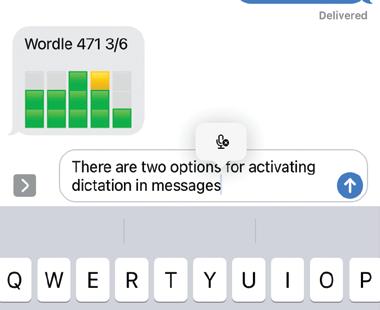
As well as tapping the microphone in the text box in Messages, you can tap the microphone next to the keyboard to start dictating.
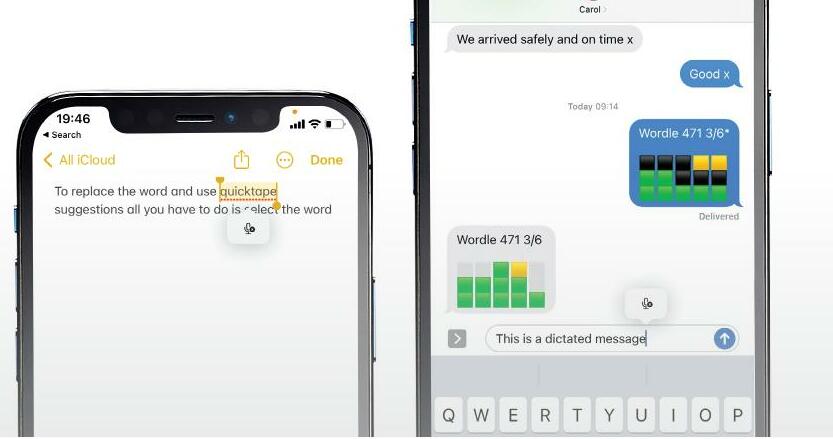
WE'VE LONG BEEN able to dictate text in iOS, whether it's in Messages, Mail, or any other app where we would normally type. However, in iOS 16, dictation has been significantly improved. It now punctuates automatically, using the context of what you're typing and the pauses in your speech to determine whether to add a comma, full stop or other punctuation mark. You can still manually punctuate by dictating the name of the punctuation you want to add.
Swapping between dictation and typing is easy and makes for a fluid writing experience, and you can even add emoji using dictation. You will, though, need to know the official unicode name for the emoji you want, so it's worth brushing up on those if you plan to dictate emoji a lot. To make composing text even faster, you can also insert QuickType suggestions using dictation. If you haven't tried dictation for a while because you found it clunky or inaccurate, it's well worth giving it another go.
HOW TO Dictate with ease


Esta historia es de la edición March 2023 de Mac Life.
Suscríbete a Magzter GOLD para acceder a miles de historias premium seleccionadas y a más de 9000 revistas y periódicos.
¿Ya eres suscriptor? Iniciar sesión
MÁS HISTORIAS DE Mac Life

Mac Life
TerraMaster F4-425 NAS
Home or office four-bay network-attached storage

3 mins
March 2026

Mac Life
Satechi OntheGo 7-in-1 Adapter
Easily add more ports to your Mac, iPhone and iPad
2 mins
March 2026

Mac Life
BenQ ScreenBar Halo 2
Monitor lighting that's a sight for sore eyes
1 mins
March 2026
Mac Life
AI: WHAT YOU NEED TO KNOW
Al can be brilliant when put to proper use, but it also has some major downsides
11 mins
March 2026

Mac Life
Calibrate a MacBook Pro display
Can I calibrate my MacBook Pro 16-inch M3 Pro's XDR display, and if so, how?
1 min
March 2026

Mac Life
Edifier S880DB MKII
Great-sounding speakers with loads of connectivity
3 mins
March 2026

Mac Life
Search text in document images
I keep thousands of images of printed documents, and want to search their contents using Live Text, but Spotlight won't index them. How can I get it to work?
1 min
March 2026

Mac Life
No looking back at old icons
Can I customize the apps bundled in macOS Tahoe by giving them back their old icons?
1 min
March 2026

Mac Life
Set up multiple timers on iOS
Discover timers done right
2 mins
March 2026

Mac Life
Blue Prince
A multilayered inheritance challenge like no other
2 mins
March 2026
Translate
Change font size