Intentar ORO - Gratis
Keep your email addresses safe with aliases
Mac Life
|March 2026
Shield your email from the long arm of the spam
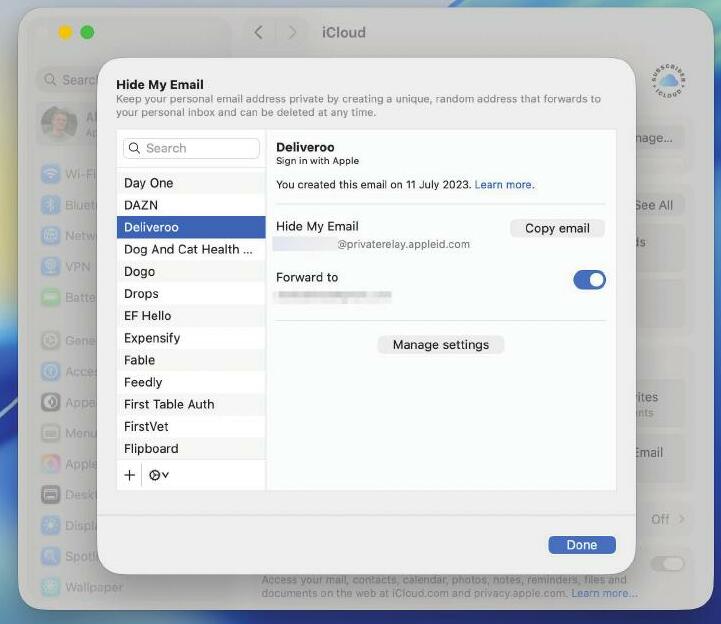
SPAM IS THE scourge of the modern internet, and there are few people yet to be bedevilled by it.
Fortunately, there are several ways you can fight back, and one of them is through using email aliases. These are alternate email addresses that redirect to your main inbox — hand out an alias and your regular email address remains uncompromised. And if an address gets spammed, most places enable you to quickly disable it.
Aliases aren’t just useful for countering spam, either; you can use them to filter and organize your incoming messages while maintaining a single inbox, for example.
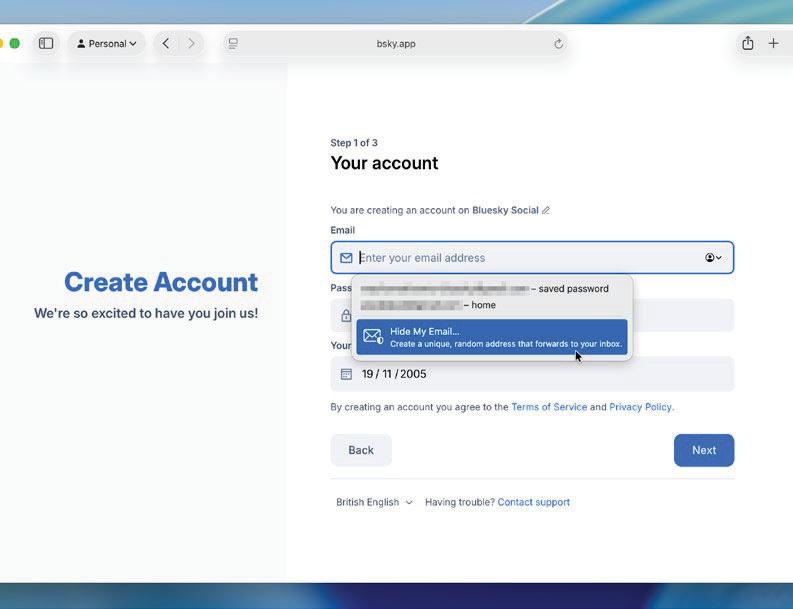 SIMPLE AND SOPHISTICATED
In this tutorial, we’ll show you how to create and use aliases with Gmail, iCloud, and Outlook. Gmail’s method is the simplest and merely requires appending a “+” symbol and an extra word to the end of your normal email address, although it does mean savvy ne’er—do-wells could suss out your real address.
You get a more sophisticated approach with iCloud, as its Hide My Email feature generates a throwaway account every time you need one. You need a paid iCloud+ subscription for this, although iCloud.com gives you three aliases for free. Outlook, meanwhile, enables you to add fresh addresses that redirect into your main inbox and can be disabled at any time.


Esta historia es de la edición March 2026 de Mac Life.
Suscríbete a Magzter GOLD para acceder a miles de historias premium seleccionadas y a más de 9000 revistas y periódicos.
¿Ya eres suscriptor? Iniciar sesión
MÁS HISTORIAS DE Mac Life

Mac Life
TerraMaster F4-425 NAS
Home or office four-bay network-attached storage

3 mins
March 2026

Mac Life
Satechi OntheGo 7-in-1 Adapter
Easily add more ports to your Mac, iPhone and iPad
2 mins
March 2026

Mac Life
BenQ ScreenBar Halo 2
Monitor lighting that's a sight for sore eyes
1 mins
March 2026
Mac Life
AI: WHAT YOU NEED TO KNOW
Al can be brilliant when put to proper use, but it also has some major downsides
11 mins
March 2026

Mac Life
Calibrate a MacBook Pro display
Can I calibrate my MacBook Pro 16-inch M3 Pro's XDR display, and if so, how?
1 min
March 2026

Mac Life
Edifier S880DB MKII
Great-sounding speakers with loads of connectivity
3 mins
March 2026

Mac Life
Search text in document images
I keep thousands of images of printed documents, and want to search their contents using Live Text, but Spotlight won't index them. How can I get it to work?
1 min
March 2026

Mac Life
No looking back at old icons
Can I customize the apps bundled in macOS Tahoe by giving them back their old icons?
1 min
March 2026

Mac Life
Set up multiple timers on iOS
Discover timers done right
2 mins
March 2026

Mac Life
Blue Prince
A multilayered inheritance challenge like no other
2 mins
March 2026
Listen
Translate
Change font size