Intentar ORO - Gratis
iPHONE PORTRAIT PHOTO GUIDE
Mac Life
|February 2024
Take amazing portraits by day or night

WHEN IT COMES to capturing stunning portraits of the people in your life, your everpresent iPhone is most likely going to be your best camera, both for instant access and quality.
This feature is packed full of tips, tricks and techniques to help you make the most of the iPhone Camera app's many shooting modes.
We'll also look at how your iPhone's various built-in lenses quickly give you a wide range of compositional choices (without having to pause and swap lenses like you do with a bulky Digital SLR camera).
During the long winter nights you'll face the challenge of shooting people in low light, so we've devoted two pages to capturing colorful low-light portraits. We also recommend some third-party gadgets (such as portable LED lights) to improve the quality of low-light shots, as well as adding three-dimensional "modeling" to a subject's face.
Your iPhone is a one-stop shop! As well as capturing portraits it enables you to change their colors, tones and composition in its digital darkroom - the Photos app. We'll explore a wide range of post-production techniques (such as adding background blur) to help make your portraits look more like the work of a professional photographer. Your edited portraits will then catch the eye of friends and followers when you share your shots via social media.
THE CAMERA APP INTERFACE EXPLAINED
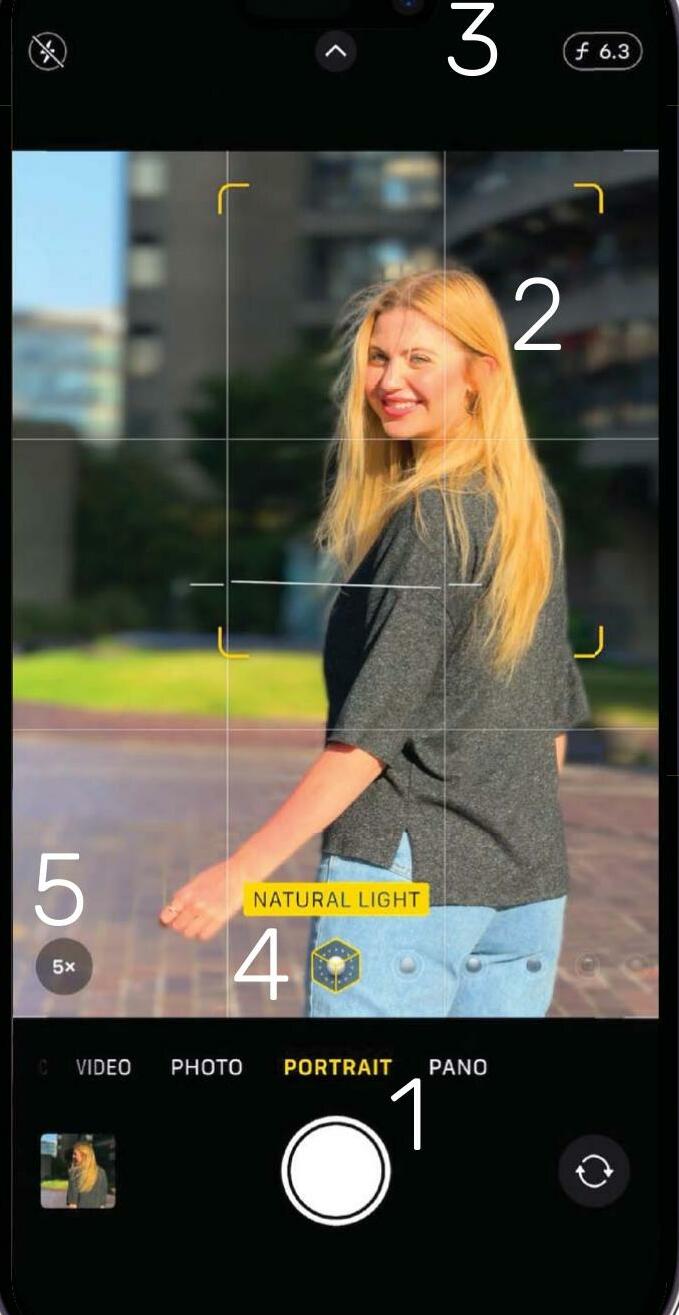
1 Portrait mode
To guarantee a flattering background blur, select Portrait mode. This mimics the professional "bokeh" effect produced by a DSLR lens. Thanks to iOS 17, it's also possible to add blur to some portraits when shooting in Photo mode (see p55).
2 Focus reticule


Esta historia es de la edición February 2024 de Mac Life.
Suscríbete a Magzter GOLD para acceder a miles de historias premium seleccionadas y a más de 9000 revistas y periódicos.
¿Ya eres suscriptor? Iniciar sesión
MÁS HISTORIAS DE Mac Life

Mac Life
TerraMaster F4-425 NAS
Home or office four-bay network-attached storage

3 mins
March 2026

Mac Life
Satechi OntheGo 7-in-1 Adapter
Easily add more ports to your Mac, iPhone and iPad
2 mins
March 2026

Mac Life
BenQ ScreenBar Halo 2
Monitor lighting that's a sight for sore eyes
1 mins
March 2026
Mac Life
AI: WHAT YOU NEED TO KNOW
Al can be brilliant when put to proper use, but it also has some major downsides
11 mins
March 2026

Mac Life
Calibrate a MacBook Pro display
Can I calibrate my MacBook Pro 16-inch M3 Pro's XDR display, and if so, how?
1 min
March 2026

Mac Life
Edifier S880DB MKII
Great-sounding speakers with loads of connectivity
3 mins
March 2026

Mac Life
Search text in document images
I keep thousands of images of printed documents, and want to search their contents using Live Text, but Spotlight won't index them. How can I get it to work?
1 min
March 2026

Mac Life
No looking back at old icons
Can I customize the apps bundled in macOS Tahoe by giving them back their old icons?
1 min
March 2026

Mac Life
Set up multiple timers on iOS
Discover timers done right
2 mins
March 2026

Mac Life
Blue Prince
A multilayered inheritance challenge like no other
2 mins
March 2026
Translate
Change font size