
Vuélvete ilimitado con Magzter GOLD
Obtenga acceso ilimitado a más de 9000 revistas, periódicos e historias Premium por solo
Intentar ORO - Gratis
iOS 17 SUPERGUIDE
Mac Life
|October 2023
Find out what's coming with iPhone's next operating system and what it can do for you

EVERY YEAR APPLE unveils a new generation of operating systems at the June Worldwide Developers Conference. It then releases them as developer and public betas a little while later, and as a finished product by the fall. The public beta of iOS 17 was released on July 12, and the developer beta was made available for free too.
iOS 17 boasts a range of new features for any iPhone that can run them. For instance, there are personalized Contact Posters to design and use, and Live Voicemails where incoming messages are transcribed and the text shown in real time, so you can decide whether or not to take the call. Or, if you ring someone using FaceTime and they don't pick up, in iOS 17 you can now leave a voice or video message for them.
The Messages app gets some upgrades too, such as a more comprehensive search feature, inline replies and other cool functions. For safety, Check In can be used to send a friend or family member a message when you've reached your destination. Also look out for new Stickers, sharing contacts via AirDrop, and a new StandBy feature.
Whether you download the public beta or wait until the new operating system's final release, there's plenty to see and do in iOS 17. Over the next few pages we show you some of the latest features and how to use them.
So what are you waiting for? Let's take an in-depth look at the iPhone's latest iOS 17 operating system, right now.
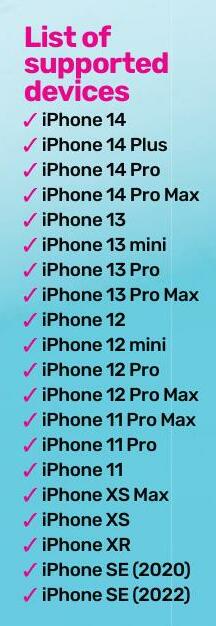
Which iPhones can run iOS 17?
iOS 17 requires a more up-to-date iPhone than previous versions. It's worth noting that even if your device is listed below, it may not support every feature in iOS 17. For example, the new enhancements to autocorrect and predictions require an iPhone 12.
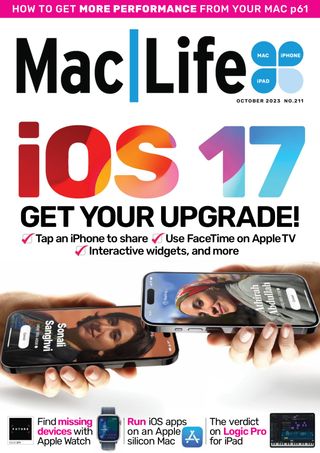

Esta historia es de la edición October 2023 de Mac Life.
Suscríbete a Magzter GOLD para acceder a miles de historias premium seleccionadas y a más de 9000 revistas y periódicos.
¿Ya eres suscriptor? Iniciar sesión
MÁS HISTORIAS DE Mac Life

Mac Life
TerraMaster F4-425 NAS
Home or office four-bay network-attached storage

3 mins
March 2026

Mac Life
Satechi OntheGo 7-in-1 Adapter
Easily add more ports to your Mac, iPhone and iPad
2 mins
March 2026

Mac Life
BenQ ScreenBar Halo 2
Monitor lighting that's a sight for sore eyes
1 mins
March 2026
Mac Life
AI: WHAT YOU NEED TO KNOW
Al can be brilliant when put to proper use, but it also has some major downsides
11 mins
March 2026

Mac Life
Calibrate a MacBook Pro display
Can I calibrate my MacBook Pro 16-inch M3 Pro's XDR display, and if so, how?
1 min
March 2026

Mac Life
Edifier S880DB MKII
Great-sounding speakers with loads of connectivity
3 mins
March 2026

Mac Life
Search text in document images
I keep thousands of images of printed documents, and want to search their contents using Live Text, but Spotlight won't index them. How can I get it to work?
1 min
March 2026

Mac Life
No looking back at old icons
Can I customize the apps bundled in macOS Tahoe by giving them back their old icons?
1 min
March 2026

Mac Life
Set up multiple timers on iOS
Discover timers done right
2 mins
March 2026

Mac Life
Blue Prince
A multilayered inheritance challenge like no other
2 mins
March 2026
Translate
Change font size