
استمتع بـUnlimited مع Magzter GOLD
احصل على وصول غير محدود إلى أكثر من 9000 مجلة وصحيفة وقصة مميزة مقابل
يحاول ذهب - حر
Meet the new menu bar
January 2026
|Mac Life
The familiar and functional menu bar now comes with added control
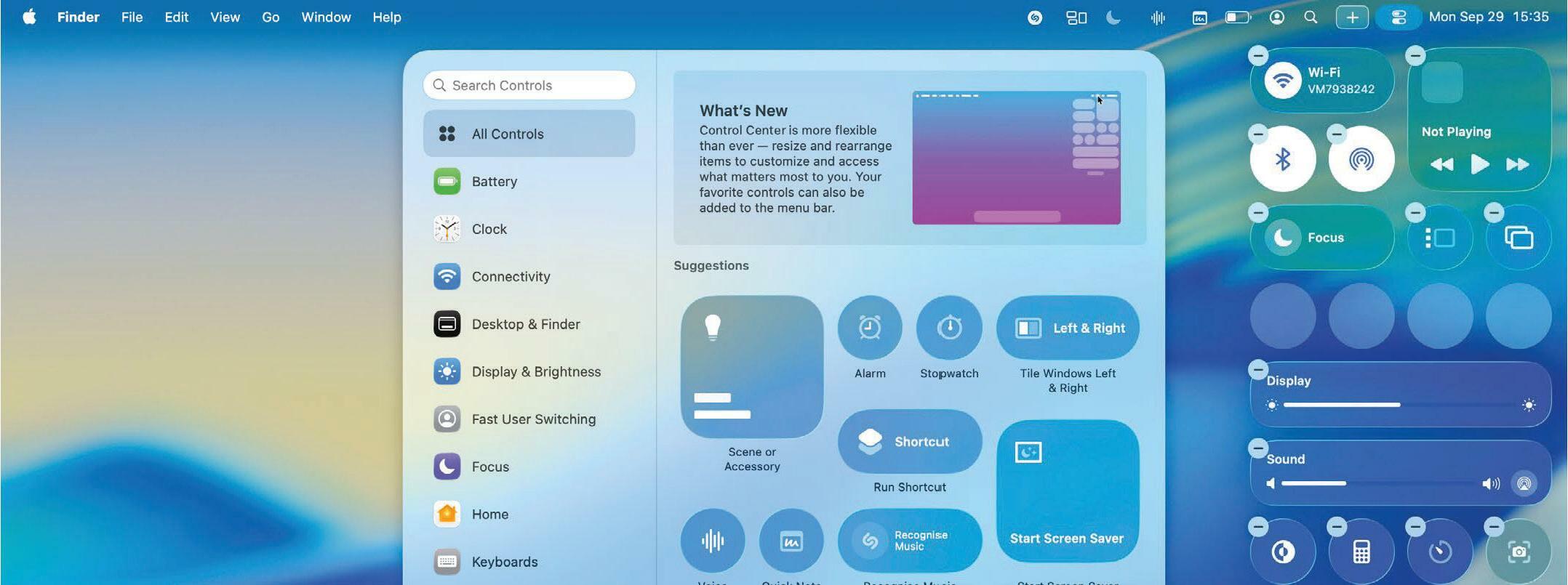
THE macOS MENU bar is familiar, functional, and mostly stays out of your way. While macOS 26 (Tahoe) hasn't revolutionized it, the update has certainly spruced things up with tweaks and new features that bring an extra level of control to your Mac.
That includes a new selection of controls and widgets, the ability to change the menu bar's appearance in granular detail, easier editing of the menu bar in conjunction with the Control Center, and more.
As well as that, you can now use secondary menu bars that work like submenus — add one and click it to access a pop-out window of apps, widgets, and controls. This is helpful if you find that cluttered menu bar items get lost under your Mac's notch. Now, you can conceal lesser-used ones until you need them, ensuring nothing gets hidden due to an overpacked menu bar.
Read on to find out how to use these features in macOS Tahoe and breathe new life into your menu bar.
HOW TO Change the menu bar's appearance
1 Show background
Don't like macOS Tahoe's invisible menu bar? You can put it back to the old, more translucent style by opening System Settings and going to Menu Bar, then enabling the toggle next to "Show menu bar background".
2 Reduce transparency


هذه القصة من طبعة January 2026 من Mac Life.
اشترك في Magzter GOLD للوصول إلى آلاف القصص المتميزة المنسقة، وأكثر من 9000 مجلة وصحيفة.
هل أنت مشترك بالفعل؟ تسجيل الدخول
المزيد من القصص من Mac Life

Mac Life
Satechi Thunderbolt 5 CubeDock
A fast, cute Thunderbolt 5 dock that looks just like the current Mac mini

2 mins
July 2026

Mac Life
The future of Apple
Graham Barlow thinks AI may remove apps from our screens
2 mins
July 2026

Mac Life
Learn to play the piano
Make your fingers fly with this terrific music tutor
2 mins
July 2026

Mac Life
DxO Nik Collection 9
Take your favorite photos to a whole new level
3 mins
July 2026
Mac Life
What next for iPhone?
Apple is planning some big changes for the next generation of iPhones
6 mins
July 2026

Mac Life
POWER UP YOUR MAC
183 must-try tips for leaner, meaner machine
15 mins
July 2026

Mac Life
Denon Home 600
A hi-fi quality smart speaker, with AirPlay for Apple devices
3 mins
July 2026

Mac Life
WHAT IF... The internet didn't exist?
Imagine if there was no iPhone, App Store, or Apple TV — and no Facebook, Amazon, or X — would things be better?
9 mins
July 2026

Mac Life
HiDock P1
Smart recording and transcription
2 mins
July 2026

Mac Life
Astell & Kern HC5
A portable digital-to-analog converter (DAC) for high-end headphones
2 mins
July 2026
Listen
Translate
Change font size