
استمتع بـUnlimited مع Magzter GOLD
احصل على وصول غير محدود إلى أكثر من 9000 مجلة وصحيفة وقصة مميزة مقابل
Fender Studio: Easy-peasy play-along and recording for the guitar player in your life
January 2026
|Macworld
This free guitar-focused recording app and amp sim is handy indeed for quick takes and practice, though it lack features such as MIDI and loop recording.
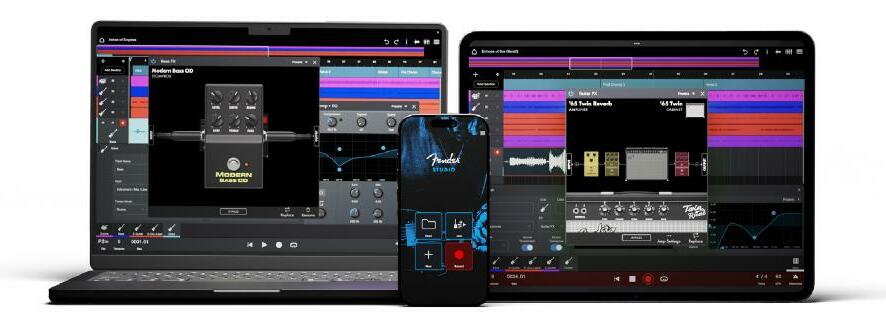
Fender Studio is a cross-platform (Android, iOS, Windows, macOS) combination 16-track audio recorder and guitar amplifier simulation app.
Plug your guitar into your interface or device, fire up Studio, start a'pluckin, and record the results. It's very cool and rock-solid, and it's useful for practice and capturing ideas. However, it's missing quite a few features whose absence might have you looking to the company's far more capable (and far more complex) Studio One (fave.co/4cGYADI).
What, an upsell app from a major vendor? Tell me it ain't so. All joking aside, as a free amp sim that records, Fender Studio is fantastic.
Fender Studio supports recording and playing back up to 16 tracks of audio and includes a bunch of the company's effects (FXs) to make it all sound good. Most saliently, it offers amp sims—effects that simulate the sound of a real guitar amplifier.
These effects, including the amp sims, can be applied to the input signal. You hear them as you play, though they aren't printed to the track when you record. Most DAWs only apply or let you hear FX post recording.
FX being audible on input (with monitoring turned on) is what allows Studio to function as a Fender-centric amp sim (guitar and bass), an app that turns your device into a digital guitar amp.
That makes it much like Native Instrument's Guitar Rig (fave.co/49CnHcn), IK Multimedia's Amplitude (fave.co/47G9zxb), Positive Grid's BIAS (fave.co/4qYqL8H), and a host of others.
As to the recording portion of the program, it features the aforementioned 16 audio tracks plus a surprisingly capable set of clip editing features: cut, paste, delete, split, start and end points, transpose, tempo, gain, and crossfades. These are nondestructive; the underlying audio material remains unchanged.


هذه القصة من طبعة January 2026 من Macworld.
اشترك في Magzter GOLD للوصول إلى آلاف القصص المتميزة المنسقة، وأكثر من 9000 مجلة وصحيفة.
هل أنت مشترك بالفعل؟ تسجيل الدخول
المزيد من القصص من Macworld

Macworld
Maximize iCloud+! 5 tips and tricks you need to start using right now
iCloud is a major component of the Apple ecosystem. Here's how to get the most from it.

6 mins
October 2025

Macworld
Your Apple TV+ subscription is going up by a whopping 30%
Apple's video-streaming service is now $12.99 per month.
1 mins
October 2025

Macworld
Apple TV tweaks: The 8 settings you should change ASAP
How to level up your Apple TV experience in 15 minutes.
4 mins
October 2025

Macworld
Apple announces AppleCare One with multi-device coverage for a flat fee
You can now protect three of your devices for $20 a month.
1 mins
October 2025

Macworld
KUXIU K1 15W 3-IN-1 MAGSAFE POWER BANK: COMPACT, VERSATILE PORTABLE iPHONE, WATCH, AIRPODS CHARGER
This apparently nondescript power bank looks like a slightly chunky iPhone power bank or an Amex Black Card member's pack of cards.
3 mins
October 2025

Macworld
Anker Prime 14-in-1 Thunderbolt 5 Docking Station: Mac mini-like looks and power
Smart and stylish dock that is right up to date with the latest Macs.
6 mins
October 2025
Macworld
VERBATIM TURBOMETAL PORTABLE SSD: STYLISH PORTABLE DRIVE
The Verbatim TurboMetal SSD comes in the classic NVMe form factor with a length of around 106 millimeters.
2 mins
October 2025

Macworld
How to reduce the Liquid Glass transparency effect in macOS Tahoe
If Apple's new look isn't for you, here's how to adjust it.
1 min
October 2025

Macworld
Everyone will want to try Apple's live translation this fall. Here's where to find it
Live translation runs on device, and can translate text and speech across several apps.
2 mins
October 2025

Macworld
RETROSTRIP: NOSTALGIC UTILITY BRINGS BACK THE LEGENDARY MAC CONTROL STRIP
Question for classic Mac users who go way back to System 6 or 7: Remember the Control Strip, which gave you direct access to various applications or functions at the click of a mouse? It was released in 1994 with System 7.1, with the PowerBook 500 series the PowerBook Duo 280 computers. With System 7.5.3, it was made available to all Macintoshes.
2 mins
October 2025
Listen
Translate
Change font size