
Magzter GOLD ile Sınırsız Olun
Sadece 9.000'den fazla dergi, gazete ve Premium hikayeye sınırsız erişim elde edin
Denemek ALTIN - Özgür
Navigate System Settings
Mac Life
|March 2023
The Mac's preferences interface has a new look and a new name
REQUIRES macOS 13
YOU WILL LEARN How to open and navigate System Settings to configure your Mac
IT WILL TAKE 5 minutes
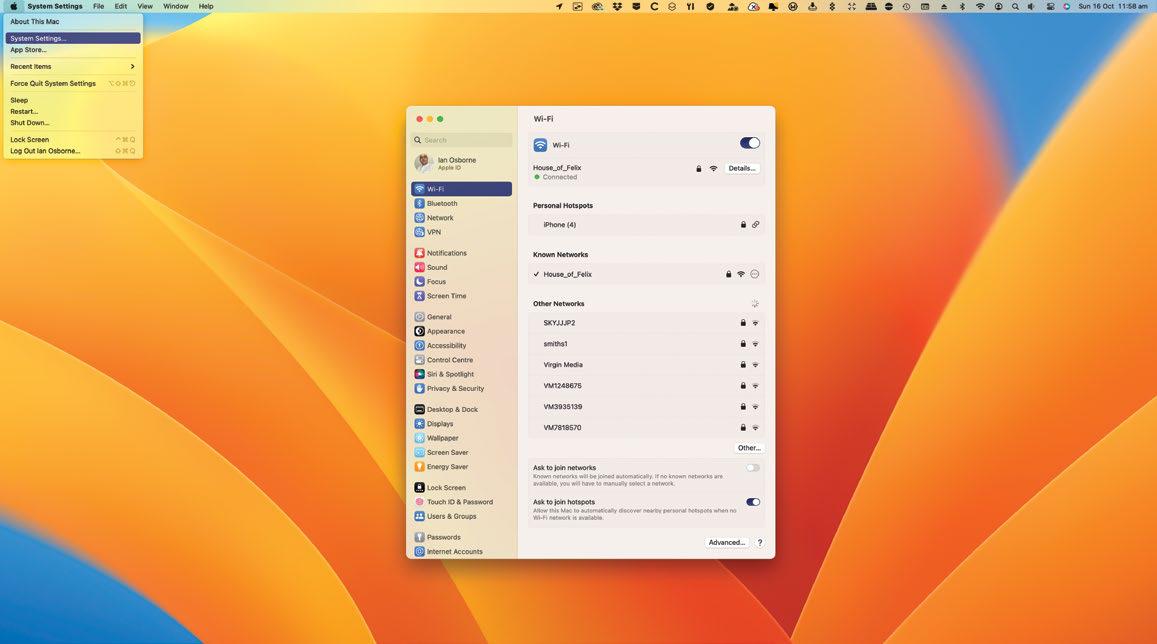
APPLE'S ONGOING PLAN to bring its operating systems closer together and form a single all-purpose ecosystem took another step forward with macOS Ventura, as System Preferences got an iOS-inspired makeover.
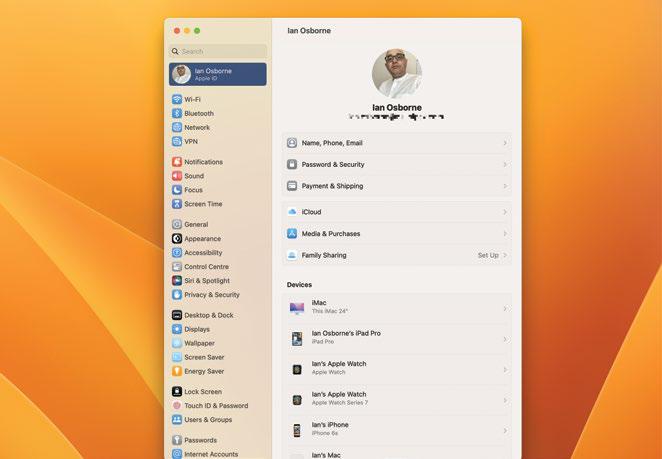
Now called System Settings, it functions in much the same way as the old System Preferences, but instead of being arranged in a grid of preference panes, it's now far more like the Settings app in iOS and iPadOS, with a long list of individual settings options. In macOS this list is set into a sidebar, with the settings options themselves in the main window.
Unlike Apple's mobile devices, it doesn't offer settings for individual apps that came bundled with the operating system or that you've installed yourself. These are still found in the app itself, under the pull-down bearing its name. But all the Mac system configurations are achieved through this new System Settings interface, so let's take a look and grasp its numerous options.
HOW TO Configure your Mac in System Settings
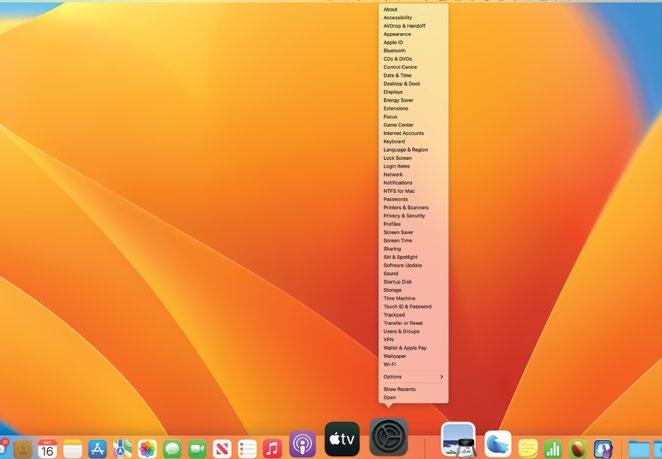
1 Open the menu
To open System Settings, you can use apple> System Settings in the top-left corner of the screen, the Dock icon or the Launchpad. Or you can Ctrl-click on the Dock icon and go straight to the Settings window you need.


Bu hikaye Mac Life dergisinin March 2023 baskısından alınmıştır.
Binlerce özenle seçilmiş premium hikayeye ve 9.000'den fazla dergi ve gazeteye erişmek için Magzter GOLD'a abone olun.
Zaten abone misiniz? Oturum aç
Mac Life'den DAHA FAZLA HİKAYE

Mac Life
TerraMaster F4-425 NAS
Home or office four-bay network-attached storage

3 mins
March 2026

Mac Life
Satechi OntheGo 7-in-1 Adapter
Easily add more ports to your Mac, iPhone and iPad
2 mins
March 2026

Mac Life
BenQ ScreenBar Halo 2
Monitor lighting that's a sight for sore eyes
1 mins
March 2026
Mac Life
AI: WHAT YOU NEED TO KNOW
Al can be brilliant when put to proper use, but it also has some major downsides
11 mins
March 2026

Mac Life
Calibrate a MacBook Pro display
Can I calibrate my MacBook Pro 16-inch M3 Pro's XDR display, and if so, how?
1 min
March 2026

Mac Life
Edifier S880DB MKII
Great-sounding speakers with loads of connectivity
3 mins
March 2026

Mac Life
Search text in document images
I keep thousands of images of printed documents, and want to search their contents using Live Text, but Spotlight won't index them. How can I get it to work?
1 min
March 2026

Mac Life
No looking back at old icons
Can I customize the apps bundled in macOS Tahoe by giving them back their old icons?
1 min
March 2026

Mac Life
Set up multiple timers on iOS
Discover timers done right
2 mins
March 2026

Mac Life
Blue Prince
A multilayered inheritance challenge like no other
2 mins
March 2026
Translate
Change font size