Denemek ALTIN - Özgür
Manage and improve images
Mac Life
|May 2025
Enhance your shots using artificial intelligence tools in Lightroom
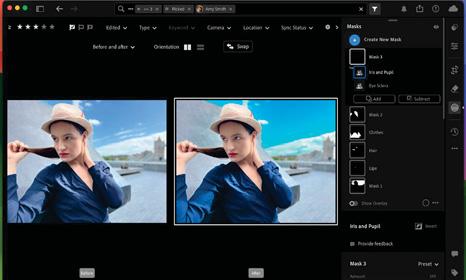
APPLE'S PHOTOS APP offers multiple ways to organize your shots, such as adding them to the Favorites album or browsing collections of recognized people. However, Photos lacks Adobe Lightroom’s extra asset management and filtering tools that enable you to find photos according to Pick or Reject flags, keywords, and star ratings. Lightroom also boasts a more powerful set of artificial intelligence (AI) photo—fixing tools.
There are two versions of Lightroom: the original Lightroom Classic and the newer Lightroom CC (which has now been rebranded to Lightroom). Lightroom is more streamlined than its Lightroom Classic cousin, but still offers a powerful suite of photo organizing and fixing tools. To enjoy Lightroom, you'll need to subscribe to an Adobe Creative Cloud plan. This gives you the ability to sync your Lightroom library between multiple devices via the Adobe Creative Cloud.
CLOUD SYNCING
Like Photos, Lightroom can sync between your iPhone, iPad, and Mac. Any ratings, keywords and edits that you apply to a picture on one device will be the same when you view it in the Lightroom app on another. This enables you to start organizing your photos on your iPhone while sitting in a café, for example. You can then continue rating and organizing your shots on your Mac’s larger display when you get home. Any changes that you make on your Mac will then be viewable on your iPhone or iPad’s Lightroom app. Let’s see how it all works...
QUICK LOOK Lightroom interface
 A CLOUD OR LOCAL

Bu hikaye Mac Life dergisinin May 2025 baskısından alınmıştır.
Binlerce özenle seçilmiş premium hikayeye ve 9.000'den fazla dergi ve gazeteye erişmek için Magzter GOLD'a abone olun.
Zaten abone misiniz? Oturum aç
Mac Life'den DAHA FAZLA HİKAYE

Mac Life
TerraMaster F4-425 NAS
Home or office four-bay network-attached storage

3 mins
March 2026

Mac Life
Satechi OntheGo 7-in-1 Adapter
Easily add more ports to your Mac, iPhone and iPad
2 mins
March 2026

Mac Life
BenQ ScreenBar Halo 2
Monitor lighting that's a sight for sore eyes
1 mins
March 2026
Mac Life
AI: WHAT YOU NEED TO KNOW
Al can be brilliant when put to proper use, but it also has some major downsides
11 mins
March 2026

Mac Life
Calibrate a MacBook Pro display
Can I calibrate my MacBook Pro 16-inch M3 Pro's XDR display, and if so, how?
1 min
March 2026

Mac Life
Edifier S880DB MKII
Great-sounding speakers with loads of connectivity
3 mins
March 2026

Mac Life
Search text in document images
I keep thousands of images of printed documents, and want to search their contents using Live Text, but Spotlight won't index them. How can I get it to work?
1 min
March 2026

Mac Life
No looking back at old icons
Can I customize the apps bundled in macOS Tahoe by giving them back their old icons?
1 min
March 2026

Mac Life
Set up multiple timers on iOS
Discover timers done right
2 mins
March 2026

Mac Life
Blue Prince
A multilayered inheritance challenge like no other
2 mins
March 2026
Listen
Translate
Change font size