Denemek ALTIN - Özgür
Mobile Pixels Trio 3 Pro: MacBook's dual QHD screen wingspan
Macworld
|July 2026
Add two 14-inch screens to your MacBook.
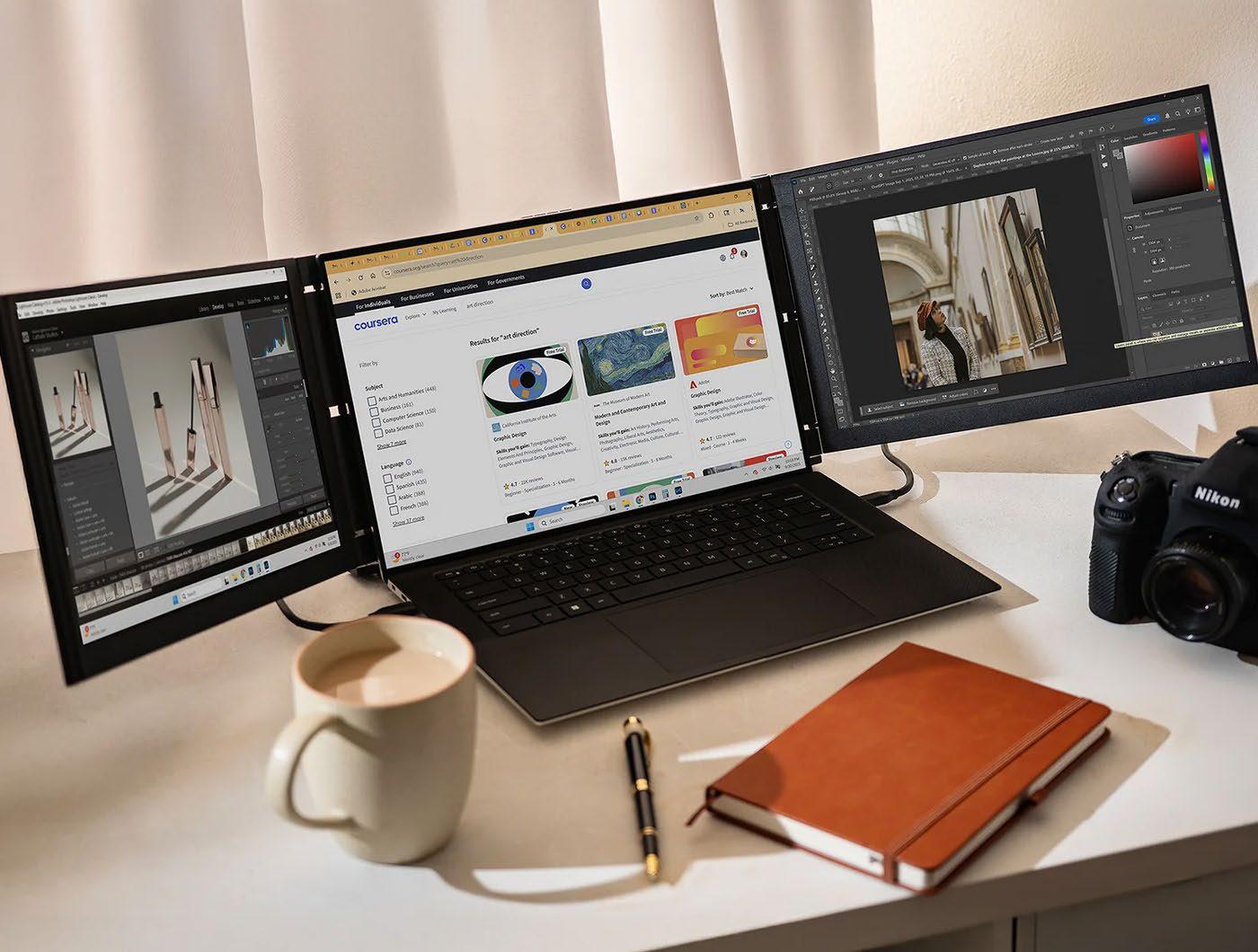
Connecting an external display to your MacBook to extend your desk-based screen space is a common practice, but making your laptop into a desktop workstation isn’t pushing the boundaries of laptop screen expansion.
Even with many of today’s best portable monitors (fave.co/3JsszG5), it’s not easy to take this setup on the road with you or pack it neatly away in a drawer.
The Mobile Pixels Trio 3 Pro is a foldable package weighing 4.13lbs (1.9kg) that physically attaches to your MacBook to add a 14-inch 1400p QHD screen to each side of the laptop’s own screen. It makes your MacBook look like it has wings.
DESIGN
Previously, we’ve tested some screen extenders that hang off just one side of the laptop and look rather strange and lopsided, like a motorbike with a dangling sidecar. A while ago we tested the Limink Al Alloy Portable Triple Monitor (LK14), fave.co/3QOZuV3, that looks and acts a lot like the Mobile Pixels Trio 3 Pro.
Both the Trio 3 Pro and LK14 are a more symmetrical screen setup when in standard Landscape Mode: either side of the MacBook’s own screen. When set up, the screen wings certainly create an impressive look sitting next to a standard one-screen MacBook. At the end of the day or when it’s time to move to a new space, you disconnect, and the two side screens fold onto the central area.
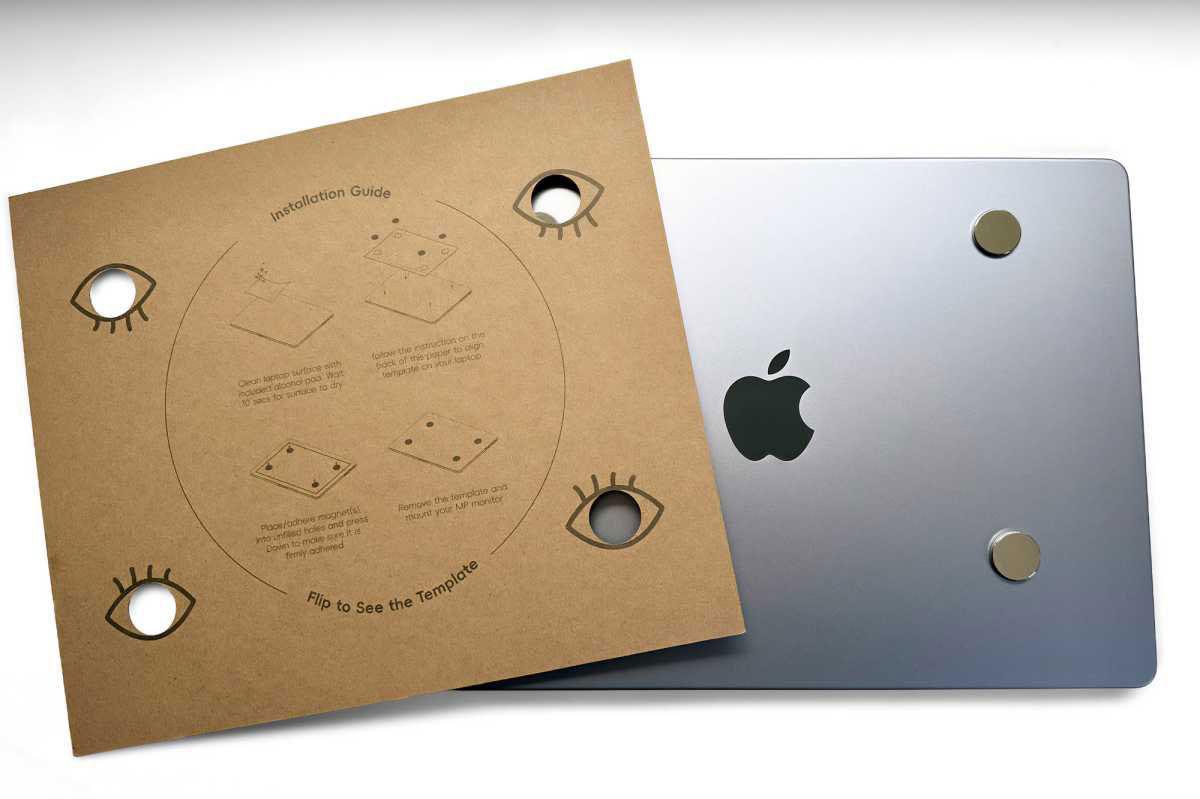 A cardboard template is included in the box, so the magnets are attached in the right spot.
When folded up, the Trio 3 Pro measures 13.4×8.8×0.9 inches (34×22.4×2.3cm). In all its unfurled glory, it spans 40.3 inches (just over 1m), but it can be pulled closer together if your available desk space doesn’t stretch that far.

Bu hikaye Macworld dergisinin July 2026 baskısından alınmıştır.
Binlerce özenle seçilmiş premium hikayeye ve 9.000'den fazla dergi ve gazeteye erişmek için Magzter GOLD'a abone olun.
Zaten abone misiniz? Oturum aç
Macworld'den DAHA FAZLA HİKAYE
Macworld
PSA: Neo won't work with some MacBook USB-C hubs
Accessory makers warn that dual-port USB-C hubs made for MacBooks aren't compatible with the Neo.

3 mins
July 2026

Macworld
16-INCH MACBOOK PRO (M5 MAX): ULTRA SPEED WITH SHOCKING READS
The MacBook Pro with the M-series Max chip is the company’s fastest laptop.
6 mins
July 2026

Macworld
OpenAI's Codex is now smart enough to control your Mac even when it's locked
In Codex’s settings, there is an option for Locked use, which does exactly what it says when you turn it on.
1 min
July 2026
Macworld
APPLE BUILT THE DREAM iPHONE. WHY DIDN’T YOU BUY IT?
APPLE FINALLY GAVE US WHAT WE WANTED, BUT IT TURNED OUT IT WASN’T SOMETHING MOST PEOPLE ACTUALLY NEED.
5 mins
July 2026

Macworld
Audio Pro Drumfire D-2 W: Powerful AirPlay speaker with impressive sound
The Audio Pro Drumfire D-2 W delivers powerful, room-filling sound with AirPlay and high-res streaming, but limited wired inputs and portability may put some buyers off.
4 mins
July 2026

Macworld
Use FaceTime like a pro with these 7 hidden features
The app has gained a ton of advanced options in the last few years that can really dress up your video calls.
4 mins
July 2026

Macworld
Apple just gave us a peek at some of iOS 27's new features
Our first official info about the capabilities and features coming in the next big OS update.
3 mins
July 2026

Macworld
How AI is working to make your iPhone and Mac nearly impervious to attacks
AI coding agents set to level the playing field between hackers and security engineers.
4 mins
July 2026
Macworld
Wavlink Thunderbolt 5 Dock: Affordable fast Thunderbolt plus handy power options
This affordable Thunderbolt 5 docking station looks good and offers some useful power options.
5 mins
July 2026

Macworld
Typed the wrong macOS password? That pause isn't a glitch
It’s a way to hinder brute-force attempts to get into your Mac.
2 mins
July 2026
Listen
Translate
Change font size