Denemek ALTIN - Özgür
Anker Prime 14-in-1 Triple Display DisplayLink Docking Station: Triple-display, fast-charging USB-C dock
Macworld
|July 2026
Connect up to three displays to any M-series Mac.
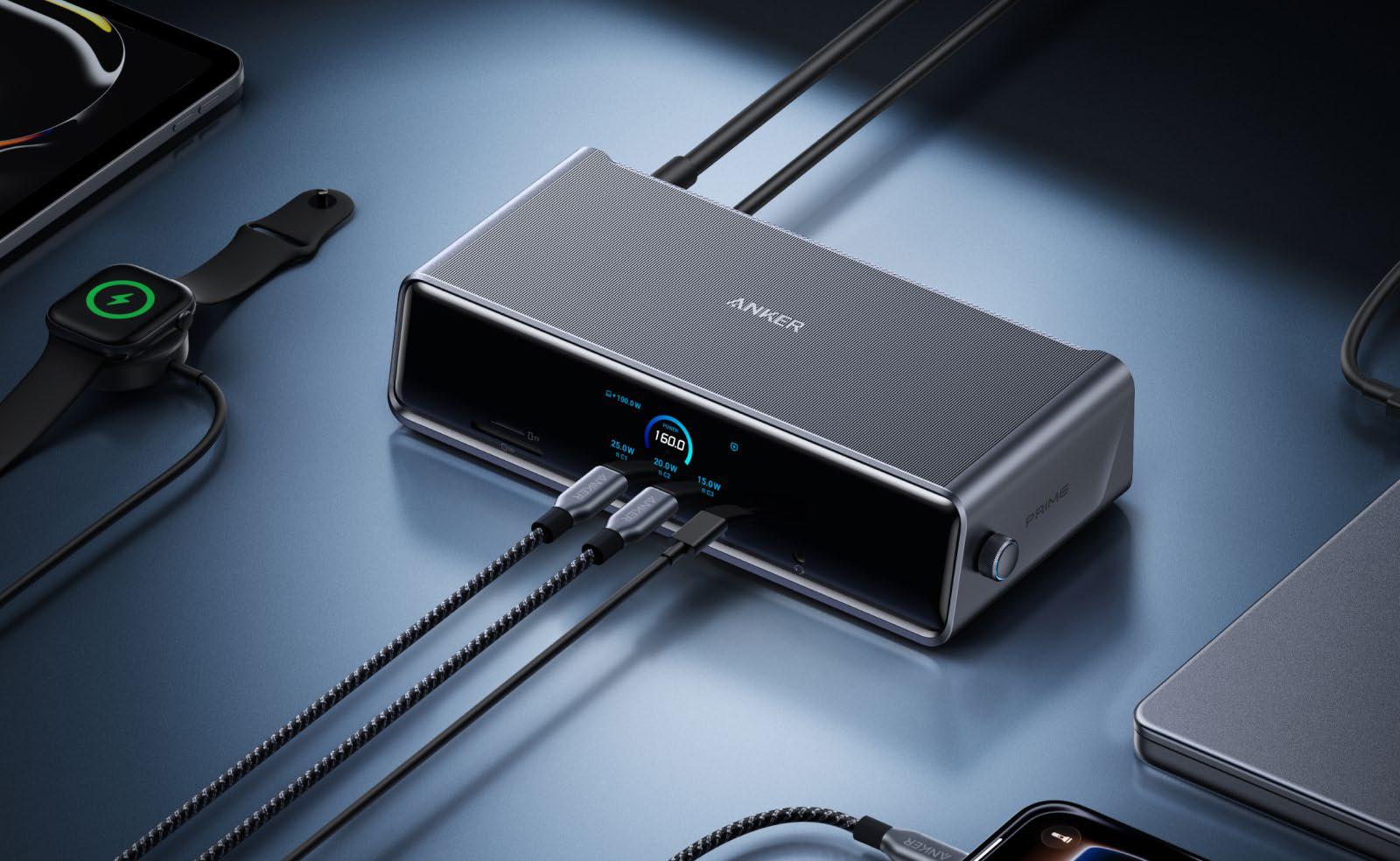
The Anker Prime 14-in-1 Triple Display DisplayLink Docking Station (DL7400) is a DisplayLink docking station that brushes aside Apple’s display limitations to enable up to three external monitors (fave.co/ 3RbaED1) via a single cable to the MacBook.
To achieve this, you must install the free DisplayLink software on your Mac, which is reasonably painless and a onetime setup.
The dock has an impressive 14 ports, including three front-mounted 100W USB-C (more on which later) and a 140W connection to the MacBook—enough to fast-charge a 16-inch MacBook Pro. A future-proof 2.5Gb Ethernet is also included for faster wired network access. It's not Thunderbolt, but the 10Gbps USB-C is ample bandwidth for most.
At the front is the smartest visual display we've seen on a docking station: It shows the output power and data ratings of the dock, MacBook, and each port. You can also set it as a handy clock.
SPECS AND FEATURES
> One upstream USB-C port (10Gbps, 140W)
> Two USB-C ports (10Gbps, 100W)
> One USB-C port (5Gbps, 100W)
> Two USB-A ports (5Gbps, 7.5W)
> One USB-A port (480Mbps, 4.5W)
> Two HDMI 2.1 video ports
> One DisplayLink 1.4 video port
> Ethernet (2.5Gb)
> SD card reader (UHS-I,104MBps)
> MicroSD card reader (UHS-I,104MBps)
> 3.5mm combo Audio jack (front)
> 160W power supply
This dock connects to the computer via 10Gbps USB-C, rather than the Mac's faster 40-80Gbps Thunderbolt ports. 10Gbps should be fast enough for most users not replying on ultra-fast external storage devices, but if you require the very fastest data-transfer rates, you should look for one of the best Thunderbolt docking stations (fave.co/3h1wVoY).
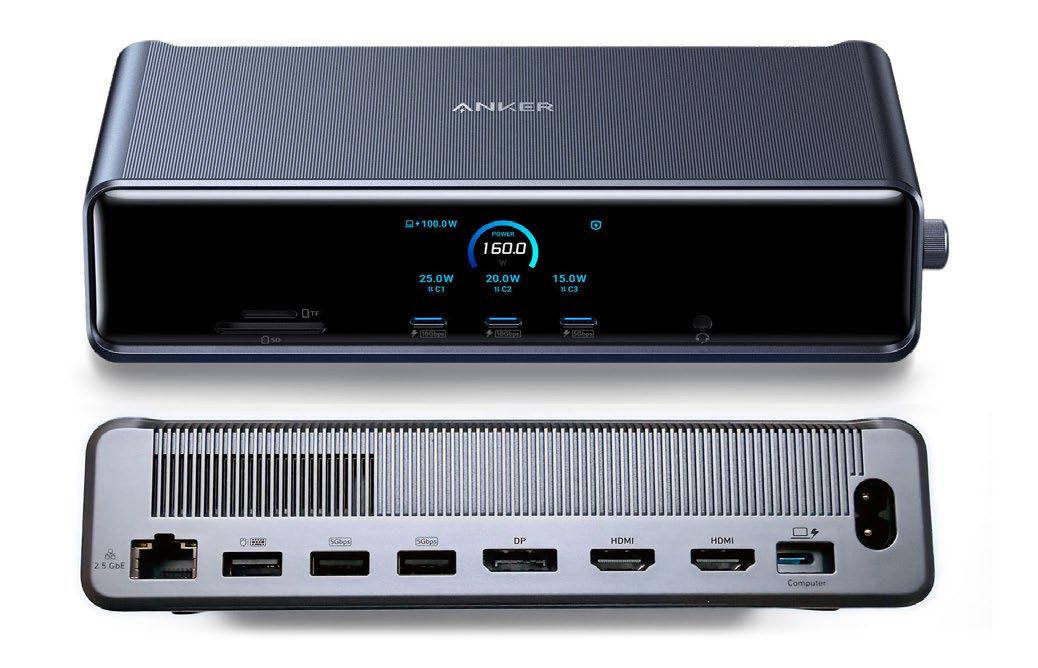 The Anker's front and rear connectivity options.

Bu hikaye Macworld dergisinin July 2026 baskısından alınmıştır.
Binlerce özenle seçilmiş premium hikayeye ve 9.000'den fazla dergi ve gazeteye erişmek için Magzter GOLD'a abone olun.
Zaten abone misiniz? Oturum aç
Macworld'den DAHA FAZLA HİKAYE
Macworld
PSA: Neo won't work with some MacBook USB-C hubs
Accessory makers warn that dual-port USB-C hubs made for MacBooks aren't compatible with the Neo.

3 mins
July 2026

Macworld
16-INCH MACBOOK PRO (M5 MAX): ULTRA SPEED WITH SHOCKING READS
The MacBook Pro with the M-series Max chip is the company’s fastest laptop.
6 mins
July 2026

Macworld
OpenAI's Codex is now smart enough to control your Mac even when it's locked
In Codex’s settings, there is an option for Locked use, which does exactly what it says when you turn it on.
1 min
July 2026
Macworld
APPLE BUILT THE DREAM iPHONE. WHY DIDN’T YOU BUY IT?
APPLE FINALLY GAVE US WHAT WE WANTED, BUT IT TURNED OUT IT WASN’T SOMETHING MOST PEOPLE ACTUALLY NEED.
5 mins
July 2026

Macworld
Audio Pro Drumfire D-2 W: Powerful AirPlay speaker with impressive sound
The Audio Pro Drumfire D-2 W delivers powerful, room-filling sound with AirPlay and high-res streaming, but limited wired inputs and portability may put some buyers off.
4 mins
July 2026

Macworld
Use FaceTime like a pro with these 7 hidden features
The app has gained a ton of advanced options in the last few years that can really dress up your video calls.
4 mins
July 2026

Macworld
Apple just gave us a peek at some of iOS 27's new features
Our first official info about the capabilities and features coming in the next big OS update.
3 mins
July 2026

Macworld
How AI is working to make your iPhone and Mac nearly impervious to attacks
AI coding agents set to level the playing field between hackers and security engineers.
4 mins
July 2026
Macworld
Wavlink Thunderbolt 5 Dock: Affordable fast Thunderbolt plus handy power options
This affordable Thunderbolt 5 docking station looks good and offers some useful power options.
5 mins
July 2026

Macworld
Typed the wrong macOS password? That pause isn't a glitch
It’s a way to hinder brute-force attempts to get into your Mac.
2 mins
July 2026
Listen
Translate
Change font size