
Magzter GOLD ile Sınırsız Olun
Sadece 9.000'den fazla dergi, gazete ve Premium hikayeye sınırsız erişim elde edin
Artist insight: 19 WORKFLOW TIPS FOR BLENDER
ImagineFX
|September 2020
Brandon Hix and Kjartan Tysdal reveal how to optimise your workflow and boost your skills in Blender, the free tool for sculpting in 3D

Blender is a rare example of a high-calibre tool that’s dedicated to remaining free for everyone. Last year’s update of Blender to version 2.8 was a major step forward towards it becoming a more industry-compatible tool. We’re now up to version 2.83, which fine-tuned many of the new features brought in with the milestone 2.8 update, as well as providing a performance boost.
In the past, many artists have criticised the software’s steep learning curve and resisted incorporating Blender into their workflow. A completely overhauled user interface, a focus on real-time asset creation and many other innovations have artists industry-wide taking a second glance at moving over to Blender. Here are 19 tips to help you make the switch, revealing the power and flexibility of Blender.
1 SET UP BLENDER TO SUIT YOUR WORKFLOW
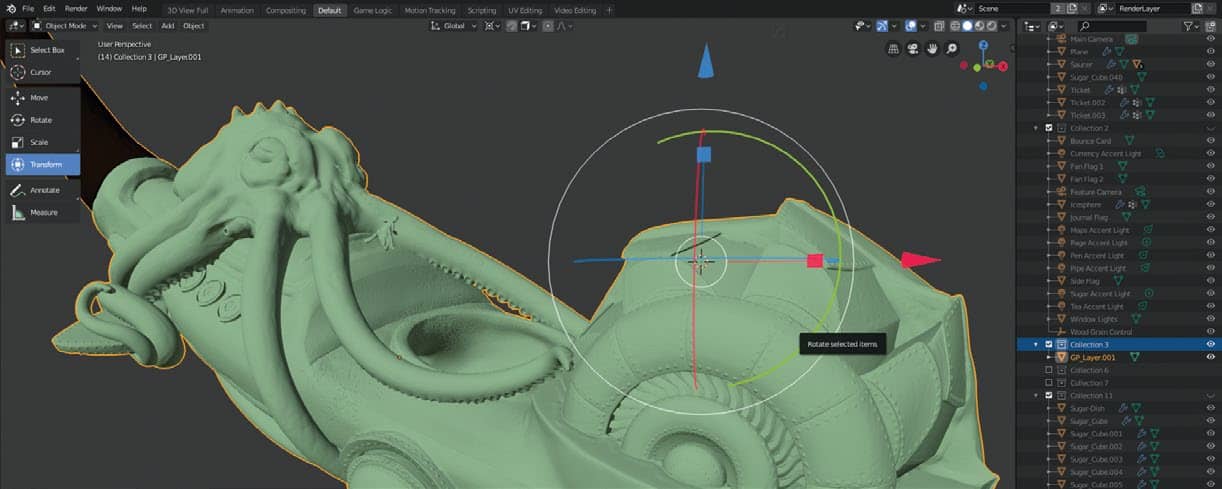
The latest version of Blender is brimming with updated features and changes designed to make your workflow more streamlined than ever. Most people never take advantage of the plethora of customisation options Blender comes bundled with to accommodate their ever-changing workflow. Start-up file preferences, hotkeys, UI themes – these are just some of the things you can alter. Everything from your workspace layout to which mouse button you use to select objects with can be changed in the user preferences found under Edit>Preferences.


Bu hikaye ImagineFX dergisinin September 2020 baskısından alınmıştır.
Binlerce özenle seçilmiş premium hikayeye ve 9.000'den fazla dergi ve gazeteye erişmek için Magzter GOLD'a abone olun.
Zaten abone misiniz? Oturum aç
ImagineFX'den DAHA FAZLA HİKAYE

ImagineFX
HP Omnibook X Flip 16
DOUBLING UP HP's latest Omnibook 2-in-1 is a decent-enough productivity laptop, but it truly shines when it's transformed into tablet mode

2 mins
February 2026

ImagineFX
Phaya Akat - The Sanctuary
“Phaya Akat’s Sanctuary Village began from a simple idea inspired by Thailand’s tradition of boiling eggs in natural hot springs.
1 min
February 2026

ImagineFX
HOW SURFACE NORMALS IMPROVE YOUR 3D ART
Ant Ward explains how to quickly change the way a polygon model looks by adjusting its normals
1 mins
February 2026

ImagineFX
Painting in Procreate: Reimagine Your Surroundings
VISIONARY WORK Across 20 lessons, Mikko Eerola reveals how he brings his ideas to life on the iPad using Procreate
1 mins
February 2026

ImagineFX
Technique focus: WORK SMARTER WITH COLOURS
Álvaro Jiménez reveals the workflow process he follows to summon an armoured demon
1 mins
February 2026

ImagineFX
FIVE MINUTES WITH PAT IMRIE
Big-screen blockbusters and a certain 3D art magazine helped set this creative on his career path
3 mins
February 2026

ImagineFX
RIFF ON YOUR PASSIONS
Max Froer draws on a range of influences when rendering a beast that's part machine
1 min
February 2026

ImagineFX
Anker SOLIX C1000
BOX OF DELIGHTS The chonkiest power bank around is powerful, portable (after a fashion) and boy is it well built
2 mins
February 2026

ImagineFX
PAINTING A SCENE OF GREEK DRAMA
Alexander Leskinen creates a stormy environment featuring harpies, the winged messengers of Zeus.
3 mins
February 2026

ImagineFX
HOW DO I COLOUR A 3D OBJECT?
The process of colouring a 3D image has a lot of layers, so let's start at the surface. Mike Griggs weighs up the material requirements
2 mins
February 2026
Translate
Change font size