Poging GOUD - Vrij
How To Delete, Disable, Or Limit Your Facebook Account
Macworld
|May 2018
If the news of Facebook’s data handling has got you spooked, here’s how you can limit third-party access to your account.

There was a time when deleting your Facebook account was a pie-in-the-sky fantasy, but this week’s news might have you thinking twice. In a series of reports, we learned that an employee at Facebook erroneously handed a trove of data to a company called Cambridge Analytica ,which in turn used that information to target voters and spread influence ahead of the 2016 U.S. election. So we totally understand if you’re having second thoughts about your account.
The good news is, you have options. First you can limit what third-party apps and the Facebook community can see about your account. If that’s not enough, you can deactivate your account, which can be undone, or full-on delete it—and even then, you have a chance to change your mind. Here’s how it works.
LIMIT YOUR FACEBOOK ACCOUNT
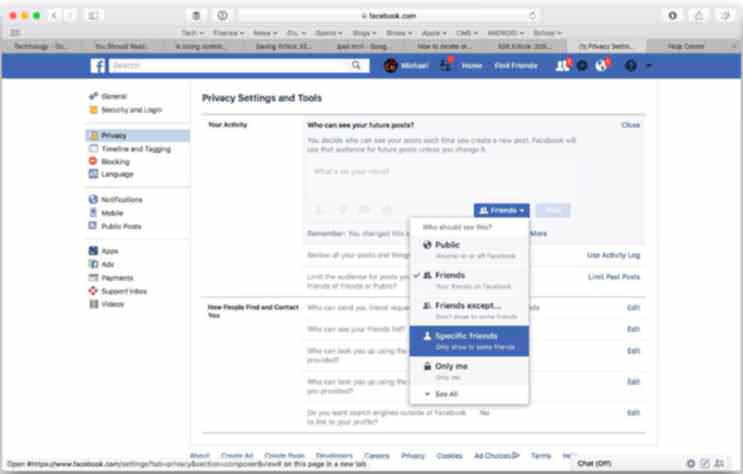
There are plenty of reasons why you wouldn’t want to nuke your Facebook account, but you can still lock it down. The easiest way is to take it private. Head over to Settings, then select the Privacy tab. At the top is a Your Activity window with a drop-down menu. If the Who Can See Your Posts option is set to Public, that means anyone can see what’s on your page, whether they have a Facebook account or not. Tap the Edit button and you’ll be able to limit viewability to just friends, only specific friends, or just yourself.


Dit verhaal komt uit de May 2018-editie van Macworld.
Abonneer u op Magzter GOLD voor toegang tot duizenden zorgvuldig samengestelde premiumverhalen en meer dan 9000 tijdschriften en kranten.
Bent u al abonnee? Aanmelden
MEER VERHALEN VAN Macworld

Macworld
Maximize iCloud+! 5 tips and tricks you need to start using right now
iCloud is a major component of the Apple ecosystem. Here's how to get the most from it.

6 mins
October 2025

Macworld
Your Apple TV+ subscription is going up by a whopping 30%
Apple's video-streaming service is now $12.99 per month.
1 mins
October 2025

Macworld
Apple TV tweaks: The 8 settings you should change ASAP
How to level up your Apple TV experience in 15 minutes.
4 mins
October 2025

Macworld
Apple announces AppleCare One with multi-device coverage for a flat fee
You can now protect three of your devices for $20 a month.
1 mins
October 2025

Macworld
KUXIU K1 15W 3-IN-1 MAGSAFE POWER BANK: COMPACT, VERSATILE PORTABLE iPHONE, WATCH, AIRPODS CHARGER
This apparently nondescript power bank looks like a slightly chunky iPhone power bank or an Amex Black Card member's pack of cards.
3 mins
October 2025

Macworld
Anker Prime 14-in-1 Thunderbolt 5 Docking Station: Mac mini-like looks and power
Smart and stylish dock that is right up to date with the latest Macs.
6 mins
October 2025
Macworld
VERBATIM TURBOMETAL PORTABLE SSD: STYLISH PORTABLE DRIVE
The Verbatim TurboMetal SSD comes in the classic NVMe form factor with a length of around 106 millimeters.
2 mins
October 2025

Macworld
How to reduce the Liquid Glass transparency effect in macOS Tahoe
If Apple's new look isn't for you, here's how to adjust it.
1 min
October 2025

Macworld
Everyone will want to try Apple's live translation this fall. Here's where to find it
Live translation runs on device, and can translate text and speech across several apps.
2 mins
October 2025

Macworld
RETROSTRIP: NOSTALGIC UTILITY BRINGS BACK THE LEGENDARY MAC CONTROL STRIP
Question for classic Mac users who go way back to System 6 or 7: Remember the Control Strip, which gave you direct access to various applications or functions at the click of a mouse? It was released in 1994 with System 7.1, with the PowerBook 500 series the PowerBook Duo 280 computers. With System 7.5.3, it was made available to all Macintoshes.
2 mins
October 2025
Translate
Change font size