
Gå ubegrenset med Magzter GOLD
Få ubegrenset tilgang til over 9000 magasiner, aviser og premiumhistorier for bare
TIPS + TRICKS GOOGLE CHROME
Stuff UK
|August 2025
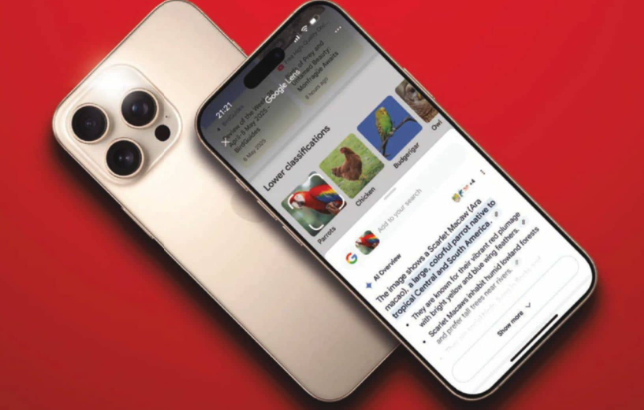
Google's browser dominates the web, but are you getting the most out of it? Craig Grannell digs through the menus and dishes out the best ways to make it work for you...
-
THE BASICS
Sync it up
■ Signed in before? Great! Chrome will remember. If not, set up a profile to sync your browser's brain across devices, including recent tabs. (Find those in:> 'History' on desktop and : or ... > 'Recent tabs' on mobile.) Got a work life? Set up a separate profile to keep it apart.
■ Make it your own
Your Chrome doesn't have to look like everyone else's. On desktop, head to: > 'More tools' > 'Customise Chrome' to shake up the theme. On iPhone, use ... > 'Customise menu'. And on Android, long-press the toolbar shortcut to change it, while wondering why Android's Chrome is the least fun. Tsk.
■ Dig into the desktop
Chrome on desktop lets you poke around the guts of a web page with dev tools. (:> 'More tools' > 'Developer tools' – and also 'View' > 'Developer' on Mac.) For power-ups, go to 'Extensions' and bolt on goodies from ad blockers to Al detectors, while once more wondering why these haven't made their way to Android.
■ Manage your tabs
Tab chaos? Herd all related pages into colour-coded tab groups. On desktop, pin regulars with ctrl/right-click > 'Pin'. On iPhone, tap-hold a tab and choose 'Pin tab'. On Android? Tumbleweeds. Sorry. Got a site you use loads on mobile? Share it to your home screen. If it's a progressive web app (PWA), Android will offer to install it. These act like proper apps, separate from Chrome.
■ Be a cunning linguist

Denne historien er fra August 2025-utgaven av Stuff UK.
Abonner på Magzter GOLD for å få tilgang til tusenvis av kuraterte premiumhistorier og over 9000 magasiner og aviser.
Allerede abonnent? Logg på
FLERE HISTORIER FRA Stuff UK
Stuff UK
A five and kicking
The first MacBook with an Apple M5 processor is here - and it's just as powerful as you'd expect

1 mins
Christmas 2025

Stuff UK
COMMODORE 64GS
'Games System', actually. It's right there on the sticker, though your version is apt.
1 mins
Christmas 2025

Stuff UK
A design 4 life
Has Google finally nailed the balance between performance and polish?
1 mins
Christmas 2025

Stuff UK
Ain't no stoppin' Plus now
A fresh face, even fresher silicon and a behemoth of a battery have sent the OnePlus 15 into the smartphone stratosphere. Should the big names be worried?
3 mins
Christmas 2025
Stuff UK
UPVOTED WATCHES
It's time for an upgrade... so Chris Rowlands clocks in with a selection of top tickers for counting the hours in style
2 mins
Christmas 2025

Stuff UK
The alternative: Oppo Find X9 Pro
If you're a photography fan, Oppo's near-lookalike might be a better choice...
1 mins
Christmas 2025

Stuff UK
FUJIFILM X-T30 III
£829 (body only) / go.stuff.tv/XT30iii
2 mins
Christmas 2025

Stuff UK
Across the slate divide
With a brighter display, bigger battery and better processor, does Samsung's latest mega-tablet have what it takes to leap into the mainstream?
3 mins
Christmas 2025

Stuff UK
A new day has cam
Drone-style subject tracking, an improved sensor... has DJI finally outdone GoPro?
1 mins
Christmas 2025

Stuff UK
WEAR DID OUR LOVE GO?
Tag Heuer Connected Calibre E5
3 mins
Christmas 2025
Listen
Translate
Change font size