
Gå ubegrenset med Magzter GOLD
Få ubegrenset tilgang til over 9000 magasiner, aviser og premiumhistorier for bare
Prøve GULL - Gratis
watchOS 26 tips & tricks
Mac Life
|November 2025
Apple's latest, greatest watchOS is a glass act
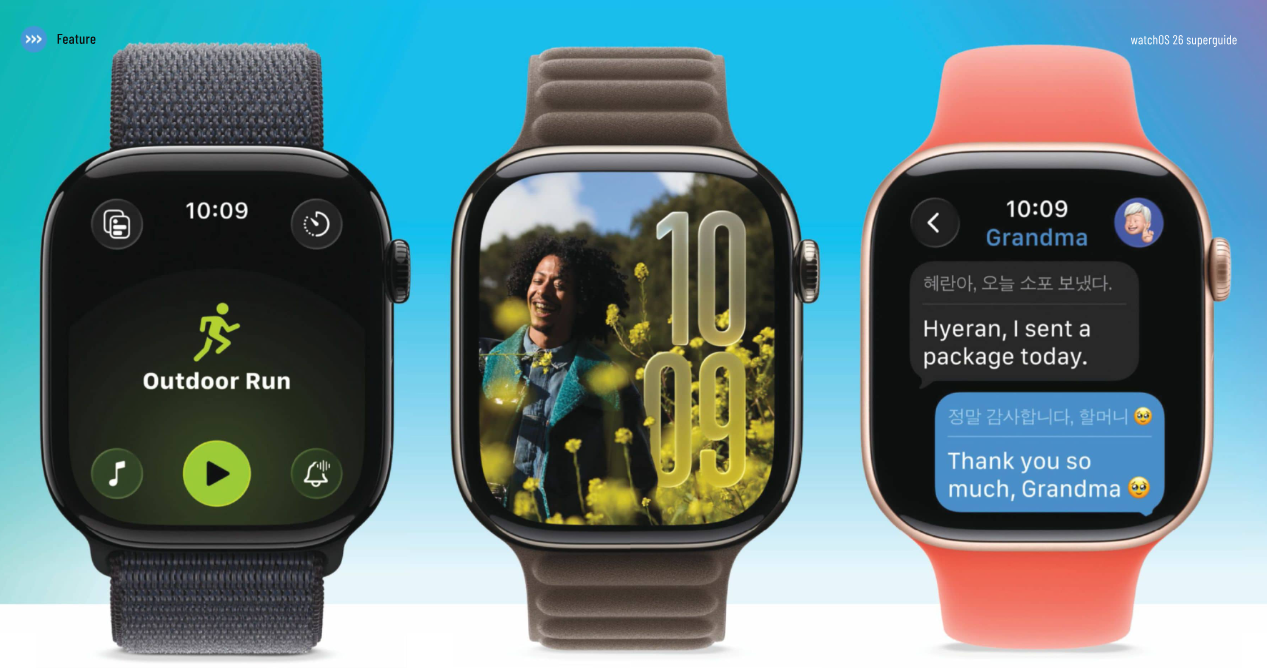
WHEN YOU UPDATE your Apple Watch to the latest watchOS, you'll make a big jump: the successor to watchOS 11 isn’t watchOS 12, but watchOS 26. That's to fit with Apple's new year-based naming policy — so is the new Watch operating system 15 times better than watchOS 11? Not quite, but there are definitely more than 15 really important and useful upgrades that make this the latest, greatest version of watchOS yet.
The first thing you'll notice when you update your Apple Watch is that Apple has given it a fresh new look to match the Liquid Glass design of your Mac, iPhone and iPad. Moreover, Apple has redesigned the Watch Face Gallery and the Workout app, which also gets a new Al-powered helper, plus there are lots of improvements in the apps you use every day, from smarter Smart Stacks to a new way to deal with notifications and automatic language translation in Messages.
 What's hot in watchOS 26
 watchOS is more than just a pretty (watch) face
Wrist Flick
There's a new Wrist Flick gesture in Settings > Gestures: when a notification comes in, flick your wrist round to dismiss it. The feature works on Series 9, 10, and Ultra 2 models or later.
WATCHOS 26 IS the best-looking watchOS yet thanks to Liquid Glass, and there's plenty of substance to match the style. Apple has focused on improving the things you do every day: health and fitness, communicating, and staying on top of the things you care about.
Liquid Glass doesn't just make your buttons and controls look cooler, either. It has improved the appearance of your widgets, made the Photos watch face even better, and it makes your watch feel brand new again. But it's what watchOS does behind the scenes that will really make your days easier.
GET SMART

Denne historien er fra November 2025-utgaven av Mac Life.
Abonner på Magzter GOLD for å få tilgang til tusenvis av kuraterte premiumhistorier og over 9000 magasiner og aviser.
Allerede abonnent? Logg på
FLERE HISTORIER FRA Mac Life

Mac Life
TerraMaster F4-425 NAS
Home or office four-bay network-attached storage

3 mins
March 2026

Mac Life
Satechi OntheGo 7-in-1 Adapter
Easily add more ports to your Mac, iPhone and iPad
2 mins
March 2026

Mac Life
BenQ ScreenBar Halo 2
Monitor lighting that's a sight for sore eyes
1 mins
March 2026
Mac Life
AI: WHAT YOU NEED TO KNOW
Al can be brilliant when put to proper use, but it also has some major downsides
11 mins
March 2026

Mac Life
Calibrate a MacBook Pro display
Can I calibrate my MacBook Pro 16-inch M3 Pro's XDR display, and if so, how?
1 min
March 2026

Mac Life
Edifier S880DB MKII
Great-sounding speakers with loads of connectivity
3 mins
March 2026

Mac Life
Search text in document images
I keep thousands of images of printed documents, and want to search their contents using Live Text, but Spotlight won't index them. How can I get it to work?
1 min
March 2026

Mac Life
No looking back at old icons
Can I customize the apps bundled in macOS Tahoe by giving them back their old icons?
1 min
March 2026

Mac Life
Set up multiple timers on iOS
Discover timers done right
2 mins
March 2026

Mac Life
Blue Prince
A multilayered inheritance challenge like no other
2 mins
March 2026
Listen
Translate
Change font size