
Gå ubegrenset med Magzter GOLD
Få ubegrenset tilgang til over 9000 magasiner, aviser og premiumhistorier for bare
Prøve GULL - Gratis
Master notifications on Mac
Mac Life
|November 2025
Take back control of the notifications you receive
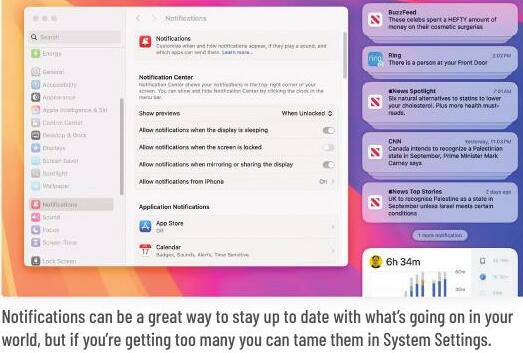
NOTIFICATIONS ARE BOTH a blessing and a curse. They can be useful in reminding you of events and letting you know what’s going on, but you can receive so many that they start to lose their impact and quickly become annoying. Rather than turn them off, however, it’s worth spending some time getting on top of them. You can turn off the notifications you don’t want, and manage and control those you do. You can even get Apple Intelligence to help you. There are some pre-emptive measures you can take, too. It’s easy to visit a website and accidentally accept notifications, for example, but it’s also easy to prevent this. Just launch Safari, go to Settings > Websites > Notifications, then turn off “Allow websites to ask for permission to send notifications”. Creating a Focus (System Settings > Focus) can also let you customize notifications for set time periods. Put yourself back in control.
 HOW TO Determine how your notifications appear
Get a glimpse
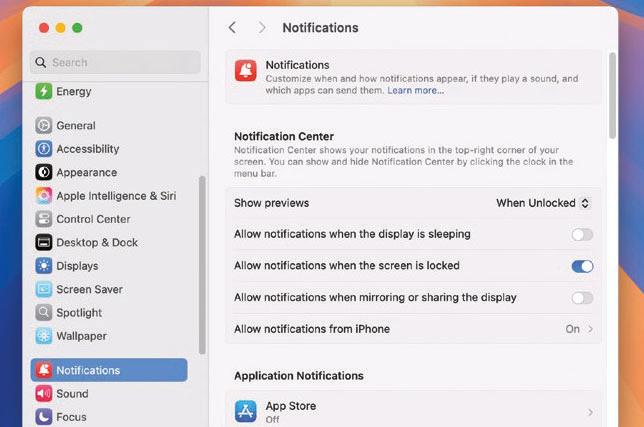
Go to Apple menu > System Settings > Notifications. Click the options next to Show previews, and decide whether or not notifications should display a summary (Always/When Unlocked) or just display the app’s name (Never).
 Secure lock screen

Denne historien er fra November 2025-utgaven av Mac Life.
Abonner på Magzter GOLD for å få tilgang til tusenvis av kuraterte premiumhistorier og over 9000 magasiner og aviser.
Allerede abonnent? Logg på
FLERE HISTORIER FRA Mac Life

Mac Life
TerraMaster F4-425 NAS
Home or office four-bay network-attached storage

3 mins
March 2026

Mac Life
Satechi OntheGo 7-in-1 Adapter
Easily add more ports to your Mac, iPhone and iPad
2 mins
March 2026

Mac Life
BenQ ScreenBar Halo 2
Monitor lighting that's a sight for sore eyes
1 mins
March 2026
Mac Life
AI: WHAT YOU NEED TO KNOW
Al can be brilliant when put to proper use, but it also has some major downsides
11 mins
March 2026

Mac Life
Calibrate a MacBook Pro display
Can I calibrate my MacBook Pro 16-inch M3 Pro's XDR display, and if so, how?
1 min
March 2026

Mac Life
Edifier S880DB MKII
Great-sounding speakers with loads of connectivity
3 mins
March 2026

Mac Life
Search text in document images
I keep thousands of images of printed documents, and want to search their contents using Live Text, but Spotlight won't index them. How can I get it to work?
1 min
March 2026

Mac Life
No looking back at old icons
Can I customize the apps bundled in macOS Tahoe by giving them back their old icons?
1 min
March 2026

Mac Life
Set up multiple timers on iOS
Discover timers done right
2 mins
March 2026

Mac Life
Blue Prince
A multilayered inheritance challenge like no other
2 mins
March 2026
Listen
Translate
Change font size