Prøve GULL - Gratis
Create great movies now!
Mac Life
|November 2024
Turn your video clips into slickly edited stories with pro production values
WHILE MANY OF us shoot movies on our iPhones, most of them languish in the Photos app, rarely to be looked at again. We're going to change that. In this feature, we'll explain how you can use iMovie to turn your home videos into mini movie masterpieces that you'll be proud to share with friends and family as well as on social media.
While you can quickly trim individual video clips in the iOS Photos app and then send them on, iMovie enables you to turn a group of clips into a professionally edited video featuring titles, transitions and music.
iOS iMovie enables you to edit a show from start to finish on your iPhone or iPad, but it lacks some of the more sophisticated tools in macOS iMovie (such as the White Balance tool for color correction). macOS iMovie also enables you to improve the quality of your clips by correcting color casts or reducing the presence of background noise, as well as using its Stabilization tool to iron out wobbles.
It's also generally more comfortable to work with video clips on a Mac's larger display, though you can have the best of both worlds by starting an edit on iOS iMovie and then finishing it on macOS iMovie, courtesy of iOS iMovie's Export Project sharing option..
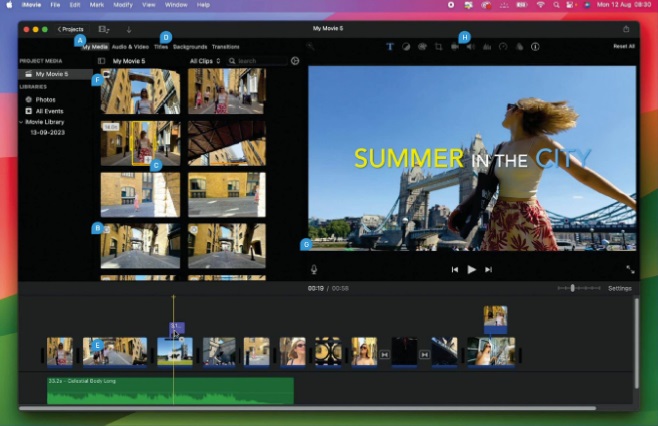
Get to to know macOS iMovie's key features
A MY MEDIA
This panel contains thumbnails of imported clips. Slide the cursor across a thumbnail to preview the clip's contents.
B CLIP TYPES
Icons indicate if a clip was shot in Cinematic or Slo-Mo mode when filming with the iPhone's Camera app.
C RANGE
Yellow handles let you trim a clip before adding it to the Timeline. Orange lines indicate which sections have been used.
D ADDITIONAL ASSETS
These labels give you access to assets such as titles, transitions, maps and backgrounds.
E TIMELINE


Denne historien er fra November 2024-utgaven av Mac Life.
Abonner på Magzter GOLD for å få tilgang til tusenvis av kuraterte premiumhistorier og over 9000 magasiner og aviser.
Allerede abonnent? Logg på
FLERE HISTORIER FRA Mac Life

Mac Life
TerraMaster F4-425 NAS
Home or office four-bay network-attached storage

3 mins
March 2026

Mac Life
Satechi OntheGo 7-in-1 Adapter
Easily add more ports to your Mac, iPhone and iPad
2 mins
March 2026

Mac Life
BenQ ScreenBar Halo 2
Monitor lighting that's a sight for sore eyes
1 mins
March 2026
Mac Life
AI: WHAT YOU NEED TO KNOW
Al can be brilliant when put to proper use, but it also has some major downsides
11 mins
March 2026

Mac Life
Calibrate a MacBook Pro display
Can I calibrate my MacBook Pro 16-inch M3 Pro's XDR display, and if so, how?
1 min
March 2026

Mac Life
Edifier S880DB MKII
Great-sounding speakers with loads of connectivity
3 mins
March 2026

Mac Life
Search text in document images
I keep thousands of images of printed documents, and want to search their contents using Live Text, but Spotlight won't index them. How can I get it to work?
1 min
March 2026

Mac Life
No looking back at old icons
Can I customize the apps bundled in macOS Tahoe by giving them back their old icons?
1 min
March 2026

Mac Life
Set up multiple timers on iOS
Discover timers done right
2 mins
March 2026

Mac Life
Blue Prince
A multilayered inheritance challenge like no other
2 mins
March 2026
Listen
Translate
Change font size