
Gå ubegrenset med Magzter GOLD
Få ubegrenset tilgang til over 9000 magasiner, aviser og premiumhistorier for bare
SOFTWARE: ZBRUSH: WHAT'S A SIMPLE WAY TO CREATE EYES IN ZBRUSH?
3D World UK
|November 2022
Practical tips and tutorials from pro artists to improve your CG skills
Hatana El Jarn, Manchester
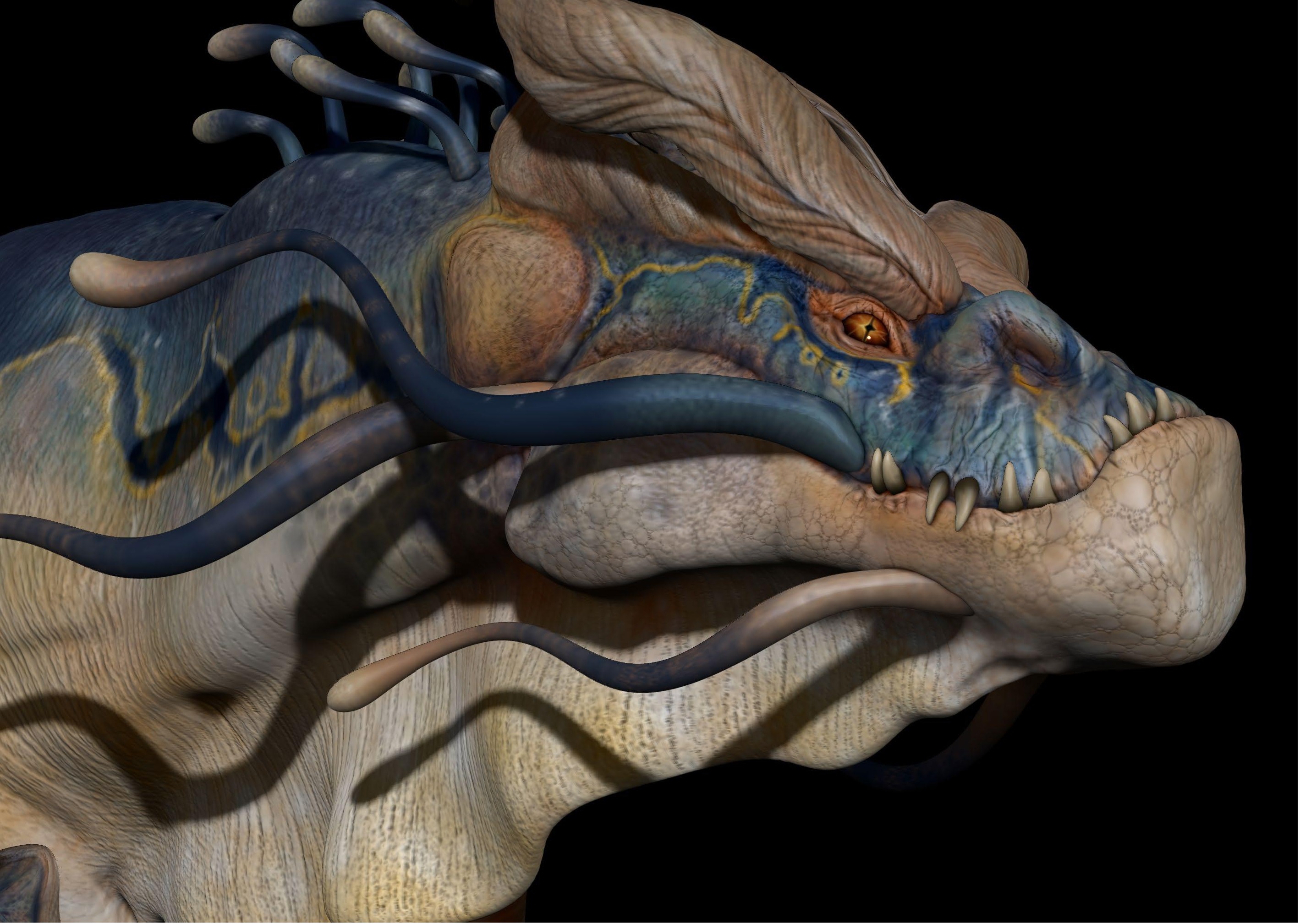
Eyes are easily the most important focal point on a character, and they can bring your design to life or leave it looking flat and dead. There is a phenomenon called the 'uncanny valley' where CG models just look unnervingly wrong, and it is often about the eyes. When you are building a character or creature in ZBrush it is good to put in some eyeballs early on, allowing you to model around them. You could also texture and paint them at the same time, to give your character that little bit of oomph while you are creating it.
I will guide you through an easy way to do just that, and I've been doing it this way in ZBrush for nearly 20 years. This way isn't going to give you an anatomically correct eye with the lens, sclera, pupil hole etc, but rather it will give you a glossy-looking eye that's just enough to bring the model to life. The main technique is using the symmetry function in ZBrush but adding in a radial setting. This then allows you to paint around the centre of the iris and pupil in just a few strokes. If you then change the material to give it that glossy look, you have a very effective-looking eye. You can even adjust the shape of the eyeball if you like to give it that bulge at the font, but I don't find that much detail is needed for simple stylised eyes.


Denne historien er fra November 2022-utgaven av 3D World UK.
Abonner på Magzter GOLD for å få tilgang til tusenvis av kuraterte premiumhistorier og over 9000 magasiner og aviser.
Allerede abonnent? Logg på
FLERE HISTORIER FRA 3D World UK

3D World UK
Nvidia GeForce RTX 4080 Super Founders Edition
On the surface, the GeForce RTX 4080 Super is barely any different from the vanilla GeForce RTX 4080 that was launched in 2022.

1 mins
December 2024

3D World UK
MCU VFX moments
Pros choose their favourite CG shots from the Marvel Cinematic Universe
4 mins
December 2024

3D World UK
Nosing around on Fallout
We sniff out the story of how FutureWorks brought The Ghoul to life with the creation of his iconic noseless face
4 mins
December 2024

3D World UK
DISCOVER RED GIANT GEO'S HANDY TOOLS
Heather Sterland introduces one of the newest additions to Maxon's suite of Red Giant VFX plugins with an atmospheric lunar creation
4 mins
December 2024

3D World UK
BUILD AND ANIMATE A FUN-FILLED ROBOT
Expand your horizons with Julio Benavides, who reveals his workflow for creating a charming hard-surface character
4 mins
December 2024

3D World UK
DESIGN STRIKING SCULPTS AT SPEED
Learn how to build 3D characters that balance visual quality and efficient workflow with pro advice from Oh Holy Mary
4 mins
December 2024

3D World UK
CREATE A CANYON ENVIRONMENT
Build a stunning desert setting with an expert walkthrough from Romain Eboli, who uses high-quality Quixel assets
4 mins
December 2024
3D World UK
TURN A 2D CONCEPT INTO AN INCREDIBLE 3D-PRINTED FIGURE
Concept artist Emily Chapman shares her process for sculpting, printing and painting an outstanding model to put on display
8 mins
December 2024

3D World UK
Goodbye SAIGON
Trevor Hogg gets held captive by multiple versions of Robert Downey Jr.while uncovering the visual effects of HBO's spy series The Sympathizer
5 mins
December 2024

3D World UK
IMPRESSIONISTIC REALISM
Trevor Hogg learns how the artisan aesthetic came to be for The Wild Robot
6 mins
December 2024
Translate
Change font size