
Gå ubegrenset med Magzter GOLD
Få ubegrenset tilgang til over 9000 magasiner, aviser og premiumhistorier for bare
Prøve GULL - Gratis
CREATE ETHEREAL LIGHT AND COLOUR
ImagineFX
|July 2025
Pauline Voss shares her approach to crafting luminous, mystical lighting and using layered colours for atmospheric characters

For me, light and colour are everything. They define the mood, depth, and emotional core of an artwork.
Over the years, I've developed my own approach to creating ethereal, glowing light effects, which I'll be breaking down in this tutorial.
I build my lighting up gradually, layer-by-layer, playing with various blending modes, opacity and subtle erasing to create soft, semi-realistic effects. It's an organic process rather than a fixed method, which means there is always room to play and discover happy accidents, too. But for this breakdown I'll try my best to give a more structured explanation that will help get you started.
The tutorial follows my core workflow: sketching and refining line work; laying down flat colours; gradually building shadows and highlights; and experimenting with layer blending and all the different effects available to achieve that glowing, dreamlike effect.
This process helps me retain control while allowing for creative discovery. Whether you're new to digital painting or looking to refine your colour and lighting skills, this method might help you push the depth and luminosity of your work.
I'll be using my custom Procreate brush pack throughout this tutorial, which you can find all the details for at the bottom-left of this page.
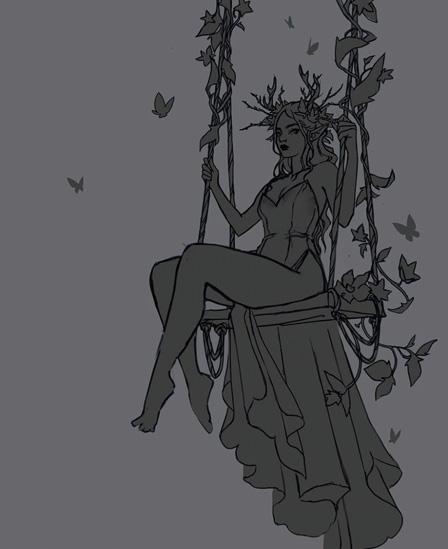
 1 Sketch the foundation
 Before diving into colours, establish a solid base sketch. This step focuses on defining proportions, gesture and composition to create a strong foundation. Keep your lines loose and organic at first, then refine them until you’re happy with the level of detail.
 2 Block in the image

Denne historien er fra July 2025-utgaven av ImagineFX.
Abonner på Magzter GOLD for å få tilgang til tusenvis av kuraterte premiumhistorier og over 9000 magasiner og aviser.
Allerede abonnent? Logg på
FLERE HISTORIER FRA ImagineFX

ImagineFX
HP Omnibook X Flip 16
DOUBLING UP HP's latest Omnibook 2-in-1 is a decent-enough productivity laptop, but it truly shines when it's transformed into tablet mode

2 mins
February 2026

ImagineFX
Phaya Akat - The Sanctuary
“Phaya Akat’s Sanctuary Village began from a simple idea inspired by Thailand’s tradition of boiling eggs in natural hot springs.
1 min
February 2026

ImagineFX
HOW SURFACE NORMALS IMPROVE YOUR 3D ART
Ant Ward explains how to quickly change the way a polygon model looks by adjusting its normals
1 mins
February 2026

ImagineFX
Painting in Procreate: Reimagine Your Surroundings
VISIONARY WORK Across 20 lessons, Mikko Eerola reveals how he brings his ideas to life on the iPad using Procreate
1 mins
February 2026

ImagineFX
Technique focus: WORK SMARTER WITH COLOURS
Álvaro Jiménez reveals the workflow process he follows to summon an armoured demon
1 mins
February 2026

ImagineFX
FIVE MINUTES WITH PAT IMRIE
Big-screen blockbusters and a certain 3D art magazine helped set this creative on his career path
3 mins
February 2026

ImagineFX
RIFF ON YOUR PASSIONS
Max Froer draws on a range of influences when rendering a beast that's part machine
1 min
February 2026

ImagineFX
Anker SOLIX C1000
BOX OF DELIGHTS The chonkiest power bank around is powerful, portable (after a fashion) and boy is it well built
2 mins
February 2026

ImagineFX
PAINTING A SCENE OF GREEK DRAMA
Alexander Leskinen creates a stormy environment featuring harpies, the winged messengers of Zeus.
3 mins
February 2026

ImagineFX
HOW DO I COLOUR A 3D OBJECT?
The process of colouring a 3D image has a lot of layers, so let's start at the surface. Mike Griggs weighs up the material requirements
2 mins
February 2026
Listen
Translate
Change font size