
Gå ubegrenset med Magzter GOLD
Få ubegrenset tilgang til over 9000 magasiner, aviser og premiumhistorier for bare
Meet the new menu bar
MacFormat UK
|December 2025
The familiar and functional menu bar now comes with added control
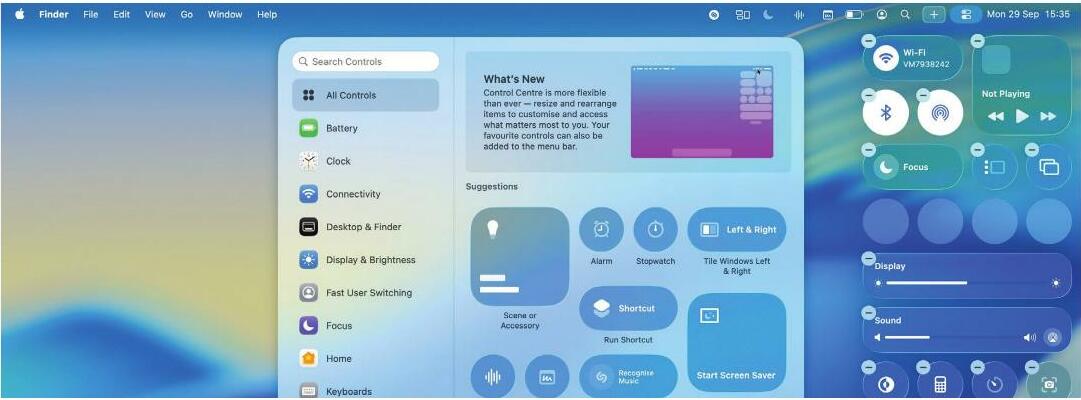
IT WILL TAKE > 5 minutes YOU WILL LEARN > How to use the new menu bar powers in macOS Tahoe YOU'LL NEED > macOS 26 or later
The macOS menu bar is familiar, functional, and mostly stays out of your way. While macOS 26 (Tahoe) hasn't revolutionised it, the update has certainly spruced things up with tweaks and new features that bring an extra level of control to your Mac.
That includes a new selection of controls and widgets, the ability to change the menu bar's appearance in granular detail, easier editing of the menu bar in conjunction with the Control Centre, and more.
As well as that, you can now use secondary menu bars that work like submenus - add one and click it to access a pop-out window of apps, widgets and controls. This is helpful if you find that cluttered menu bar items often get lost under your Mac's notch. Now, you can conceal lesser-used ones until you need them, ensuring nothing ever gets hidden due to an overpacked menu bar.
Read on to find out how to use these features in macOS Tahoe and breathe new life into your menu bar.
HOW TO Change the menu bar's appearance >
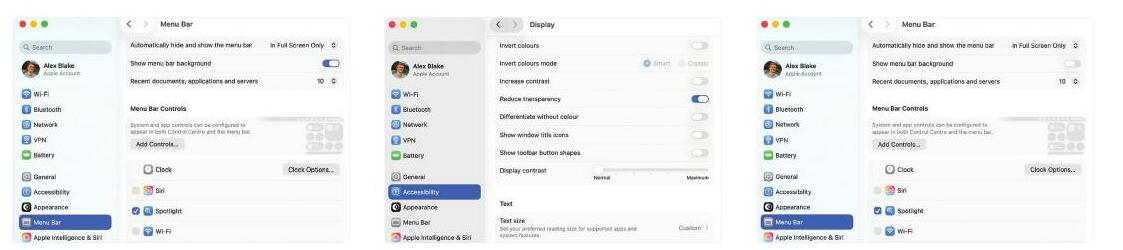 Show the background

Denne historien er fra December 2025-utgaven av MacFormat UK.
Abonner på Magzter GOLD for å få tilgang til tusenvis av kuraterte premiumhistorier og over 9000 magasiner og aviser.
Allerede abonnent? Logg på
FLERE HISTORIER FRA MacFormat UK

MacFormat UK
Hitman: Absolution
Sharp-shooting series goes soft in middle age

2 mins
January 2026

MacFormat UK
One more thing iPhone Pocket
Graham Barlow thinks Apple may have finally knitted itself into a corner
2 mins
January 2026

MacFormat UK
Mous MagSafe Compatible 3-in-1 Portable Charger
Good for your pocket in lots of ways
1 min
January 2026

MacFormat UK
6 apps for Pro-level photography
Unleash your iPhone camera's full potential
2 mins
January 2026

MacFormat UK
Logitech MX Master 4 for Mac
The best mouse since Mickey? Not if you're left-handed...
2 mins
January 2026

MacFormat UK
Philips Hue Bridge Pro
A major upgrade for owners of Philips's Hue smart lights
2 mins
January 2026

MacFormat UK
Final Cut Camera 2.0
Enjoy pro-level video camera controls on your iPhone
3 mins
January 2026

MacFormat UK
AI: WHAT YOU NEED TO KNOW
AI can be brilliant when put to proper use but it also has some major downsides
11 mins
January 2026

MacFormat UK
John-Anthony Disotto...
THINKS THAT AFTER 2024'S FANFARE AND A LOT OF PUBLIC DITHERING, IT MIGHT BE TOO LATE TO SAVE APPLE INTELLIGENCE
2 mins
January 2026
MacFormat UK
6 BEST APPS FOR MAKING MUSIC
The best apps for bedroom bleeps and rowdy rock
6 mins
January 2026
Listen
Translate
Change font size