
Gå ubegrenset med Magzter GOLD
Få ubegrenset tilgang til over 9000 magasiner, aviser og premiumhistorier for bare
Photoshop:GET EXPERIMENTAL WITH PORTRAITS
ImagineFX
|June 2022
Gabriel Lee Greene shares his process for creating colourful portraits with unique graphical elements, experimenting with shapes and effects

As I first transitioned into working digitally, I felt overwhelmed with the amount of freedom I had. I'm sure it's something a lot of us can relate to. With an infinite amount of colour, texture and brush options at our fingertips, it's hard not to try to throw a bit of everything in the pot.
Over time, I found that with the abundance of tools came an endless amount of ways to experiment! Whether it be creating colour thumbnails, using masks/clipping modes, adding adjustment layers, or applying textural effects – the digital medium has made it simple and quick to experiment with it all.
In this tutorial, I'm going to take you through my process - how I rely on experimentation with colour, shape, various effects and adjustments to nudge me along the way. We'll touch on making colour thumbnails to create a palette, using gradient overlay to add colour harmony, and which brushes I use to help add that final bit of grain or grit to an illustration.
While I'll be using Photoshop during this workshop, these steps can be easily adopted into other programs. I'm glad to share this process and hope those who follow along are inspired to experiment!
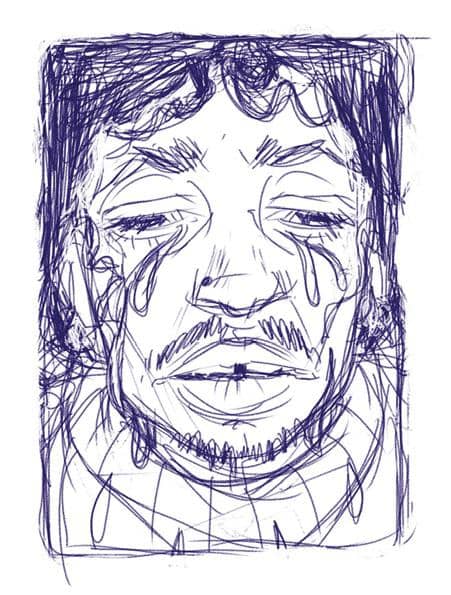
I Start with a sketch
I started with blocking in a loose sketch. I knew going in I wanted to do two things: riff off the term 'crybaby' and keep my subject framed in a rectangle shape, but play with breaking out of the silhouette later on. In this stage I'm not worried too much about specifics - just having fun while getting the main idea out.
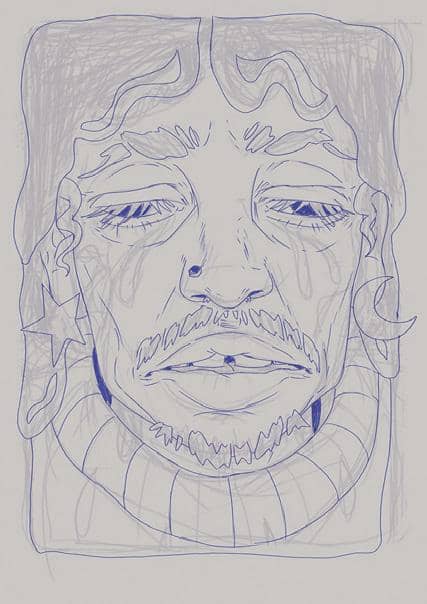
2 Enlarge and refine

Denne historien er fra June 2022-utgaven av ImagineFX.
Abonner på Magzter GOLD for å få tilgang til tusenvis av kuraterte premiumhistorier og over 9000 magasiner og aviser.
Allerede abonnent? Logg på
FLERE HISTORIER FRA ImagineFX

ImagineFX
HP Omnibook X Flip 16
DOUBLING UP HP's latest Omnibook 2-in-1 is a decent-enough productivity laptop, but it truly shines when it's transformed into tablet mode

2 mins
February 2026

ImagineFX
Phaya Akat - The Sanctuary
“Phaya Akat’s Sanctuary Village began from a simple idea inspired by Thailand’s tradition of boiling eggs in natural hot springs.
1 min
February 2026

ImagineFX
HOW SURFACE NORMALS IMPROVE YOUR 3D ART
Ant Ward explains how to quickly change the way a polygon model looks by adjusting its normals
1 mins
February 2026

ImagineFX
Painting in Procreate: Reimagine Your Surroundings
VISIONARY WORK Across 20 lessons, Mikko Eerola reveals how he brings his ideas to life on the iPad using Procreate
1 mins
February 2026

ImagineFX
Technique focus: WORK SMARTER WITH COLOURS
Álvaro Jiménez reveals the workflow process he follows to summon an armoured demon
1 mins
February 2026

ImagineFX
FIVE MINUTES WITH PAT IMRIE
Big-screen blockbusters and a certain 3D art magazine helped set this creative on his career path
3 mins
February 2026

ImagineFX
RIFF ON YOUR PASSIONS
Max Froer draws on a range of influences when rendering a beast that's part machine
1 min
February 2026

ImagineFX
Anker SOLIX C1000
BOX OF DELIGHTS The chonkiest power bank around is powerful, portable (after a fashion) and boy is it well built
2 mins
February 2026

ImagineFX
PAINTING A SCENE OF GREEK DRAMA
Alexander Leskinen creates a stormy environment featuring harpies, the winged messengers of Zeus.
3 mins
February 2026

ImagineFX
HOW DO I COLOUR A 3D OBJECT?
The process of colouring a 3D image has a lot of layers, so let's start at the surface. Mike Griggs weighs up the material requirements
2 mins
February 2026
Translate
Change font size