
Gå ubegrenset med Magzter GOLD
Få ubegrenset tilgang til over 9000 magasiner, aviser og premiumhistorier for bare
Photoshop & traditional skills : MAKE WOODBLOCK STYLE PRINTS
ImagineFX
|June 2022
Tom Foster demonstrates how to replicate the gorgeous look of a traditional Japanese woodblock print

Although Japanese woodblock printmaking is a tradition that goes back several centuries, it's an aesthetic that tends to look timeless - particularly the Shin Hanga prints of the early 20th century. The tightly rendered line work has so much in common with contemporary western artists like Frank Quitely and Chris Burnham, that it's easy to imagine it appearing in the pages of a modern comic book. But there are a few tell-tale signs that betray the age of the originals and it's these I'll be focusing on here, in order to mimic the style.
On its own, trying to create an authentic-looking period piece might be an interesting technical exercise, but it may not be all that interesting to anyone other than a specialist, so I've opted to add some futuristic touches to the subject matter. I think these bits of futurism with the traditional-looking style make for a nice contrast.
Traditionally, the artwork for a print like this would be painstakingly carved out of wooden blocks. Since I have absolutely no experience in the field of engraving (and none of the appropriate tools), I'll instead be doing the line work with pens and brushes, then using Photoshop for the colouring. I'll only be using a small Wacom One graphics tablet and the default Photoshop Pencil tool for the digital work - no custom brushes. Right, let's get to it!
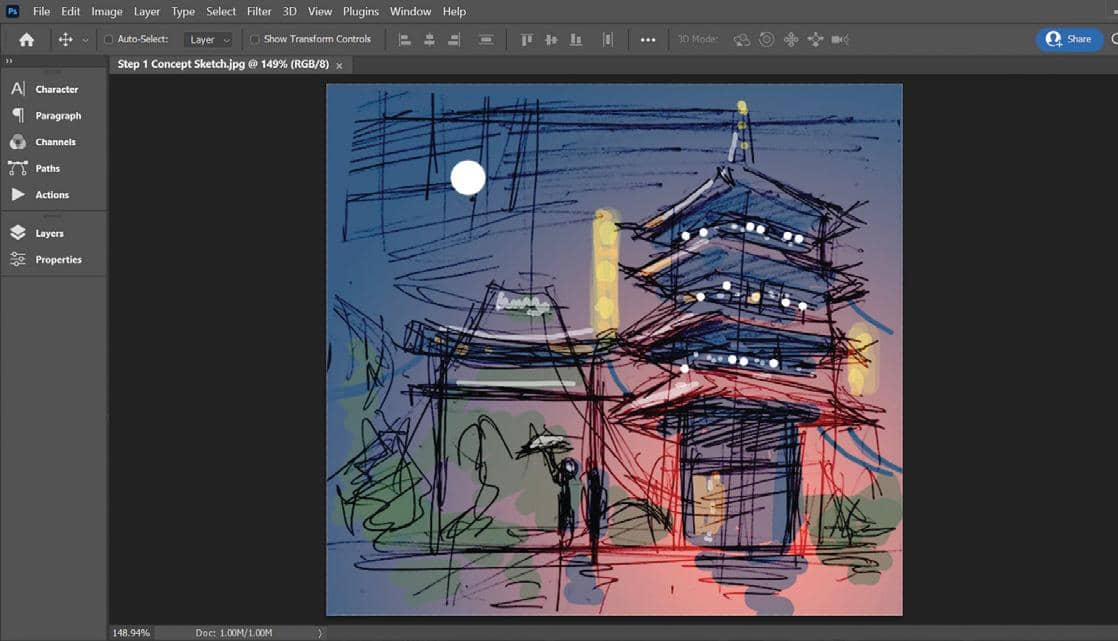
1 Concept sketch
I start out with a rough concept sketch, just to establish the main elements of the image. In my comics work, this would normally just be a pencil sketch, but since colour is going to be so important to the mood of the picture, I add a quick dash of colour in Photoshop.
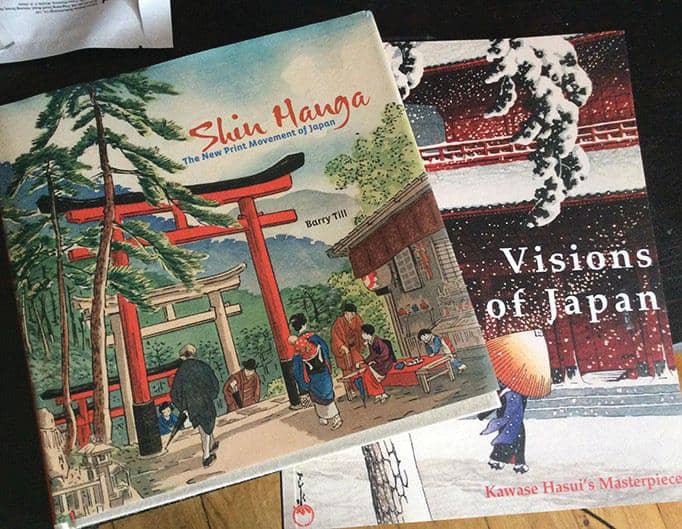
2 Source reference

Denne historien er fra June 2022-utgaven av ImagineFX.
Abonner på Magzter GOLD for å få tilgang til tusenvis av kuraterte premiumhistorier og over 9000 magasiner og aviser.
Allerede abonnent? Logg på
FLERE HISTORIER FRA ImagineFX

ImagineFX
HP Omnibook X Flip 16
DOUBLING UP HP's latest Omnibook 2-in-1 is a decent-enough productivity laptop, but it truly shines when it's transformed into tablet mode

2 mins
February 2026

ImagineFX
Phaya Akat - The Sanctuary
“Phaya Akat’s Sanctuary Village began from a simple idea inspired by Thailand’s tradition of boiling eggs in natural hot springs.
1 min
February 2026

ImagineFX
HOW SURFACE NORMALS IMPROVE YOUR 3D ART
Ant Ward explains how to quickly change the way a polygon model looks by adjusting its normals
1 mins
February 2026

ImagineFX
Painting in Procreate: Reimagine Your Surroundings
VISIONARY WORK Across 20 lessons, Mikko Eerola reveals how he brings his ideas to life on the iPad using Procreate
1 mins
February 2026

ImagineFX
Technique focus: WORK SMARTER WITH COLOURS
Álvaro Jiménez reveals the workflow process he follows to summon an armoured demon
1 mins
February 2026

ImagineFX
FIVE MINUTES WITH PAT IMRIE
Big-screen blockbusters and a certain 3D art magazine helped set this creative on his career path
3 mins
February 2026

ImagineFX
RIFF ON YOUR PASSIONS
Max Froer draws on a range of influences when rendering a beast that's part machine
1 min
February 2026

ImagineFX
Anker SOLIX C1000
BOX OF DELIGHTS The chonkiest power bank around is powerful, portable (after a fashion) and boy is it well built
2 mins
February 2026

ImagineFX
PAINTING A SCENE OF GREEK DRAMA
Alexander Leskinen creates a stormy environment featuring harpies, the winged messengers of Zeus.
3 mins
February 2026

ImagineFX
HOW DO I COLOUR A 3D OBJECT?
The process of colouring a 3D image has a lot of layers, so let's start at the surface. Mike Griggs weighs up the material requirements
2 mins
February 2026
Translate
Change font size