試す 金 - 無料
ACER SWIFT GO 14 AI SMARTER, LIGHTER, AND BUILT FOR THE FUTURE!
Exhibit
|March 2025
The Acer Swift Go 14 AI is an intriguing addition to Acer’s lineup, bringing AI-powered features and efficient performance to professionals, students, and casual users.
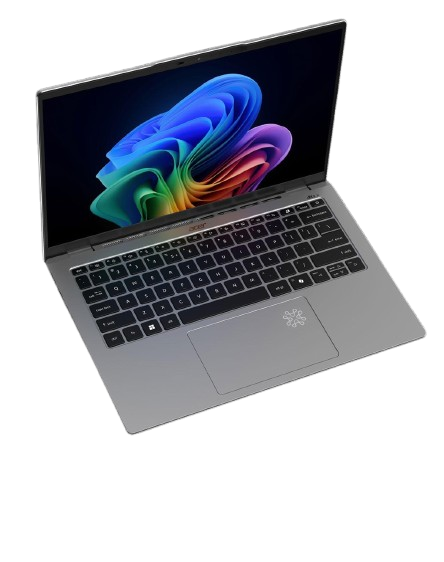
With its sleek design, ARM-based Snapdragon X processor, and Copilot+ AI enhancements, this laptop aims to offer a seamless computing experience. But does it truly meet the needs of modern users? Let’s dive into the details.
DESIGN & BUILD
The Acer Swift Go 14 AI boasts a lightweight design, weighing just 1.35 kg. This makes it highly portable for professionals and students needing a work or travel laptop. The build quality feels solid, ensuring durability without adding extra weight.
One of the standout features is the compact keyboard, which includes a fingerprint sensor embedded in the power button. This allows for quick and secure Windows login with just a touch, and it is highly accurate. The keyboard follows a compact layout without a dedicated numeric pad, which may take some time for those who frequently work with numbers. However, the backlit keys make it easy to work in low-light environments or at night.
Acer has integrated a Copilot key, offering quick access to Microsoft Copilot for AI-powered assistants. With just one click, we get a quick way to interact with AI for drafting documents, summarizing meetings, and more.
Another interesting addition is the AI-illuminated touchpad, which lights up when AI features are used. While this doesn’t necessarily enhance functionality, it adds a futuristic and interactive touch to the laptop. For security and privacy, the built-in webcam supports Windows Hello face recognition. Acer has also included a physical camera shutter, giving assurance and peace of mind to users concerned about privacy.
DISPLAY


このストーリーは、Exhibit の March 2025 版からのものです。
Magzter GOLD を購読すると、厳選された何千ものプレミアム記事や、10,000 以上の雑誌や新聞にアクセスできます。
すでに購読者ですか? サインイン
Exhibit からのその他のストーリー
Exhibit
HOW TO? SET UP AND OPTIMIZE DUAL SCREENS FOR WINDOWS DESKTOP
Setting up dual monitors on a Windows desktop can significantly boost productivity, allowing you to multitask seamlessly, whether you're coding on one screen while referencing documents on the other, or gaming with a secondary display for chats and stats.

1 mins
January 2026

Exhibit
CREATOR OF THE MONTH Sonia Shenoy
Financial literacy and education have always been my passion.
3 mins
January 2026

Exhibit
THE NEW ARCHITECTS OF INFLUENCE
At the start of 2026, hear from 26 of India's top marketing leaders on how fresh ideas are shaping the modern brand
3 mins
January 2026

Exhibit
ONEPLUS 15R BALANCING AFFORDABILITY AND PERFORMANCE
OnePlus is known for providing flagship experiences at accessible prices, and the OnePlus 15R continues this trend.
2 mins
January 2026

Exhibit
SEASON 10, REDEFINED
VinFast Brings Global Flair to the Tech Fashion Tour Runway
1 mins
January 2026

Exhibit
SONY ULT TOWER 9 WHEN A PARTY SPEAKER IS POWERFUL ENOUGH TO MAKE THE BUILDING FEEL ALIVE
I have used many portable and party speakers over the years, including Sony's compact ULT Field 3, which I genuinely enjoyed for its easy portability and everyday usability.
3 mins
January 2026

Exhibit
LIVING WITH RAIDA GEAR
Tested on Open Roads, From Mumbai to Panchgani
4 mins
January 2026

Exhibit
THIS ₹12K PHONE IS WAY TOO POWERFUL
I did not expect to be impressed by a ₹12K smartphone in 2025. Yet the Poco C85 5G managed to punch well above its weight during my daily use.
2 mins
January 2026

Exhibit
CARS AND BIKES TO LOOK FORWARD TO IN 2026
A glimpse into the machines that will define the road ahead
5 mins
January 2026

Exhibit
THE WORLD IS READY TO BE EXPLORED AGAIN
Places to Visit in 2026
4 mins
January 2026
Listen
Translate
Change font size