
Magzter GOLDで無制限に
10,000以上の雑誌、新聞、プレミアム記事に無制限にアクセスできます。
試す 金 - 無料
Do You Need an M1 Max?
Mac Life
|May 2022
Apple's latest MacBook Pros come with two powerful versions of its M1 chip – but which do you need?

Late last year, Apple announced the MacBook Pro 16-inch and the MacBook Pro 14-inch with a pair of new chips inside, the M1 Pro and M1 Max. Both of these are substantial upgrades over Apple's original M1 chip (which powers the latest MacBook Air and MacBook Pro 13-inch), with the M1 Max-powered MacBook Pro being by far the most powerful laptop Apple has ever made. The kind of performance the M1 Max provides comes at a price, however, with the 14-inch model starting at $2,899.
With that kind of investment, you need to make sure you're getting your money's worth, and for most people, the M1 Max is overkill. The good news? The M1 Pro is a more affordable, brilliant performer. As for the M1 Max, if you're going to be doing some serious creative work, such as complex 3D modelling, then it'll be worth investing in a MBP that packs it. Read on to find out whether you should get an M1 Max-powered MacBook.
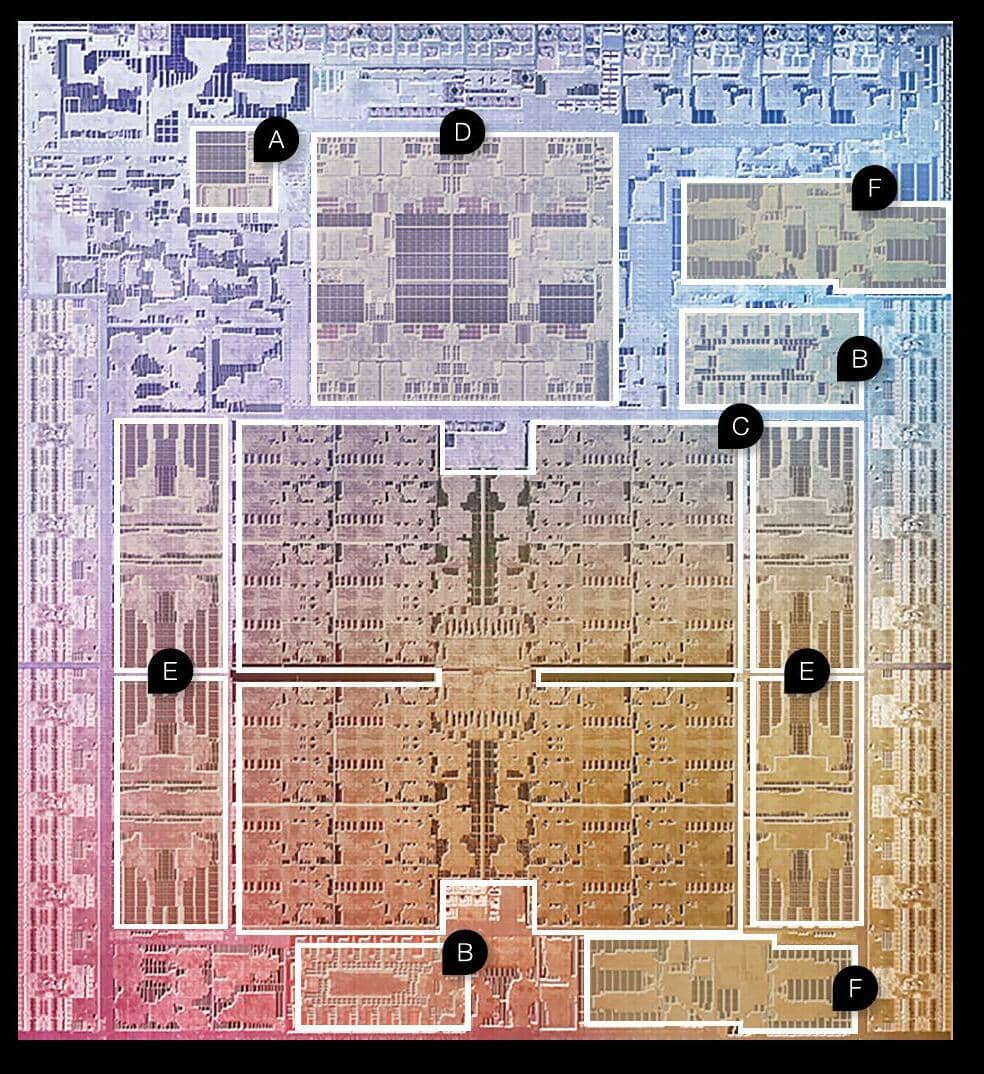
What’s inside the M1 Max?
А EFFICIENCY CORES
The CPU of the M1 Max is made up of 10 cores; two efficiency cores and eight performance cores. When you're browsing the web and don't need a lot of CPU power, the M1 Max will use the efficiency cores to preserve battery life.
B NEURAL ENGINE
The 16-core Neural Engine handles the chip's machine learning (ML) duties, like computional photography. The Neural Engine in the M1 Max helps deliver 11.5x faster ML performance when tracking moving objects in Final Cut Pro.
C GPU

このストーリーは、Mac Life の May 2022 版からのものです。
Magzter GOLD を購読すると、厳選された何千ものプレミアム記事や、10,000 以上の雑誌や新聞にアクセスできます。
すでに購読者ですか? サインイン
Mac Life からのその他のストーリー

Mac Life
TerraMaster F4-425 NAS
Home or office four-bay network-attached storage

3 mins
March 2026

Mac Life
Satechi OntheGo 7-in-1 Adapter
Easily add more ports to your Mac, iPhone and iPad
2 mins
March 2026

Mac Life
BenQ ScreenBar Halo 2
Monitor lighting that's a sight for sore eyes
1 mins
March 2026
Mac Life
AI: WHAT YOU NEED TO KNOW
Al can be brilliant when put to proper use, but it also has some major downsides
11 mins
March 2026

Mac Life
Calibrate a MacBook Pro display
Can I calibrate my MacBook Pro 16-inch M3 Pro's XDR display, and if so, how?
1 min
March 2026

Mac Life
Edifier S880DB MKII
Great-sounding speakers with loads of connectivity
3 mins
March 2026

Mac Life
Search text in document images
I keep thousands of images of printed documents, and want to search their contents using Live Text, but Spotlight won't index them. How can I get it to work?
1 min
March 2026

Mac Life
No looking back at old icons
Can I customize the apps bundled in macOS Tahoe by giving them back their old icons?
1 min
March 2026

Mac Life
Set up multiple timers on iOS
Discover timers done right
2 mins
March 2026

Mac Life
Blue Prince
A multilayered inheritance challenge like no other
2 mins
March 2026
Translate
Change font size