
मैगज़्टर गोल्ड के साथ असीमित हो जाओ
10,000 से अधिक पत्रिकाओं, समाचार पत्रों और प्रीमियम कहानियों तक असीमित पहुंच प्राप्त करें सिर्फ
कोशिश गोल्ड - मुक्त
Make the most of StandBy
Mac Life
|December 2025
Stand by for a new way to use your iPhone...

FOR MANY PEOPLE, the iPhone has replaced the alarm clock on their bedside cabinets.
But you don't have to settle for a phone that only springs into action when it's time to wake you up — with StandBy mode, your iPhone can display all sorts of useful information, from a simple clock, to widget updates, to roundups of your favorite photos.
StandBy mode isn't restricted to bedtime, either. You can use it when your phone is charging in any room of the house — for example, it can be a desktop photo frame when you're working in your office. Just connect it to power and turn it on its side to get started.
StandBy has a few different forms. It can tell the time with a variety of clock faces, or it can cycle through various photo albums to remind you of fond memories. There's also a widget view that's packed with useful info. Just note that you need to be running iOS 17 or later on your iPhone in order to use StandBy mode.
HOW TO Use Stand By mode on your iPhone
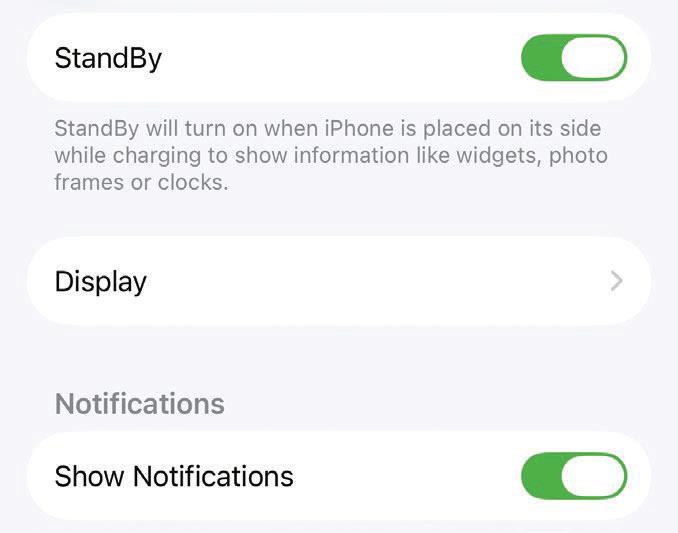 1 Find it in Settings
To enable StandBy on your iPhone, open the Settings app and go to StandBy, then ensure the toggle is switched on next to the StandBy entry at the top of the page. It should be enabled by default, but you can check it here.
 2 Start charging

यह कहानी Mac Life के December 2025 संस्करण से ली गई है।
हजारों चुनिंदा प्रीमियम कहानियों और 10,000 से अधिक पत्रिकाओं और समाचार पत्रों तक पहुंचने के लिए मैगज़्टर गोल्ड की सदस्यता लें।
क्या आप पहले से ही ग्राहक हैं? साइन इन करें
Mac Life से और कहानियाँ

Mac Life
TerraMaster F4-425 NAS
Home or office four-bay network-attached storage

3 mins
March 2026

Mac Life
Satechi OntheGo 7-in-1 Adapter
Easily add more ports to your Mac, iPhone and iPad
2 mins
March 2026

Mac Life
BenQ ScreenBar Halo 2
Monitor lighting that's a sight for sore eyes
1 mins
March 2026
Mac Life
AI: WHAT YOU NEED TO KNOW
Al can be brilliant when put to proper use, but it also has some major downsides
11 mins
March 2026

Mac Life
Calibrate a MacBook Pro display
Can I calibrate my MacBook Pro 16-inch M3 Pro's XDR display, and if so, how?
1 min
March 2026

Mac Life
Edifier S880DB MKII
Great-sounding speakers with loads of connectivity
3 mins
March 2026

Mac Life
Search text in document images
I keep thousands of images of printed documents, and want to search their contents using Live Text, but Spotlight won't index them. How can I get it to work?
1 min
March 2026

Mac Life
No looking back at old icons
Can I customize the apps bundled in macOS Tahoe by giving them back their old icons?
1 min
March 2026

Mac Life
Set up multiple timers on iOS
Discover timers done right
2 mins
March 2026

Mac Life
Blue Prince
A multilayered inheritance challenge like no other
2 mins
March 2026
Listen
Translate
Change font size