
मैगज़्टर गोल्ड के साथ असीमित हो जाओ
10,000 से अधिक पत्रिकाओं, समाचार पत्रों और प्रीमियम कहानियों तक असीमित पहुंच प्राप्त करें सिर्फ
कोशिश गोल्ड - मुक्त
Luminar Neo
MacFormat UK
|May 2022
Perform classic photo fixes or get creative in a few clicks

> £59 > FROM Skylum, skylum.com > NEEDS macOS 10.14.6 or higher
Luminar Neo's Al tools work well to speed up what would otherwise be tedious, time-consuming tasks
The newly released Luminar Neo follows on the heels of its sister app – Luminar AI. The latter uses artificial intelligence (or machine learning) and one-click templates to help you perform a range of image adjustments quickly and easily. Luminar Neo doesn’t replace Luminar AI, its just targeted at image editors and photo fixers who want more control over a wider range of high-end tools (though it also offers AI assistance). Luminar Neo is a standalone app, though it does slot nicely into your existing workflows as a plug-in for the Photos app (and it can also be accessed via Photoshop and Lightroom Classic).
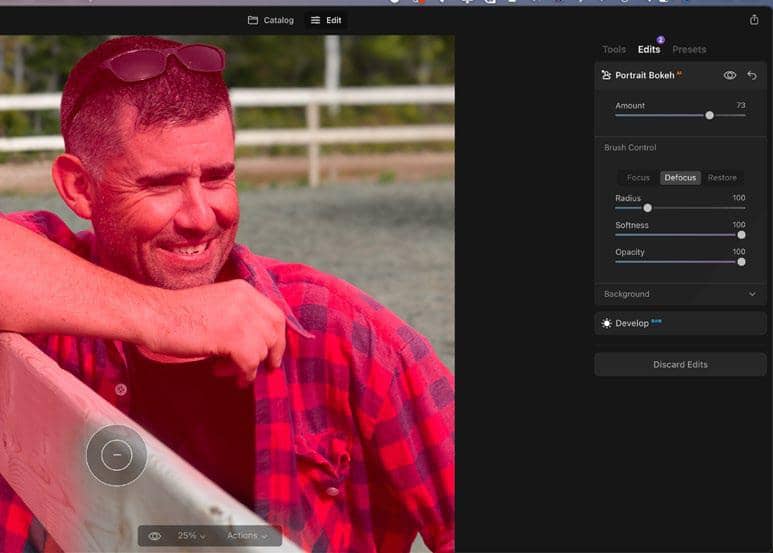
Use brush-based tools and masks to fine-tune the Al created bokeh in a portrait.
Luminar Neo is particularly useful if you prefer to work with uncompressed Raw files (which have more info about a scene’s colours and tones). In Photoshop you have to process a Raw file’s colours, tones and sharpness in the Camera Raw editor before bringing it into the main workspace. Then you can use layer-based tools to enhance a copy of the original Raw shot. Luminar Neo also enables you to make creative adjustments using layers but you can also access the original Raw file at the bottom of the layer stack at any time and tweak its original colour and tones. This enables you to make more of your Raw format file than you can in Photoshop. We’re also happy to see that Neo supports raw DNG files from the latest iPhone models.
Clever assistance


यह कहानी MacFormat UK के May 2022 संस्करण से ली गई है।
हजारों चुनिंदा प्रीमियम कहानियों और 10,000 से अधिक पत्रिकाओं और समाचार पत्रों तक पहुंचने के लिए मैगज़्टर गोल्ड की सदस्यता लें।
क्या आप पहले से ही ग्राहक हैं? साइन इन करें
MacFormat UK से और कहानियाँ
MacFormat UK
Affinity by Canva
A complete creative studio for zero cost

3 mins
February 2026
MacFormat UK
RSRs return from the dead
Apple announced Rapid Security Responses in June 2022, as a new means of applying urgent security patches in between macOS updates.
1 min
February 2026
MacFormat UK
Rediscover albums with Longplay
Fall in love with your albums all over again with this amazing music player
3 mins
February 2026
MacFormat UK
Set up multiple timers on iOS
Discover timers done right
2 mins
February 2026

MacFormat UK
Chants of Sennaar
Work your way beyond being lost in translation
2 mins
February 2026
MacFormat UK
Signature Slim Solar+ wireless keyboard K980
A comfortable, full-size keyboard that's always good to go
2 mins
February 2026
MacFormat UK
One more thing Apple Intelligence
Apple has promised a big AI update in 2026, and Graham Barlow feels nervous
2 mins
February 2026

MacFormat UK
Search any website - fast!
Find your favourite websites faster than ever
3 mins
February 2026

MacFormat UK
Make your ideal web browser
Make online life easy by making your web browser work your way
2 mins
February 2026

MacFormat UK
Best home printers & all-in-ones
We put six all-round home models through their printing paces
7 mins
February 2026
Translate
Change font size