Essayer OR - Gratuit
The problem with built-in password managers
PCWorld
|July 2023
Think before entrusting all your logins to Apple, Google, or Microsoft

In recent years, it’s gotten a lot easier to have better password hygiene without using a dedicated password manager (fave.co/3lRkfRz). Thanks to built-in password management tools on iOS and Android, and at the browser level on Chrome and Microsoft Edge, you can create secure passwords with minimal efforts. These tools are becoming increasingly sophisticated, such that a separate password manager might not be necessary.
But before you tie all your logins with the likes of Google, Apple, and Microsoft, take some time to consider the trade-offs. In exchange for the convenience of their built-in solutions, you’ll lose both the freedom and features that a proper password manager provides.
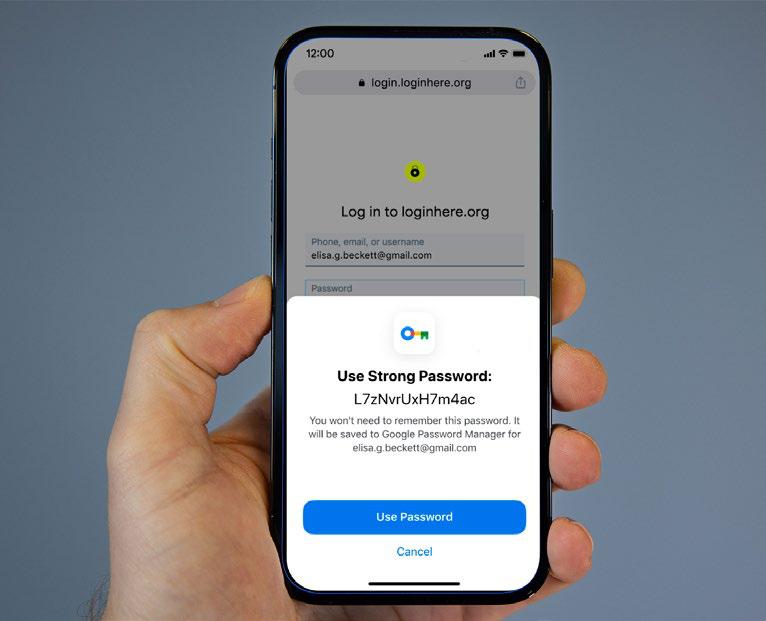
BUILT-IN OPTIONS ARE IMPROVING
Relying solely on your web browser for password management used to be a laughable concept.
Sure, the auto-fill features in Chrome, Firefox, and other browsers made logging into websites easier, but they didn’t help you log into apps on your phone. They also didn’t include some features that were table stakes in dedicated password managers, such as the ability to generate secure passwords when signing up for new services.
As a result, they didn’t deliver the main benefit of using a dedicated password manager such as Dashlane or Bitwarden, which is to keep you from using the same weak passwords everywhere (fave.co/ 3aXBOgj).
But a lot has changed since then:


Cette histoire est tirée de l'édition July 2023 de PCWorld.
Abonnez-vous à Magzter GOLD pour accéder à des milliers d'histoires premium sélectionnées et à plus de 9 000 magazines et journaux.
Déjà abonné ? Se connecter
PLUS D'HISTOIRES DE PCWorld

PCWorld
Instagram might be leaking your location. Here's how to check
Meta could have handled this \"social\" feature better.

1 mins
October 2025

PCWorld
I'm obsessed with Windows 11's secret God mode
A well-kept Windows secret revealed!
1 mins
October 2025

PCWorld
I GOT STARLINK INTERNET AT HOME.IWISHI KNEW THESE 6 DETAILS FIRST
OUT IN THE BOONIES, I'M STARVED FOR CHOICE WHEN IT COMES TO FAST INTERNET... SO I WENT WITH STARLINK.
6 mins
October 2025

PCWorld
I haven't gotten PC malware in a decade. Here are my 7 secrets
Tips to keep your PC free of malware!
3 mins
October 2025

PCWorld
If my Wi-Fi's not working, here's how I find answers
How I diagnose Wi-Fi problems.
1 mins
October 2025

PCWorld
Acer Chromebook Plus Spin 514: This 2-in-1 multitasks like a pro
The Acer Chromebook Plus Spin 514 mixes a premium-feeling build with solid multitasking chops.
6 mins
October 2025

PCWorld
LAPTOP DESIGNS ARE GETTING WEIRD AGAIN, AND I'M ALL FOR IT
EXPERIMENTS, QUIRKS, AND OPTIONS-THESE ARE THE THINGS THAT MAKE LAPTOPS SO INTERESTING.
4 mins
October 2025

PCWorld
Corsair Xeneon Edge 14.5: A weird monitor in all the right ways
A small, versatile touchscreen monitor that can be used as a secondary display, attached to a tripod mount, or mounted inside a desktop PC.
9 mins
October 2025
PCWorld
Teamgroup X2 Max: This SSD flash drive is a mighty mite
The size of a small commodity thumb drive, the X2 Max is actually a 10Gbps powerhouse SSD.
5 mins
October 2025
PCWorld
Windows 11 25H2: Meet the exciting features coming to your PC soon
With Windows 11 25H2, Microsoft is providing numerous new features for Windows 11. We show you everything you need to know now.
7 mins
October 2025
Translate
Change font size