
Passez à l'illimité avec Magzter GOLD
Obtenez un accès illimité à plus de 9 000 magazines, journaux et articles Premium pour seulement
VirtualBox: Supports Windows on M-series Macs, but not for beginners
Macworld
|January 2026
If you want to run Windows apps on your Mac, VirtualBox is free for personal use, but you need the technical know-how.
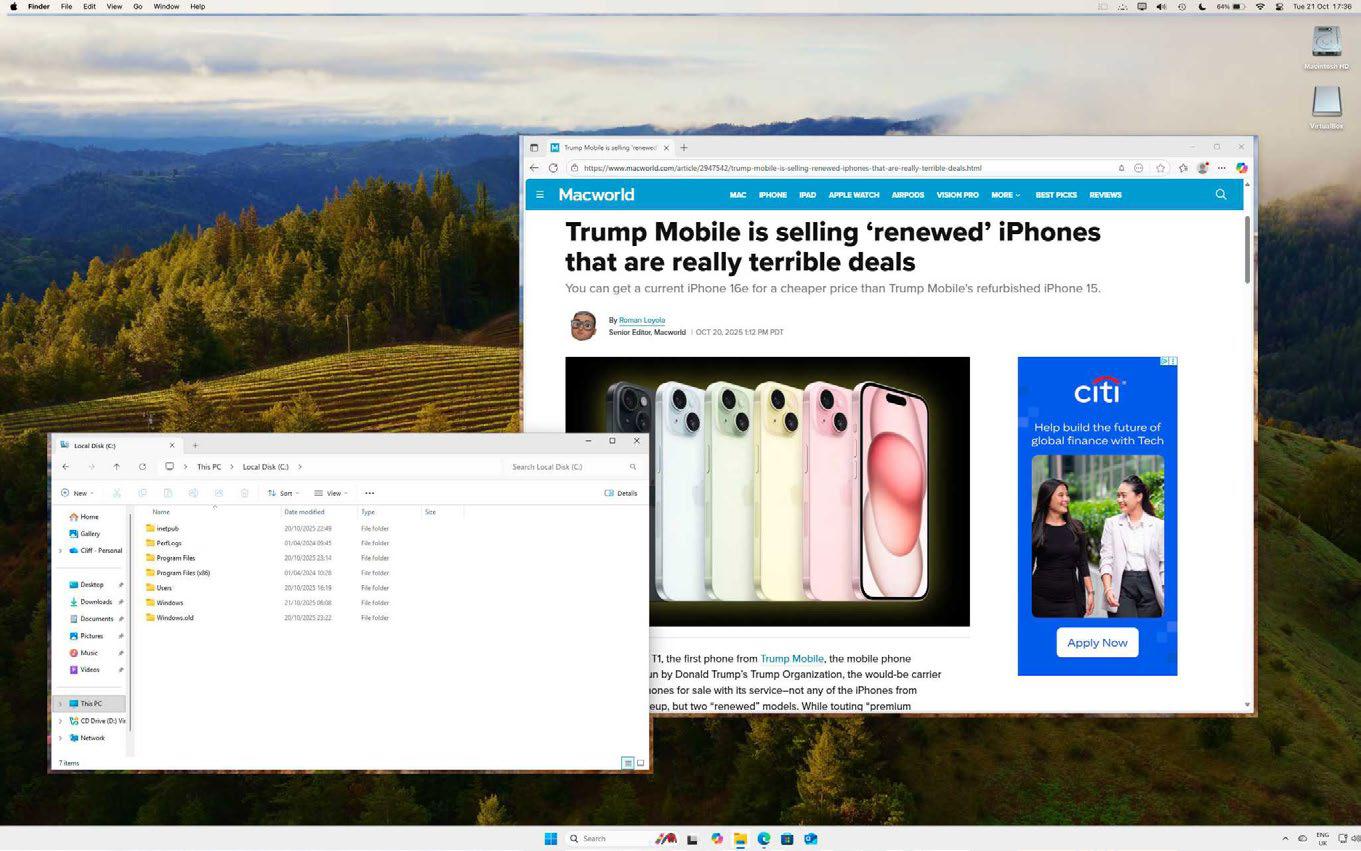
As the name suggests, VirtualBox (in version 7.2 at the time of this review, fave.co/3JyAdyZ) is a virtualization tool—similar to Parallels Desktop and VMware Fusion—that allows you to create a virtual machine (VM) that can run Windows and Windows apps from within the macOS itself. It's fallen behind its rivals in recent years as it lacked support for Macs with Apple Silicon, but it made something of a comeback with the 7.1 update in September 2024 that finally added support for Apple Silicon alongside older Intel Macs. A number of maintenance updates have followed since then, bringing VirtualBox to version 7.2.4 at the end of October 2025.
VirtualBox is owned by database giant Oracle, but it's available as an open-source program and it's free for personal and educational use. There's also an option to buy an annual license for business and commercial use, which costs $61/£48.73 per license with a year of technical support included. However, there's a minimum order of 100 licenses for business users, so it's clear that Oracle has primarily got its sights set on its existing base of large corporate customers.
There are Linux and Windows versions of VirtualBox too, which allow you to use your virtual machines on many different types of computers. Just remember that you'll still need to pay for your own Windows license to install Windows on your VM, and that Macs with Apple Silicon will need to use a special version of Windows, called Windows On ARM, to create a Windows VM.
VIRTUALBOX VMS
Like many open-source programs, VirtualBox lacks the polished interface and ease of use you can find in commercial software such as Parallels Desktop, and this means you do need a reasonable amount of technical knowledge to figure out how it works.

Cette histoire est tirée de l'édition January 2026 de Macworld.
Abonnez-vous à Magzter GOLD pour accéder à des milliers d'histoires premium sélectionnées et à plus de 9 000 magazines et journaux.
Déjà abonné ? Se connecter
PLUS D'HISTOIRES DE Macworld

Macworld
Maximize iCloud+! 5 tips and tricks you need to start using right now
iCloud is a major component of the Apple ecosystem. Here's how to get the most from it.

6 mins
October 2025

Macworld
Your Apple TV+ subscription is going up by a whopping 30%
Apple's video-streaming service is now $12.99 per month.
1 mins
October 2025

Macworld
Apple TV tweaks: The 8 settings you should change ASAP
How to level up your Apple TV experience in 15 minutes.
4 mins
October 2025

Macworld
Apple announces AppleCare One with multi-device coverage for a flat fee
You can now protect three of your devices for $20 a month.
1 mins
October 2025

Macworld
KUXIU K1 15W 3-IN-1 MAGSAFE POWER BANK: COMPACT, VERSATILE PORTABLE iPHONE, WATCH, AIRPODS CHARGER
This apparently nondescript power bank looks like a slightly chunky iPhone power bank or an Amex Black Card member's pack of cards.
3 mins
October 2025

Macworld
Anker Prime 14-in-1 Thunderbolt 5 Docking Station: Mac mini-like looks and power
Smart and stylish dock that is right up to date with the latest Macs.
6 mins
October 2025
Macworld
VERBATIM TURBOMETAL PORTABLE SSD: STYLISH PORTABLE DRIVE
The Verbatim TurboMetal SSD comes in the classic NVMe form factor with a length of around 106 millimeters.
2 mins
October 2025

Macworld
How to reduce the Liquid Glass transparency effect in macOS Tahoe
If Apple's new look isn't for you, here's how to adjust it.
1 min
October 2025

Macworld
Everyone will want to try Apple's live translation this fall. Here's where to find it
Live translation runs on device, and can translate text and speech across several apps.
2 mins
October 2025

Macworld
RETROSTRIP: NOSTALGIC UTILITY BRINGS BACK THE LEGENDARY MAC CONTROL STRIP
Question for classic Mac users who go way back to System 6 or 7: Remember the Control Strip, which gave you direct access to various applications or functions at the click of a mouse? It was released in 1994 with System 7.1, with the PowerBook 500 series the PowerBook Duo 280 computers. With System 7.5.3, it was made available to all Macintoshes.
2 mins
October 2025
Listen
Translate
Change font size