
Mit Magzter GOLD unbegrenztes Potenzial nutzen
Erhalten Sie unbegrenzten Zugriff auf über 9.000 Zeitschriften, Zeitungen und Premium-Artikel für nur
Versuchen GOLD - Frei
Setting Up Snort to Secure Your Network
Open Source For You
|December 2025
Snort is a popular, open source intrusion detection system that monitors traffic in real time to detect malware. Here’s a detailed explanation of how to set it up on Ubuntu and test it by generating traffic from another system.

In today's digital world, networks often face constant risks from intrusions that may lead to data theft, service outages, or even complete system compromise if not detected in time. To address these risks, many organisations use intrusion detection systems (IDS). A widely used open source IDS tool is Snort, which monitors network traffic in real time and identifies suspicious activity based on rules and patterns.
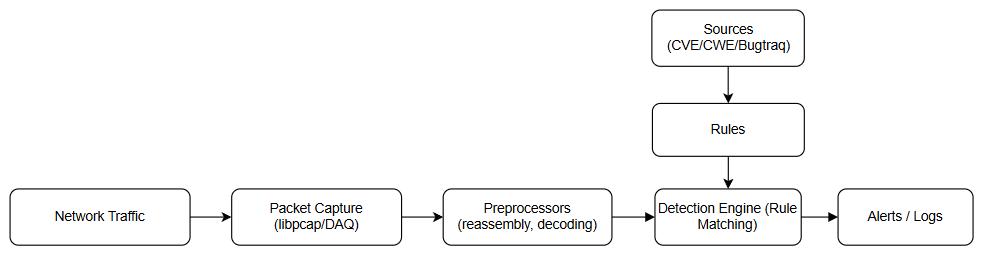
Snort works by capturing raw network packets with its packet capture module, preprocessing them to normalise and decode protocols, and then passing this data to its detection engine. Here, the preprocessed packets are compared against a separate set of rules, which are created based on threat intelligence from sources like CVE and Bugtraq, to identify suspicious activity. If a rule matches, Snort generates alerts/logs through its output modules.
System setup
Before installing Snort, it is important to prepare the system properly. Snort works best on a clean and updated Linux environment. We will use Ubuntu as the base operating system. Ensure that the system is up to date so that all required packages remain current.
Since we will be testing FTP detection rules later, it is also necessary to have an FTP server installed and running on the Ubuntu system. This will allow you to generate FTP traffic (USER, PASS, STOR commands, etc) for testing Snort's dynamic behaviour. The popular option is vsftpd, which can be installed via apt.
 A stable internet connection is also necessary since several dependencies need to be downloaded during the installation. It is recommended to have root or sudo access to the system because most installation and configuration steps require administrative privileges. With these preparations done, the system will be ready for the smooth installation of Snort.

Diese Geschichte stammt aus der December 2025-Ausgabe von Open Source For You.
Abonnieren Sie Magzter GOLD, um auf Tausende kuratierter Premium-Geschichten und über 9.000 Zeitschriften und Zeitungen zuzugreifen.
Sie sind bereits Abonnent? Anmelden
WEITERE GESCHICHTEN VON Open Source For You

Open Source For You
Top 10 Open Source Tools for System and IT Administrators
All reputed online services have committed system and IT administrators working behind the scenes. Here are ten open source tools they should be aware of, as these can help them monitor, automate, as well as manage complex infrastructure with relative ease.

6 mins
February 2026
Open Source For You
Google opens access to its Gemini Deep Research Agent
Google has opened access to its Gemini Deep Research Agent for the first time, allowing developers to integrate advanced autonomous research capabilities directly into their applications.
1 min
February 2026

Open Source For You
NVIDIA buys SchedMD, keeps Slurm open source and vendor neutral
NVIDIA has acquired AI software company SchedMD, signalling a deeper commitment to open source technologies as competition intensifies across the artificial intelligence ecosystem.
1 min
February 2026

Open Source For You
How Open Source Tools Power Modern IT Operations
Open source tools have not replaced enterprise IT platforms; they have become the connective layer that makes modern operations possible.
6 mins
February 2026
Open Source For You
Mandiant's Auralnspector enhances Salesforce security
Google-owned cybersecurity firm Mandiant has released AuraInspector, a free, open source command-line tool designed to identify dangerous access control misconfigurations in Salesforce environments, marking a significant move to democratise enterprise-grade security testing.
1 min
February 2026
Open Source For You
Google launches Universal Commerce Protocol to power agentic AI commerce
Google has introduced the Universal Commerce Protocol (UCP), a new open standard that enables AI agents to autonomously perform end-to-end commerce activities, spanning product discovery, purchasing, checkout, payments, and postpurchase experiences.
1 min
February 2026

Open Source For You
Zero Trust CI/CD: The Death of Static Secrets
In an era where data breach costs continue to hit record highs, shifting to a secretless CI/CD pipeline is the most effective step to safeguard digital infrastructure.
7 mins
February 2026

Open Source For You
Quantum Algorithms: The Future of Computing
Explore the essence of quantum algorithms, their groundbreaking applications, recent innovations, and the challenges that remain.
8 mins
February 2026

Open Source For You
Bringing Clarity to the Chaos in AI
AI feels powerful, yet most teams struggle because they cannot define what intelligence they really need. But there are ways to address this challenge.
5 mins
February 2026

Open Source For You
Top researchers return to OpenAI
OpenAI has welcomed back three high-profile researchers, Barret Zoph, Luke Metz, and Sam Schoenholz, following their brief tenure at former OpenAI CTO Mira Murati's AI startup, Thinking Machines.
1 min
February 2026
Listen
Translate
Change font size