Versuchen GOLD - Frei
Organize your emails with macOS Sequoia 15.4
Mac Life
|July 2025
The Mac has finally got automatic Mail organization features
REQUIRES
macOS 15.4 or later
YOU WILL LEARN
What you can do with this latest Mail redesign
IT WILL TAKE
5 minutes
GENIUS TIP
You can also quickly switch from any of the mailbox categories to All Mail by doubling-clicking any category or pressing Opt+Cmd+5.
IT'S COMMON TO FEEL overwhelmed by an overflowing inbox, so any help with regaining control over your messages has to be worth considering. When iOS 18.2 arrived, assistance came in the form of a new feature that sorts emails into one of four categories.
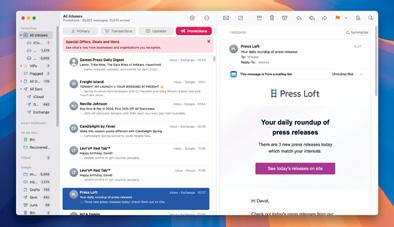 Now, that function has come to macOS 15.4 (Sequoia) as well, and it should mean you don't miss anything of importance amid a sea of spam. It can take a bit of getting used to, and in the early stages, you may feel as if you could struggle to find specific messages — there have already been complaints about “disappearing” emails. But with priority messages enabled on devices that support Apple Intelligence, the ability to reassign any misplaced emails to a more relevant category, and with the knowledge that you can quickly switch to All Mail at any time, you'll likely find that email management becomes a bit easier. Let's check it out.
HOW TO Use categories in Mail

Diese Geschichte stammt aus der July 2025-Ausgabe von Mac Life.
Abonnieren Sie Magzter GOLD, um auf Tausende kuratierter Premium-Geschichten und über 9.000 Zeitschriften und Zeitungen zuzugreifen.
Sie sind bereits Abonnent? Anmelden
WEITERE GESCHICHTEN VON Mac Life

Mac Life
TerraMaster F4-425 NAS
Home or office four-bay network-attached storage

3 mins
March 2026

Mac Life
Satechi OntheGo 7-in-1 Adapter
Easily add more ports to your Mac, iPhone and iPad
2 mins
March 2026

Mac Life
BenQ ScreenBar Halo 2
Monitor lighting that's a sight for sore eyes
1 mins
March 2026
Mac Life
AI: WHAT YOU NEED TO KNOW
Al can be brilliant when put to proper use, but it also has some major downsides
11 mins
March 2026

Mac Life
Calibrate a MacBook Pro display
Can I calibrate my MacBook Pro 16-inch M3 Pro's XDR display, and if so, how?
1 min
March 2026

Mac Life
Edifier S880DB MKII
Great-sounding speakers with loads of connectivity
3 mins
March 2026

Mac Life
Search text in document images
I keep thousands of images of printed documents, and want to search their contents using Live Text, but Spotlight won't index them. How can I get it to work?
1 min
March 2026

Mac Life
No looking back at old icons
Can I customize the apps bundled in macOS Tahoe by giving them back their old icons?
1 min
March 2026

Mac Life
Set up multiple timers on iOS
Discover timers done right
2 mins
March 2026

Mac Life
Blue Prince
A multilayered inheritance challenge like no other
2 mins
March 2026
Listen
Translate
Change font size