Versuchen GOLD - Frei
CREATE HOW TO DO ANYTHING ON YOUR MAC, IPHONE & IPAD
Mac Life
|August 2025
WHETHER IT'S HOME movies on VHS or a library of classic vinyl, it's easy to capture audio and video, play it, and even improve it on your Mac.
-
Digitize your old media
Turn old audio into shiny new digital files using free software
If you have videos on CD or DVD, a portable CD/DVD drive is all you need; connect it, open it in Finder and drag the files across. An app such as Handbrake (https://handbrake.fr) can convert outdated file formats into more modern formats.
With VHS video, vinyl LPs, or audio cassettes it's slightly trickier; you'll need an analog-to-digital interface for your VHS player or tape deck, so your Mac can capture the video and/or audio.
AMPLIFY THE SIGNAL
For capturing video, we'd suggest trying iMovie before looking into third-party apps. For audio, we'd recommend Audacity for recording. We're using that here.
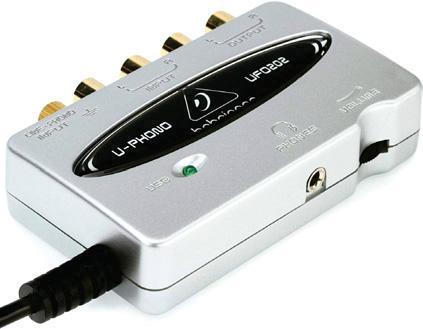
If your turntable has USB, you can connect it to your Mac. For non-USB turntables, you'll get best results via a USB audio interface; connect the turntable to the interface, and the interface to your Mac.
REQUIRES Audacity (Free, www.audacityteam.org), macOS 14 or later
YOU WILL LEARN How to digitize records and other old media
IT WILL TAKE 1 hour
Turntables put out very quiet signals that need to be amplified. Some have a built-in pre-amp that makes the signal suitably loud; if not, yours is probably connected to a hi-fi amp with line outputs, so use those, and tweak the volume of the amp until your Mac's inputs are loud enough, but not distorting. No amp? Look for a USB interface that has its own pre-amp built in.
CARRIE MARSHALL

Diese Geschichte stammt aus der August 2025-Ausgabe von Mac Life.
Abonnieren Sie Magzter GOLD, um auf Tausende kuratierter Premium-Geschichten und über 9.000 Zeitschriften und Zeitungen zuzugreifen.
Sie sind bereits Abonnent? Anmelden
WEITERE GESCHICHTEN VON Mac Life

Mac Life
TerraMaster F4-425 NAS
Home or office four-bay network-attached storage

3 mins
March 2026

Mac Life
Satechi OntheGo 7-in-1 Adapter
Easily add more ports to your Mac, iPhone and iPad
2 mins
March 2026

Mac Life
BenQ ScreenBar Halo 2
Monitor lighting that's a sight for sore eyes
1 mins
March 2026
Mac Life
AI: WHAT YOU NEED TO KNOW
Al can be brilliant when put to proper use, but it also has some major downsides
11 mins
March 2026

Mac Life
Calibrate a MacBook Pro display
Can I calibrate my MacBook Pro 16-inch M3 Pro's XDR display, and if so, how?
1 min
March 2026

Mac Life
Edifier S880DB MKII
Great-sounding speakers with loads of connectivity
3 mins
March 2026

Mac Life
Search text in document images
I keep thousands of images of printed documents, and want to search their contents using Live Text, but Spotlight won't index them. How can I get it to work?
1 min
March 2026

Mac Life
No looking back at old icons
Can I customize the apps bundled in macOS Tahoe by giving them back their old icons?
1 min
March 2026

Mac Life
Set up multiple timers on iOS
Discover timers done right
2 mins
March 2026

Mac Life
Blue Prince
A multilayered inheritance challenge like no other
2 mins
March 2026
Listen
Translate
Change font size