
استمتع بـUnlimited مع Magzter GOLD
احصل على وصول غير محدود إلى أكثر من 9000 مجلة وصحيفة وقصة مميزة مقابل
يحاول ذهب - حر
STREAMLINE YOUR DATA
December 2022
|PC Pro
STRUGGLING WITH AN UNDERSIZED SSD? DARIEN GRAHAM-SMITH EXPLAINS HOW TO MAKE THE MOST OF YOUR PRECIOUS DISK SPACE

Modern laptops are amazing things, with ultra-slim designs, bright screens and powerful processors. Storage, however, tends to be a sticking point. To keep the price down, entry-level computers often have a small SSD with a capacity of only 256GB or even 128GB, much of which is instantly eaten up by the operating system and core applications.
That’s fine if you just want to browse the web and edit the odd Word document, but when it comes to playing games, editing movies or otherwise taking advantage of your PC’s potential, space can quickly become tight. Here’s our advice on stretching your storage to get the best from your computer.
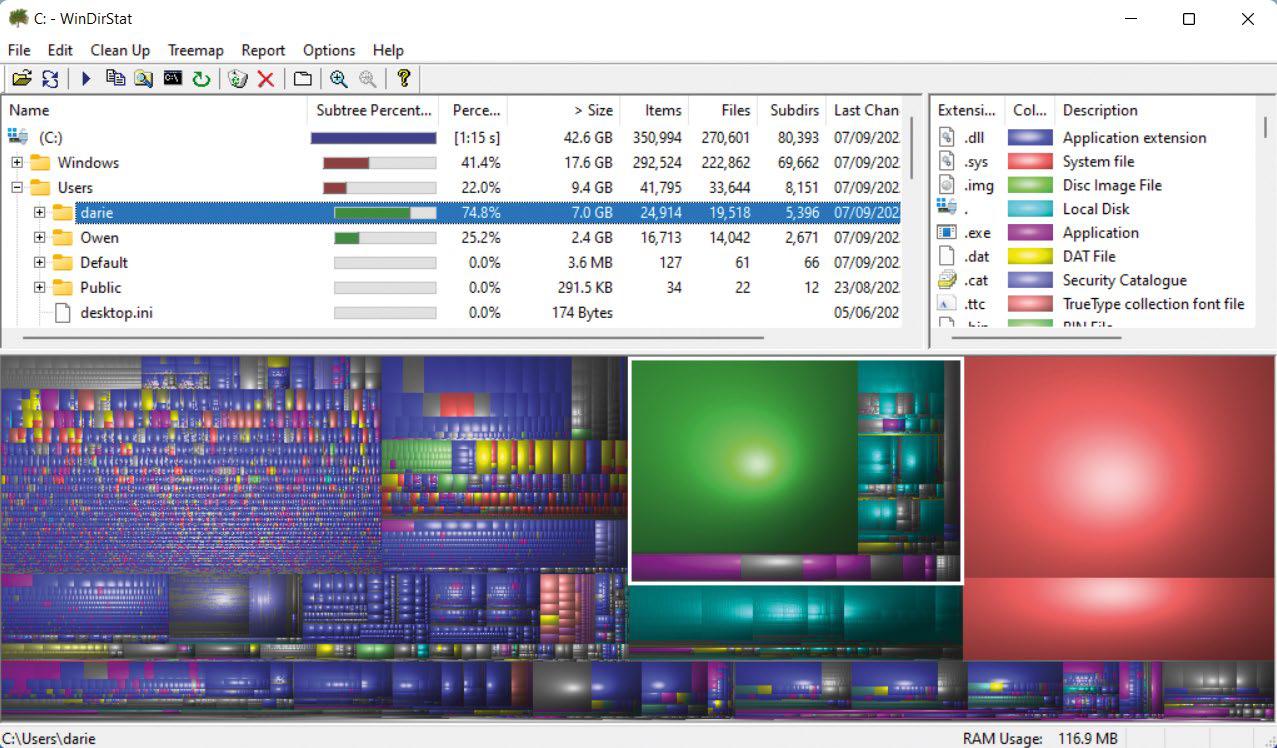
Use the built-in clean-up tool
Let’s start with a simple tool that’s been built into every release of Microsoft’s OS since Windows 98. To open it, hit the Windows key and enter “Disk Clean-up”; a window will open detailing various categories of file, with an estimate of how much space each type is taking up. All of these can be safely deleted by ticking their boxes and hitting the OK button at the bottom of the window.
Hit the “Clean up system files” button at the bottom of the window and some additional categories will appear, including files left over from upgrading and updating Windows. These can be quite substantial – on my personal laptop those categories weighed in at 4.56GB and 2.48GB respectively, which is an amount of space that’s well worth reclaiming. After deleting these you won’t be able to remove the updates or roll back to an earlier version of Windows, but when did you last do that anyway?


هذه القصة من طبعة December 2022 من PC Pro.
اشترك في Magzter GOLD للوصول إلى آلاف القصص المتميزة المنسقة، وأكثر من 9000 مجلة وصحيفة.
هل أنت مشترك بالفعل؟ تسجيل الدخول
المزيد من القصص من PC Pro

PC Pro
LG UltraFine 6K Evo
Thunderbolt 5 connectivity and a 6K resolution both impress, but at this price we want OLED technology

3 mins
April 2026

PC Pro
Motorola signature
One of the most stylish phones in the universe, but that comes with a matching price and two compromises
3 mins
April 2026

PC Pro
Geekom X14 Pro
The CPU may be ageing, but Geekom's debut laptop delivers in every other area - if you can find it for sale
3 mins
April 2026
PC Pro
Asus Zenbook Duo (2026)
With a next-gen processor and numerous design improvements, this is the best dual-screen laptop yet
3 mins
April 2026

PC Pro
Dell UltraSharp 52 Thunderbolt Hub Monitor
A superb choice for anyone who currently finds themselves with three or more monitors sitting on their desk
5 mins
April 2026

PC Pro
Investors may still believe in Elon Musk, but Jon Honeyball isn't buying any of it
My day started badly. Still bleary-eyed at 6am, with a bucket of coffee sitting untouched beside me, I dropped the SIM-removal tool into my keyboard.
3 mins
April 2026

PC Pro
Green cloud
Don't entrust your jobs to dirty, energy-hungry servers:
2 mins
April 2026

PC Pro
"I've said it before, and I'll say it again: the biggest obstacle to security is inconvenience"
Have you seen those password books on Amazon? They're not a cybersecurity abomination, despite what you may think
7 mins
April 2026

PC Pro
"Cyber resilience is now treated as a matter of governance rather than pure technical compliance"
Rule Britannia, Britannia waives the rules... or why the shoulder-shrugging Cyber Security and Resilience Bill causes such problems for UK businesses
6 mins
April 2026

PC Pro
"Not to point any fingers here; I seriously doubt the fault lies with our esteemed editor"
Whether it's PDFs from PC Pro's editor, Outlook messages or his partner's photos, space is at a premium for Steve this month
9 mins
April 2026
Translate
Change font size