
استمتع بـUnlimited مع Magzter GOLD
احصل على وصول غير محدود إلى أكثر من 9000 مجلة وصحيفة وقصة مميزة مقابل
يحاول ذهب - حر
Detox Your Mac And iOS Devices
April 2020
|Mac Life
Mac running slow or short on space? This feature will show you how to clear out the rubbish and keep hold of the important stuff

One thing that's as sure as death and taxes is the fact that your Mac’s hard disk will eventually fill up. These days it may be an SSD or Fusion Drive, but regardless of the nature of the hardware it can only hold a finite number of gigabytes. And the more files you add — whether new apps, downloads, music and videos, your photo collection, work files or anything else — the less space will be left. And the same goes for your iPhone or iPad.
As we so often say about macOS and iOS, remember that there’s only a problem when there’s a problem.
There’s generally no need to worry about unwanted files existing, or to install software that promises to remove them. These files won’t break anything or slow anything down. But when you try to save or download a file and get a warning that your drive is almost full then yep, you’ll need to do something about it.
In this article, we look at all the kinds of content that are likely to be taking up storage unnecessarily, where to find them, and how to get rid of them safely. Finally, in case it feels like time for more drastic action, you’ll see how to wipe your drive and start again.
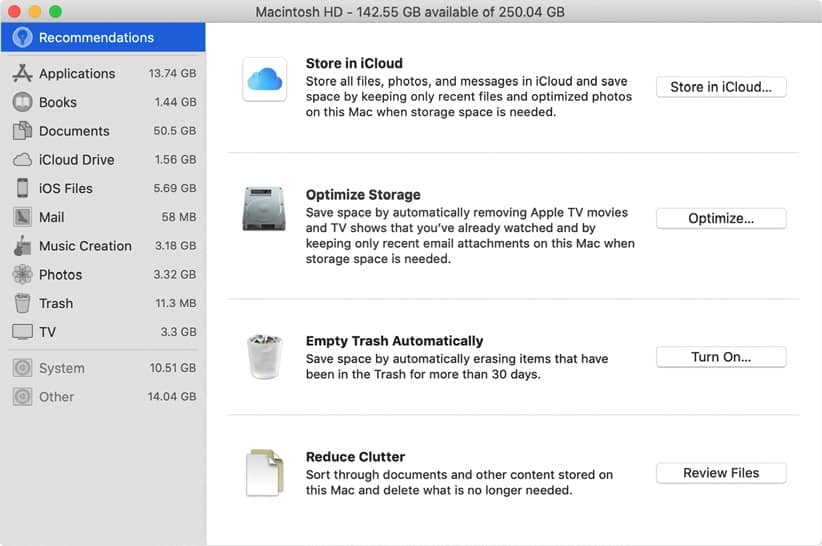
Step one: Identify space hogs and optimize storage
The bigger the file, the more you’ll gain by trashing it
YOUR MAC’S BUILT–IN primary drive, called Macintosh HD by default, is where all your files are stored, unless you saved them to an external drive. Check both for anything you don’t need to keep.
1 Get an overview
The status bar at the foot of any Finder window (show or hide it with Cmd+/) lists free space on the current drive. For more detail, choose About This Mac from the Apple menu and click the Storage tab.

هذه القصة من طبعة April 2020 من Mac Life.
اشترك في Magzter GOLD للوصول إلى آلاف القصص المتميزة المنسقة، وأكثر من 9000 مجلة وصحيفة.
هل أنت مشترك بالفعل؟ تسجيل الدخول
المزيد من القصص من Mac Life

Mac Life
TerraMaster F4-425 NAS
Home or office four-bay network-attached storage

3 mins
March 2026

Mac Life
Satechi OntheGo 7-in-1 Adapter
Easily add more ports to your Mac, iPhone and iPad
2 mins
March 2026

Mac Life
BenQ ScreenBar Halo 2
Monitor lighting that's a sight for sore eyes
1 mins
March 2026
Mac Life
AI: WHAT YOU NEED TO KNOW
Al can be brilliant when put to proper use, but it also has some major downsides
11 mins
March 2026

Mac Life
Calibrate a MacBook Pro display
Can I calibrate my MacBook Pro 16-inch M3 Pro's XDR display, and if so, how?
1 min
March 2026

Mac Life
Edifier S880DB MKII
Great-sounding speakers with loads of connectivity
3 mins
March 2026

Mac Life
Search text in document images
I keep thousands of images of printed documents, and want to search their contents using Live Text, but Spotlight won't index them. How can I get it to work?
1 min
March 2026

Mac Life
No looking back at old icons
Can I customize the apps bundled in macOS Tahoe by giving them back their old icons?
1 min
March 2026

Mac Life
Set up multiple timers on iOS
Discover timers done right
2 mins
March 2026

Mac Life
Blue Prince
A multilayered inheritance challenge like no other
2 mins
March 2026
Translate
Change font size