
Go Unlimited with Magzter GOLD
Get unlimited access to 10,000+ magazines, newspapers and Premium stories for just
Try GOLD - Free
Use Handoff in FaceTime calls
Mac Life
|March 2023
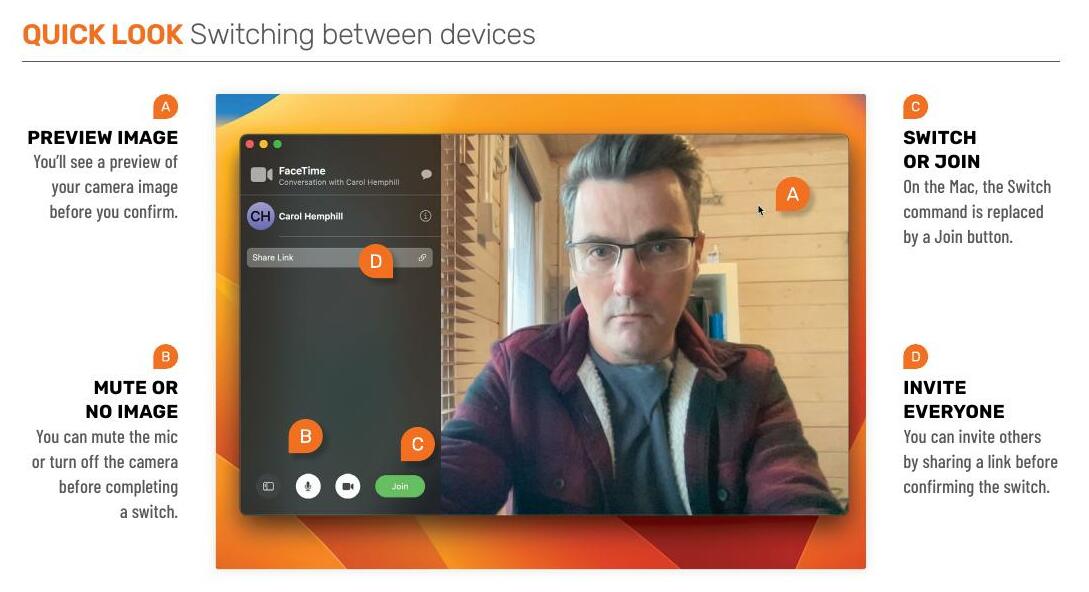
You can now switch between iPhone, iPad and Mac mid-call

REQUIRES macOS 13, iOS 16, iPadOS 16
YOU WILL LEARN How to use Handoff during a FaceTime call
IT WILL TAKE 30 minutes
FACETIME, ALONG WITH its competitors Zoom and Teams, came into its own when we were all stuck at home during lockdown. When we couldn't leave the house, being limited to using only one device during a call wasn't a problem. Now that we're back to being able to come and go, swap home for office and back again, and socialize with friends in real life, it's more of an issue.
Video calling is here to stay and so Apple's solution to enable us to move around without breaking a call is to bring Handoff to FaceTime. You may remember that Handoff, which has worked with most Apple apps for the best part of a decade, allows you to switch seamlessly from working in an application on your Mac to your iPhone or iPad. And now you can do that in FaceTime too, mid-call.

This story is from the March 2023 edition of Mac Life.
Subscribe to Magzter GOLD to access thousands of curated premium stories, and 10,000+ magazines and newspapers.
Already a subscriber? Sign In
MORE STORIES FROM Mac Life

Mac Life
Apple at 50
Graham Barlow recollects what 50 years of Apple feels like

2 mins
May 2026

Mac Life
LOCK DOWN YOUR iPHONE
Lower the odds of iPhone theft - and the cost of it
8 mins
May 2026

Mac Life
MacBook Air 13in (2026)
Now with more powerful M5 chip and twice the storage to start
5 mins
May 2026

Mac Life
Anker Nano Docking Station
Neat 13-in-1 dock with removable hub
2 mins
May 2026

Mac Life
Create an iPad weather station
Use Carrot Weather and never get caught out by a downpour again
3 mins
May 2026

Mac Life
Use the correct port
Every time I try to install macOS on my external SSD it fails and my M2 MacBook Air can't start up from it. What am I doing wrong?
1 min
May 2026

Mac Life
Soundcore Nebula X1 Pro
The ultimate home cinema experience
3 mins
May 2026

Mac Life
The hazards of magnets
The magnets for keeping my MacBook Pro closed picked up a tiny craft pin that's now wedged between the display and its surrounding bezel, and it no longer turns on. How can I extract it?
1 min
May 2026

Mac Life
Find planes fast with Zephy
Follow aircraft routes with your very own radar tracker
2 mins
May 2026

Mac Life
Manage Mac windows with Moom
Use shortcuts and maximize buttons to move Mac windows - in a snap
3 mins
May 2026
Translate
Change font size