
Go Unlimited with Magzter GOLD
Get unlimited access to 10,000+ magazines, newspapers and Premium stories for just
Try GOLD - Free
Explore extensions in Safari
Mac Life
|September 2025
Give Safari superpowers to improve your browsing experience
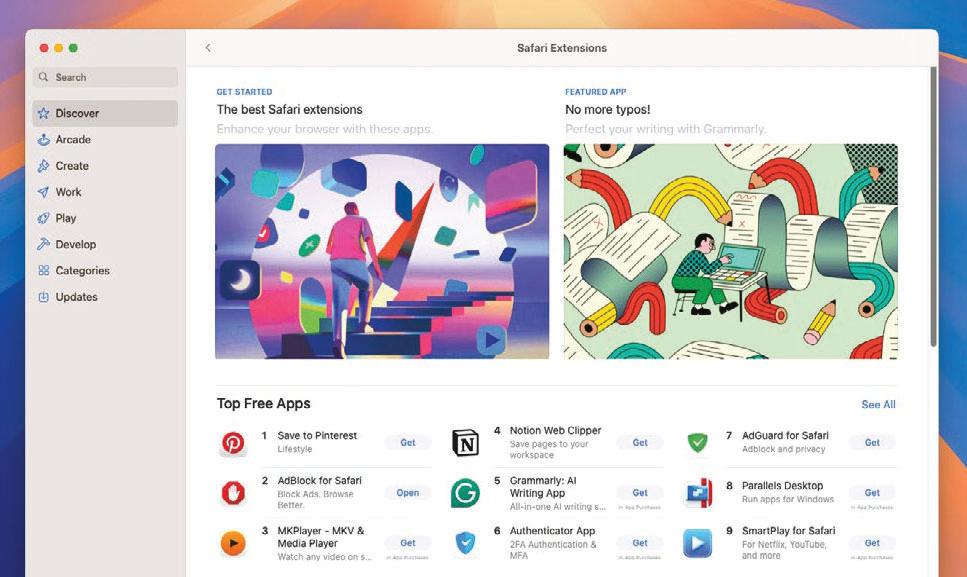
EXTENSIONS GIVE SAFARI on Mac superpowers; they add a host of extra features, ranging from changing how websites work and offering extra search engines to storing your passwords and offering instant language translation.
Finding and installing extensions couldn’t be easier — in Safari, go to Safari > Safari Extensions in the menu bar, and you can configure them, disable them, or uninstall them in Safari > Settings > Extensions.
In this tutorial, we’ll focus on three extensions that do really useful things. First, there’s Anybox, a kind of bookmark manager that’s fast, friendly, and multi-talented — you can use it to clip text, save images, and tag websites for easy recall.
Adblock Plus does what the name suggests, and StopTheMadness (shown here in its Pro edition) is a Swiss Army knife for making websites work better. It’s the most complex of the three, but it’s a very useful tool that can make surfing the web a lot less annoying.
HOW TO Never lose anything
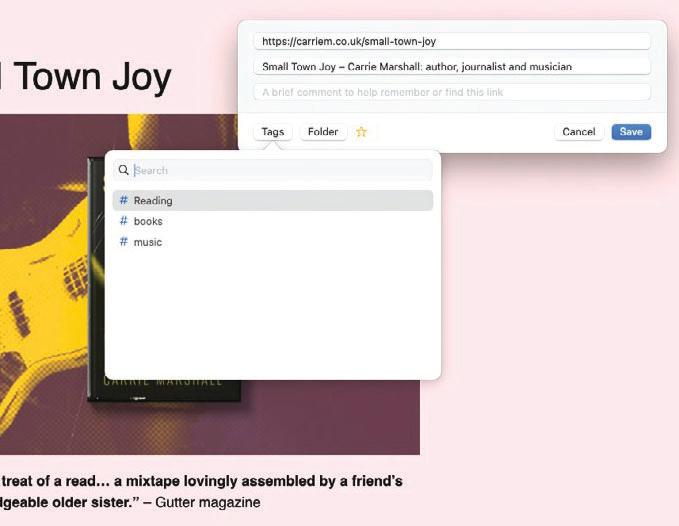 1 Put it in Anybox
Anybox enables you to save links to read later, and it’s also a really good way of saving bits of text, images, and other things you’ll want to find later. Once the extension is installed, tap on the toolbar icon to save the page.
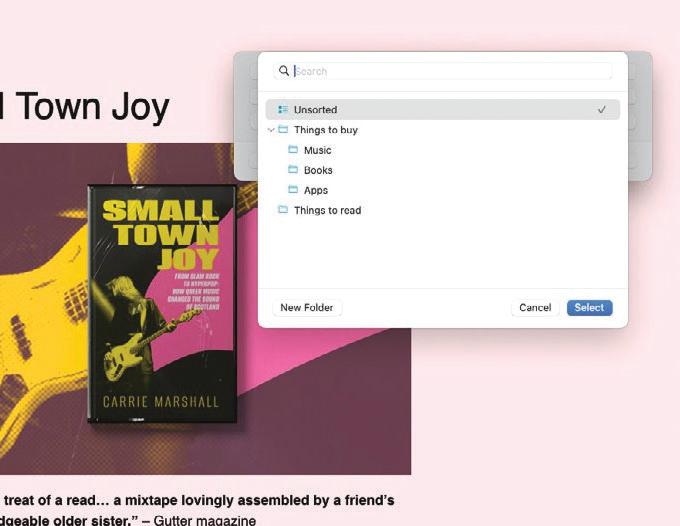 2 Tag it, file it

This story is from the September 2025 edition of Mac Life.
Subscribe to Magzter GOLD to access thousands of curated premium stories, and 10,000+ magazines and newspapers.
Already a subscriber? Sign In
MORE STORIES FROM Mac Life

Mac Life
Apple at 50
Graham Barlow recollects what 50 years of Apple feels like

2 mins
May 2026

Mac Life
LOCK DOWN YOUR iPHONE
Lower the odds of iPhone theft - and the cost of it
8 mins
May 2026

Mac Life
MacBook Air 13in (2026)
Now with more powerful M5 chip and twice the storage to start
5 mins
May 2026
Mac Life
Anker Nano Docking Station
Neat 13-in-1 dock with removable hub
2 mins
May 2026

Mac Life
Create an iPad weather station
Use Carrot Weather and never get caught out by a downpour again
3 mins
May 2026

Mac Life
Use the correct port
Every time I try to install macOS on my external SSD it fails and my M2 MacBook Air can't start up from it. What am I doing wrong?
1 min
May 2026
Mac Life
Soundcore Nebula X1 Pro
The ultimate home cinema experience
3 mins
May 2026

Mac Life
The hazards of magnets
The magnets for keeping my MacBook Pro closed picked up a tiny craft pin that's now wedged between the display and its surrounding bezel, and it no longer turns on. How can I extract it?
1 min
May 2026

Mac Life
Find planes fast with Zephy
Follow aircraft routes with your very own radar tracker
2 mins
May 2026
Mac Life
Manage Mac windows with Moom
Use shortcuts and maximize buttons to move Mac windows - in a snap
3 mins
May 2026
Listen
Translate
Change font size