
Go Unlimited with Magzter GOLD
Get unlimited access to 10,000+ magazines, newspapers and Premium stories for just
Try GOLD - Free
CleanMyMac
Mac Life
|April 2025
The Mac's favorite maintenance manager gets a big update

CLEANMYMAC HAS LONG been the Mac's favorite - if not the cheapest - suite of maintenance and upkeep tools. This new release is focused on tightening up the app, with improved speed and performance and greater efficiency, all wrapped up in a great new interface.
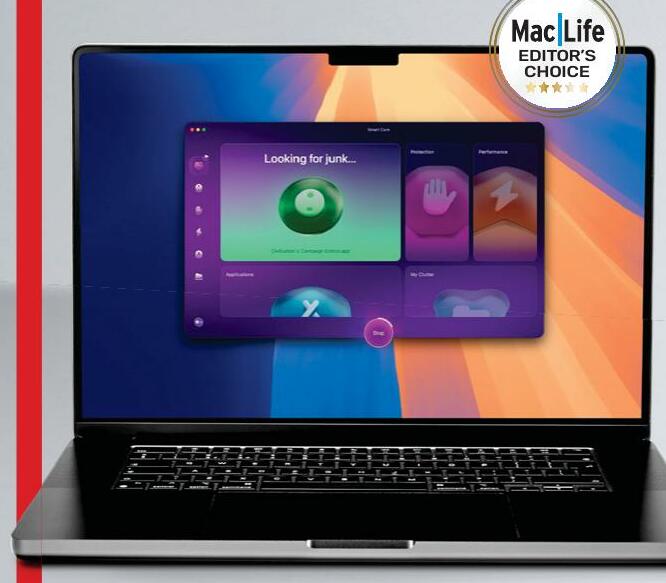
It's easy to use: boot the app, and the first thing you see is the Smart Care pane. This integrates the functionality of the app as a whole into a single process, scanning your Mac for junk files, checking for malware, hunting down large and unused apps, and more. It can even scan your iCloud Drive.
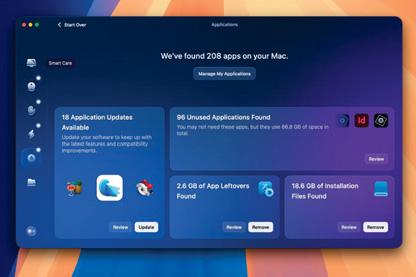 Smart Care makes the process of looking after your Mac so much easier. All you have to do is click a large button marked "Scan". It takes some time, but the longer it takes, the more necessary it is, and there's no user intervention needed while it's working its magic. When done, you're offered the chance to review potential actions in each of five categories (Cleanup, Protection, Performance, Applications, and My Clutter) before pressing the Run button and having the app purge your Mac. That's it. You need never go any further into this app if you're so inclined - Smart Care does everything for you.
If you do choose to use the other five modules found in CleanMyMac's sidebar individually instead of through Smart Care, the first one you come across is Cleanup. This looks for files that do nothing except waste space. It's amazing how much junk it can find, especially if you've given the app Full Disk Access (which you should).


This story is from the April 2025 edition of Mac Life.
Subscribe to Magzter GOLD to access thousands of curated premium stories, and 10,000+ magazines and newspapers.
Already a subscriber? Sign In
MORE STORIES FROM Mac Life

Mac Life
Apple at 50
Graham Barlow recollects what 50 years of Apple feels like

2 mins
May 2026

Mac Life
LOCK DOWN YOUR iPHONE
Lower the odds of iPhone theft - and the cost of it
8 mins
May 2026

Mac Life
MacBook Air 13in (2026)
Now with more powerful M5 chip and twice the storage to start
5 mins
May 2026

Mac Life
Anker Nano Docking Station
Neat 13-in-1 dock with removable hub
2 mins
May 2026

Mac Life
Create an iPad weather station
Use Carrot Weather and never get caught out by a downpour again
3 mins
May 2026

Mac Life
Use the correct port
Every time I try to install macOS on my external SSD it fails and my M2 MacBook Air can't start up from it. What am I doing wrong?
1 min
May 2026

Mac Life
Soundcore Nebula X1 Pro
The ultimate home cinema experience
3 mins
May 2026

Mac Life
The hazards of magnets
The magnets for keeping my MacBook Pro closed picked up a tiny craft pin that's now wedged between the display and its surrounding bezel, and it no longer turns on. How can I extract it?
1 min
May 2026

Mac Life
Find planes fast with Zephy
Follow aircraft routes with your very own radar tracker
2 mins
May 2026

Mac Life
Manage Mac windows with Moom
Use shortcuts and maximize buttons to move Mac windows - in a snap
3 mins
May 2026
Listen
Translate
Change font size